# About Corppass

Corppass is the Singapore Government’s corporate authorisation system that enables entities to securely manage their employees’ access to digital services for corporate transactions. It allows businesses, non-profit organisations, and other entities to transact digitally with Singapore Government agencies and participating private sector services.

Corppass leverages Singpass to authenticate individual identities. By providing a trusted and unified corporate authentication and authorisation framework, Corppass supports Singapore’s Smart Nation objectives and the Government’s goal of delivering secure, reliable digital services for both citizens and businesses.


# Corppass Login

### What is Corppass Login?

The Corppass Login enables authorised individuals to securely access and transact with digital services on behalf of their organisations.

It provides organisations with a trusted login mechanism that verifies both the user and their permissions to act for a specific entity, ensuring secure and accountable business transactions.

#### How Corppass Login enhances your digital service?

* **Enables users to act on behalf of organisations**\
  Support business transactions by allowing authorised individuals to access your digital services as verified representatives of their organisations.
* **Tap on a trusted corporate access framework**\
  Integrate a widely adopted login mechanism used across government and business services, without building your own authorisation system.
* **Access an established ecosystem of organisations**\
  Reach companies and authorised users already using Corppass to transact digitally.

<figure><img src="https://1605527357-files.gitbook.io/~/files/v0/b/gitbook-x-prod.appspot.com/o/spaces%2FpwMYYKh1MoYyFF7hQI6N%2Fuploads%2FIKCYq3gvwBSPdaNTUHtf%2FScreenshot%202026-03-17%20at%2010.45.31%E2%80%AFAM.png?alt=media&amp;token=205a4fc9-c8b0-48c1-a436-19f8d4a85f42" alt=""><figcaption><p>Users log in with Singpass as authorised Corppass representatives, based on permissions granted by their entity administrators</p></figcaption></figure>


# Key Principles

Partners are to comply with Corppass Login key principles for your integration and submission of documents.

### Authentication and Authorisation

#### Use Corppass Login as an authentication and authorisation service

* Corppass Login should be used to verify both the identity of the user and their authorised role / permissions for the digital service.

#### User identification using UUID

* While Corppass provides both NRIC/FIN and UUID, digital services are recommended to use the Universally Unique Identifier (UUID) to identify users.
* UUID avoids handling sensitive NRIC/FIN information and provides a stable, privacy-friendly identifier for authentication and authorisation.

#### Alternative login options

* Where feasible, offer support for users who may require non-Corppass login options to access your service.

***

### Data Use and Compliance

#### Comply with PDPA and applicable legislation

* Protect, retain and transfer any data retrieved according to the Personal Data Protection Act (PDPA), relevant industry regulations and applicable legislation.
* For collection of National Identification Numbers, refer to the advisory guidelines from PDPC [here](https://www.pdpc.gov.sg/-/media/Files/PDPC/PDF-Files/Advisory-Guidelines/Advisory-Guidelines-for-NRIC-Numbers---310818.pdf).

#### Use data and credentials for lawful purposes

* Ensure that any access or usage of Corppass credentials and retrieved data is strictly for authorised and lawful purposes.


# Pricing Plan

**Government Agencies**\
The [official government pricing plan](https://gccprod.sharepoint.com/sites/GOVTECH-digitalgov/Singpass-and-Corppass/SitePages/Price-Plan.aspx) is available on GSIB devices.

**Entities affiliated with Government Agencies**\
You may check with your respective Ministry or Agency counterparts for pricing details.

**All other entities**\
For any pricing-related queries, please submit a request via the [Partner Support Portal](https://partnersupport.corppass.gov.sg).


# Corppass Design Guidelines

The **Corppass** brand is more than just a name - it reflects our mission, values, and commitment to enabling secure, seamless digital transactions for businesses and organisations in Singapore. Consistency in branding, design, and UI elements strengthens trust, recognition, and a lasting connection with our audience.

{% content-ref url="/pages/caqNEt78EeDvzQgP3Hda" %}
[Brand Guidelines](/products/corppass-login/corppass-design-guidelines/brand-guidelines)
{% endcontent-ref %}

{% content-ref url="/pages/d0AdlZlCxDs0zAGowDlk" %}
[Button Guidelines](/products/corppass-login/corppass-design-guidelines/button-guidelines)
{% endcontent-ref %}

Adhering to these guidelines ensures a professional, accessible, and user-friendly experience.


# Brand Guidelines

Our brand guidelines ensure a strong and unified brand presence, whether you are crafting digital experiences, or representing Corppass in any way. Use only approved brand assets to uphold our integrity, professionalism, and trustworthiness.

**Download Corppass logo:**

{% file src="/files/kCmRGlwtZMfIYmhR5eAS" %}

***

## Logo

<div align="center" data-full-width="true"><figure><img src="https://1605527357-files.gitbook.io/~/files/v0/b/gitbook-x-prod.appspot.com/o/spaces%2FpwMYYKh1MoYyFF7hQI6N%2Fuploads%2F4NJtLUprSVRuTJ9ZS1jz%2FCorppassLogo.png?alt=media&amp;token=7f292594-9d7b-4cbe-862d-3745797cf288" alt="" width="375"><figcaption></figcaption></figure></div>

The **Corppass** logo uses a customised lowercase typeface for consistency and recognisability. The stylised black ‘o,’ derived from our ‘key figure,’ symbolises secure access to services. Optical kerning, refined weight, and defined clear space ensure clarity and recognisability across all sizes and contexts.

{% hint style="info" %}
Always write '**Corppass'** as a single word with an uppercase ‘**C**’—never as ‘CorpPass’ or other variations.
{% endhint %}

***

## Logo Variations

<div align="right"><figure><img src="https://1605527357-files.gitbook.io/~/files/v0/b/gitbook-x-prod.appspot.com/o/spaces%2FpwMYYKh1MoYyFF7hQI6N%2Fuploads%2FGVuuOz6A6wg90FlDbUfH%2FBlue.png?alt=media&amp;token=caee0425-0bd7-4cb0-bfb2-2591d70afc1b" alt=""><figcaption><p>Full colour</p></figcaption></figure> <figure><img src="https://1605527357-files.gitbook.io/~/files/v0/b/gitbook-x-prod.appspot.com/o/spaces%2FpwMYYKh1MoYyFF7hQI6N%2Fuploads%2FbpN4DyHCM13rpKGOLEoS%2F2.png?alt=media&amp;token=3453bc18-956d-4aec-b111-91343d2872ea" alt=""><figcaption><p>Black</p></figcaption></figure> <figure><img src="https://1605527357-files.gitbook.io/~/files/v0/b/gitbook-x-prod.appspot.com/o/spaces%2FpwMYYKh1MoYyFF7hQI6N%2Fuploads%2FYgwoaO7XNRHxeXKKUBTH%2F3.png?alt=media&amp;token=0bfd288d-e396-4f8b-9c12-9280c56ed6d2" alt=""><figcaption><p>White</p></figcaption></figure></div>

Our master logo is available in two colour configurations. 

{% hint style="info" %}
**Full colour:** The entire logotype is in Corppass blue except for the black ‘o’. 

**Single colour:** The entire logotype can be used in either Corpppass blue, black or reverse white.
{% endhint %}

***

## Usage on background

<figure><img src="https://1605527357-files.gitbook.io/~/files/v0/b/gitbook-x-prod.appspot.com/o/spaces%2FpwMYYKh1MoYyFF7hQI6N%2Fuploads%2FFps2I4FnBujlcO2wGo4u%2FBackgroundUsage.jpg?alt=media&amp;token=172f11c0-04ad-4d16-8d3d-79dab02dd085" alt="" width="563"><figcaption></figcaption></figure>

We recommend to use the full colour logo whenever possible. It should be used on either white or light grey background only.

The single colour logos should only be used on either Corppass blue, light blue or black background.

For photograph backgrounds, the single colour logo in reverse white should be used.

***

## Do not

<figure><img src="https://1605527357-files.gitbook.io/~/files/v0/b/gitbook-x-prod.appspot.com/o/spaces%2FpwMYYKh1MoYyFF7hQI6N%2Fuploads%2FvR8bmohUyTInaEiKisFS%2FDoNot.jpg?alt=media&amp;token=1f797758-de17-489f-8533-b5913dae8e5a" alt=""><figcaption></figcaption></figure>

***

## Scale

<figure><img src="https://1605527357-files.gitbook.io/~/files/v0/b/gitbook-x-prod.appspot.com/o/spaces%2FpwMYYKh1MoYyFF7hQI6N%2Fuploads%2FZ3SavCy7JDkIyzAf9sok%2FSize.png?alt=media&amp;token=59710fea-f87c-4ec0-b584-94a153c7f1f7" alt="" width="375"><figcaption></figcaption></figure>

Our master logo is designed to scale for small sizes on print and screen. The clearspace around the logo is equal to the x-height of the ‘o’.

Minimum sizes of the master logo:\
Digital: **80 pixels** wide\
Print: **18mm** wide


# Button Guidelines

Please adhere to the following guidelines when recreating the Singpass button.

**Download** **Singpass logo:**

{% file src="/files/ZRahDRNTmxF7O4TWvBQT" %}

#### **Singpass button types**

By default, use the white fill button to pair it with your service’s interface. Alternatively, you may use the red fill button if it’s suitable.

* White-filled button: **#FFFFFF**
* Red-filled button: **#F4333D**

<figure><img src="https://1605527357-files.gitbook.io/~/files/v0/b/gitbook-x-prod.appspot.com/o/spaces%2FpwMYYKh1MoYyFF7hQI6N%2Fuploads%2FC6IECHR0FGRnawPkXaYc%2FGroup%207140.png?alt=media&amp;token=7c59d7ce-b977-47e9-869e-3fc1b89d7cf9" alt=""><figcaption></figcaption></figure>

**Singpass button for Corppass user**

We recommend adding 'as Corppass user' when pairing with the Singpass button to help users quickly identify their login role.

<figure><img src="https://1605527357-files.gitbook.io/~/files/v0/b/gitbook-x-prod.appspot.com/o/spaces%2FpwMYYKh1MoYyFF7hQI6N%2Fuploads%2FkIfbpZjcSZLvvgfSCt5K%2FSingpass%20button%20types.png?alt=media&amp;token=3fde9c3b-b361-4de1-973a-2f94b0fde84d" alt=""><figcaption></figcaption></figure>

#### Font usage for button label

By default, please use **Poppins** at 16px size. Alternatively, you may use your brand’s typeface. San serif is highly recommended for this button to better match the Singpass logo.

Download Poppins Bold on [Google fonts](https://fonts.google.com/specimen/Poppins).

<figure><img src="https://1605527357-files.gitbook.io/~/files/v0/b/gitbook-x-prod.appspot.com/o/spaces%2FpwMYYKh1MoYyFF7hQI6N%2Fuploads%2FgTbAF0sJ6WL1EE1GMBxd%2FSingpass%20button%20types.png?alt=media&amp;token=7c324d70-fad6-4770-9690-f4bb2fd9da87" alt=""><figcaption></figcaption></figure>

#### Label

If you are using the label ‘**Log in**’ must be kept as two words.

<figure><img src="https://1605527357-files.gitbook.io/~/files/v0/b/gitbook-x-prod.appspot.com/o/spaces%2FpwMYYKh1MoYyFF7hQI6N%2Fuploads%2FiczvG5eGCILstKxB66TJ%2FSingpass%20button%20types.png?alt=media&amp;token=23a735bf-2cb8-45c3-80af-2cf2f09c84d4" alt=""><figcaption></figcaption></figure>

**Accessibility: Aria labels for screen readers**

Please ensure that the Singpass logo has a aria-label to ensure that screen readers will read it as “Sing pass” to avoid it reading out the entire word as ‘S-i-n-g-p-a-s-s’.

<div><figure><img src="https://1605527357-files.gitbook.io/~/files/v0/b/gitbook-x-prod.appspot.com/o/spaces%2FpwMYYKh1MoYyFF7hQI6N%2Fuploads%2FGIFK7HzoG5n1Kk3dkC0F%2FSingpass%20button%20types-1.png?alt=media&amp;token=b7b32f80-eeda-4647-a60c-2e8621108077" alt=""><figcaption></figcaption></figure> <figure><img src="https://1605527357-files.gitbook.io/~/files/v0/b/gitbook-x-prod.appspot.com/o/spaces%2FpwMYYKh1MoYyFF7hQI6N%2Fuploads%2F8yzhpqnAfYFAb7d69S8k%2FSingpass%20button%20types-2.png?alt=media&amp;token=18c777fe-aab2-4e38-b1c9-257daa6d9b23" alt=""><figcaption></figcaption></figure></div>

**Singpass logo size**

Match the **x-height** of the label as close as possible to ensure visual balance and proportion.

<div><figure><img src="https://1605527357-files.gitbook.io/~/files/v0/b/gitbook-x-prod.appspot.com/o/spaces%2FpwMYYKh1MoYyFF7hQI6N%2Fuploads%2F6n6gVS0Ahb9gWs0Ku6CT%2FSingpass%20button%20types-3.png?alt=media&amp;token=fd04d812-a765-478e-9298-77e611b169fe" alt=""><figcaption></figcaption></figure> <figure><img src="https://1605527357-files.gitbook.io/~/files/v0/b/gitbook-x-prod.appspot.com/o/spaces%2FpwMYYKh1MoYyFF7hQI6N%2Fuploads%2FlH1Oy8xI5jozWZ5h0xf8%2FSingpass%20button%20types-4.png?alt=media&amp;token=d6d1e989-c470-4328-b9fa-6df0086a83eb" alt=""><figcaption></figcaption></figure></div>

**Button colour**

To ensure brand recognition and consistency, use the **white-filled** or **red-filled** **buttons** as stated below. Avoid using colours other than white-filled or red-filled buttons.

<figure><img src="https://1605527357-files.gitbook.io/~/files/v0/b/gitbook-x-prod.appspot.com/o/spaces%2FpwMYYKh1MoYyFF7hQI6N%2Fuploads%2FDEru3RWcWea09eWvOSNr%2FSingpass%20button%20types-5.png?alt=media&amp;token=6d248029-0dae-4bec-99fa-429554c437bd" alt=""><figcaption></figcaption></figure>

<div><figure><img src="https://1605527357-files.gitbook.io/~/files/v0/b/gitbook-x-prod.appspot.com/o/spaces%2FpwMYYKh1MoYyFF7hQI6N%2Fuploads%2FS9YahnEqiyUIvOjWj2Qp%2FSingpass%20button%20types-6.png?alt=media&amp;token=2158caeb-5d7a-4f5b-a469-22b1dfa75f15" alt=""><figcaption></figcaption></figure> <figure><img src="https://1605527357-files.gitbook.io/~/files/v0/b/gitbook-x-prod.appspot.com/o/spaces%2FpwMYYKh1MoYyFF7hQI6N%2Fuploads%2FP33Sr34Q8es00VHimQWl%2FSingpass%20button%20types-7.png?alt=media&amp;token=ec410ec7-4de4-4476-a0c2-a9f5aaa3e758" alt=""><figcaption></figcaption></figure></div>

**Border stroke**

When using the white-filled button, please ensure to adhere to the specs stated below.

* Border colour: **#C8C9CC**
* Border width: **1px**

<figure><img src="https://1605527357-files.gitbook.io/~/files/v0/b/gitbook-x-prod.appspot.com/o/spaces%2FpwMYYKh1MoYyFF7hQI6N%2Fuploads%2FEWILRG3bRbLHR4Gh9cgh%2FSingpass%20button%20types-8.png?alt=media&amp;token=07256ee3-3137-4c78-b7d4-32d4099263a0" alt=""><figcaption></figcaption></figure>

**Border radius**

Ensure that the border radius of Singpass button matches your button.

<div><figure><img src="https://1605527357-files.gitbook.io/~/files/v0/b/gitbook-x-prod.appspot.com/o/spaces%2FpwMYYKh1MoYyFF7hQI6N%2Fuploads%2FmpGOwMWEAMc1hW1dAKyc%2FSingpass%20button%20types-9.png?alt=media&amp;token=ac4a393b-5d4b-45ba-a51c-d2fef6bfe455" alt=""><figcaption></figcaption></figure> <figure><img src="https://1605527357-files.gitbook.io/~/files/v0/b/gitbook-x-prod.appspot.com/o/spaces%2FpwMYYKh1MoYyFF7hQI6N%2Fuploads%2FlVviFjXRhvM5YJ9FjT8F%2FSingpass%20button%20types-11.png?alt=media&amp;token=33772591-e4a7-4627-a405-377a8aa3139b" alt=""><figcaption></figcaption></figure></div>

**Hover state**

Please adhere to the following colours, and avoid using another hover state styling.

* White-filled button hover colour: **#F5F5F7**
* Red-filled button hover colour: **#B0262D**

<div><figure><img src="https://1605527357-files.gitbook.io/~/files/v0/b/gitbook-x-prod.appspot.com/o/spaces%2FpwMYYKh1MoYyFF7hQI6N%2Fuploads%2F6HtH0zBauwnE8lNbgh1k%2FSingpass%20button%20types-12.png?alt=media&amp;token=9a9c7363-a72a-4c8e-9dbd-1ff025a16243" alt=""><figcaption></figcaption></figure> <figure><img src="https://1605527357-files.gitbook.io/~/files/v0/b/gitbook-x-prod.appspot.com/o/spaces%2FpwMYYKh1MoYyFF7hQI6N%2Fuploads%2FIXxADTtqSeaCf3brzxgU%2FSingpass%20button%20types-13.png?alt=media&amp;token=95a3c5f5-b5ba-411a-89fc-f250144e13ec" alt=""><figcaption></figcaption></figure></div>

**Width and height**

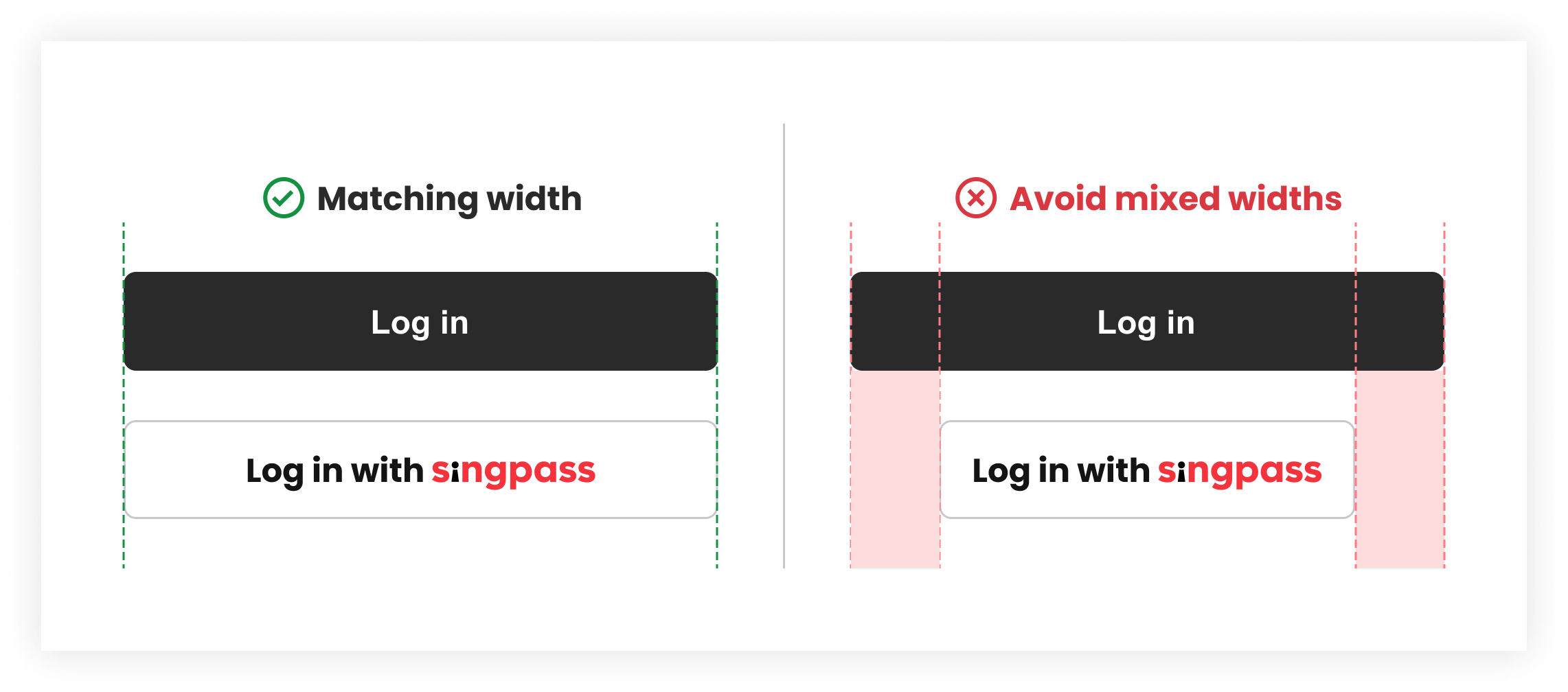
Please ensure that the Singpass button visually matches your primary button with the following:

<div><figure><img src="https://1605527357-files.gitbook.io/~/files/v0/b/gitbook-x-prod.appspot.com/o/spaces%2FpwMYYKh1MoYyFF7hQI6N%2Fuploads%2Fg4zIBKvdNzlUw3vJgtZp%2FSingpass%20button%20types-14.png?alt=media&amp;token=fc70a46e-2d34-424f-81dd-42cae60a6d38" alt=""><figcaption><p>Width: Fill to match your primary button width.</p></figcaption></figure> <figure><img src="https://1605527357-files.gitbook.io/~/files/v0/b/gitbook-x-prod.appspot.com/o/spaces%2FpwMYYKh1MoYyFF7hQI6N%2Fuploads%2F0CGFBT3LJwzrAwe1xZNi%2FSingpass%20button%20types-15.png?alt=media&amp;token=a941d871-5d2f-4501-9d75-15f6cc017171" alt=""><figcaption><p>Height: Match your button height.</p></figcaption></figure></div>


# Getting Started

Before integrating Corppass Login, ensure your organisation has access to the [Corppass Developer Portal (CDP)](https://developer.corppass.gov.sg/) and that your use case meets the onboarding requirements.

### 1. Get Access to the Corppass Developer Portal

To begin, request access to the Corppass Developer Portal for your organisation.

This will allow you to create and manage staging and production applications for Corppass Login.

👉 [How to get access to Corppass Developer Portal](/corppass-developer-portal-cdp/user-guide/getting-started)

### 2. Create a Staging Application

Create a Corppass Login Staging application on the Corppass Developer Portal.

The staging environment allows you to:

* Configure your application.
* Test your integration safely before going live.

👉 [How to create a Corppass Login application](/corppass-developer-portal-cdp/user-guide/portal-features/creating-digital-service)

### 3. Set Up Your Test Environment

Once your Staging application is ready, begin testing your Corppass Login integration.

Use a Corppass staging test account to verify that authorised users can log in and transact on behalf of the entity.

👉 [How to set up a staging Corppass account](https://partnersupport.corppass.gov.sg/hc/en-sg/articles/49809641612185-I-need-staging-test-account-for-Corppass-testing)

### 4. Begin Your Integration

With your Staging environment and test accounts ready, start building your Corppass Login integration.

👉 [Integrate with Corppass Authorization API (FAPI 2.0)](/technical-specifications/corppass-authorization-api-fapi-2.0)

### 5. Prepare for Production

Before creating your Production application:

* Review the relevant service agreements.

👉 [Review Corppass Agreement](https://www.corppass.gov.sg/corppass/common/terms)

### 6. Create Your Production Application

Once you are ready:

* Create your Production application in Corppass Developer Portal.
* Configure your application.
* Submit your Production application for approval.
* Publish your digital service once your application has been approved.

You can begin testing using your Production credentials after your submission has been approved.

👉 [How to create a Corppass Login application](/corppass-developer-portal-cdp/user-guide/portal-features/creating-digital-service)


# Myinfo Business

### What is Myinfo Business?

Myinfo Business enables organisations to retrieve verified corporate and applicant data from government sources for seamless digital transactions. Authorised users can consent to allow digital services to access relevant information about their organisation or applicants, reducing manual data entry and supporting faster, more accurate business processes.

#### How Myinfo Business enhances your digital service?

* **Reduce manual data entry and paperwork**\
  With user consent via Corppass, services can retrieve verified corporate and applicant data directly, eliminating repetitive form-filling and minimising errors.
* **Access authoritative, verified data**\
  Data comes from trusted government sources, enabling faster onboarding, compliance checks, and accurate verification of business details.
* **Streamline transactions and approvals**\
  Pre-filled, verified data allows digital services to process applications and approvals more efficiently, improving the experience for both corporate users and applicants.
* **Minimise supporting documents**\
  By leveraging verified data, digital services can reduce the need for physical documents to complete transactions, further simplifying the user journey.


# Key Principles

Partners are required to comply with Myinfo Business key principles for your integration and submission of documents.

### Requesting and Using Data

#### Requesting only what you need

* Only retrieve business data necessary for your service.
* Do not collect data unless required for regulatory, compliance, or operational purposes.
* Each data request should support only a single business purpose.

#### Comply with PDPA and applicable legislation

* Protect, retain and transfer any data retrieved according to the Personal Data Protection Act (PDPA), relevant industry regulations and applicable legislation.
* Ensure usage aligns with the consent provided by the authorised business representative.

#### Use data for lawful purposes

* Use the data items retrieved through Myinfo Business strictly for lawful purposes.
* The data must only be used for the intended service or transaction for which the business provided consent.

***

### Designing your User Journey

#### Display data as-is

* Data retrieved from Myinfo Business APIs should be displayed exactly as received.
* Government-originated data should remain un-editable to preserve accuracy and data integrity.
* User-provided information may remain editable where appropriate.
* Displaying data as-is helps assure users that the correct data has been retrieved and encourages them to update official records if information is outdated.

#### Reduce supporting document upload

* Business data retrieved from verified government sources (e.g. entity information, registered address, business ownership details) should be assessed for suitability as an alternative to requesting supporting documents for verification (e.g., ACRA business profile, government-issued licence, CPF contribution history, Notice of Assessment).

#### Store data only if submitted

* Data should be purged if the application or form is not successfully submitted.
* For “Save-as-draft” features, unsubmitted data should be purged periodically.

#### Provide alternative options

* Partners are encouraged to provide an alternative option for users who prefer not to use Myinfo Business.

#### Indicate availability and eligibility

* Clearly indicate that Myinfo Business is available for your service.
* Specify who is eligible: ACRA-registered businesses, and authorised individuals with a Corppass user account linked to an NRIC/FIN.

#### Highlight benefits to businesses

* Present the benefits of using Myinfo Business, such as faster applications, reduced manual form-filling, fewer document uploads, and more accurate business data.

#### Follow design guidelines

* Ensure your implementation adheres to the prescribed [Design Guidelines](/products/myinfo-business/design-guidelines) to provide a consistent and recognisable user experience when using Myinfo Business.


# Pricing Plan

Myinfo Business is currently provided free of charge.

Any future changes to pricing will be communicated in advance and available to view from the [Singpass Developer Portal](https://developer.singpass.gov.sg/) after you log in.


# Design Guidelines

Singapore residents use Singpass every day to access essential services, from government to financial transactions and healthcare. This is made possible as thousands of partners across the public and private sectors have integrated with Singpass to make services more seamless for their customers.

Help us protect our brand, by following these guidelines and only using approved brand assets (any logos or images found elsewhere on the web are not approved for use).

{% content-ref url="/pages/tD2bcHz65TXbDOIv7YRz" %}
[Singpass Brand Guidelines](/products/myinfo-business/design-guidelines/singpass-brand-guidelines)
{% endcontent-ref %}

{% content-ref url="/pages/hZhR7C3p8wdbfVgEqhM8" %}
[Button Guidelines](/products/myinfo-business/design-guidelines/button-guidelines)
{% endcontent-ref %}


# Button Guidelines

## Overview

This guide covers how to display the Singpass button correctly. It includes the approved button for Myinfo Business, approved labels, visual style and accessibility considerations.

Following these guidelines helps prevents common implementation issues, and ensure a clear user experience with what users already know and trust.

**Download asset:**

{% file src="/files/g9KeLiRgbDfKvdKbRsVO" %}

***

### Approved button label

The button label communicates what will happen when users click the button.

**These are the** **only approved labels for the Singpass button**. Choose the one that best reflects the user's action in your flow, and do not create your own variations.

**Download Singpass button:**

{% file src="/files/v3NPtLBjjqKUpgDbqqze" %}

<table><thead><tr><th>Use case type</th><th>Use when</th><th width="249.12109375">Button</th></tr></thead><tbody><tr><td>Registration and Sign up</td><td>Users are signing up or registering for your service<br><br>Example: Creating a new banking, telco, or service account</td><td><p><img src="https://1605527357-files.gitbook.io/~/files/v0/b/gitbook-x-prod.appspot.com/o/spaces%2FpwMYYKh1MoYyFF7hQI6N%2Fuploads%2FQKcDtQZOFYHQTFnfQrfY%2FSign%20up%20with%20Singpass.svg?alt=media&amp;token=fec3b401-3ac4-404b-a35d-c10326f12ac9" alt="" data-size="original"></p><p><img src="https://1605527357-files.gitbook.io/~/files/v0/b/gitbook-x-prod.appspot.com/o/spaces%2FpwMYYKh1MoYyFF7hQI6N%2Fuploads%2Fk8KuzadxTai0Ip8TvxT2%2FRegister%20with%20Singpass.svg?alt=media&amp;token=3c801cf5-11ec-4dad-b10a-7b72ba95b0bf" alt="" data-size="original"></p></td></tr><tr><td>Application</td><td>Users are applying for a product or service<br>Examples: Applying for a credit card, loan, or grants</td><td><img src="https://1605527357-files.gitbook.io/~/files/v0/b/gitbook-x-prod.appspot.com/o/spaces%2FpwMYYKh1MoYyFF7hQI6N%2Fuploads%2FusT654xajm2diOFnnOCc%2FApply%20with%20Singpass.svg?alt=media&amp;token=c2b36d8a-9768-4ca9-b4da-ae421108a3cd" alt="" data-size="original"></td></tr><tr><td>Identity verification</td><td><p>The primary purpose is to confirm the user’s identity</p><p>Examples:</p><ul><li>Verifying identity before accessing sensitive features</li><li>Performing KYC checks before allowing further actions</li></ul></td><td><img src="https://1605527357-files.gitbook.io/~/files/v0/b/gitbook-x-prod.appspot.com/o/spaces%2FpwMYYKh1MoYyFF7hQI6N%2Fuploads%2FATSPNNNy6v51vtL0aOc0%2FVerify%20with%20Singpass.svg?alt=media&amp;token=730f6a8b-5511-4927-962d-79d4bd1ddeb2" alt="" data-size="original"></td></tr><tr><td>Retrieval or update of Information</td><td><p>Users are asked to fill in their details</p><p>Examples:</p><ul><li>Pre-filling details in a form</li><li>Refreshing previously saved information</li></ul></td><td><img src="https://1605527357-files.gitbook.io/~/files/v0/b/gitbook-x-prod.appspot.com/o/spaces%2FpwMYYKh1MoYyFF7hQI6N%2Fuploads%2FoczuBZ8shYgWykBJs7SE%2FColourway%3DWhite%20with%20outline%2C%20Size%3DMedium%2C%20State%3DDefault.svg?alt=media&amp;token=d3e12d4b-f709-40b9-994f-eedc351ea30b" alt="" data-size="original"></td></tr><tr><td>Others</td><td><p>Singpass is used as a step within a larger flow. The action is to proceed, not to apply or verify</p><p>Examples:</p><ul><li>Booking an appointment</li><li>Moving to the next step before details are shown</li></ul></td><td><img src="https://1605527357-files.gitbook.io/~/files/v0/b/gitbook-x-prod.appspot.com/o/spaces%2FpwMYYKh1MoYyFF7hQI6N%2Fuploads%2FjY3FtG8F9JIbEtwsr1Ex%2FContinue%20with%20Singpass.svg?alt=media&amp;token=3ac1a21c-73d7-4906-8039-2afe88503084" alt="" data-size="original"></td></tr></tbody></table>

***

### Button colour

Use colour to indicate emphasis and ensure the Singpass button is clearly visible in your interface.

Choose a variant that provides sufficient contrast with the background and reflects the importance of the action.

#### White with outline (Default)

* White background `#FFFFFF` with grey border `#AAABAD`
* Dark grey text `#141414`

Use when a lower visual emphasis is needed or when pairing with other primary actions.

<figure><img src="https://1605527357-files.gitbook.io/~/files/v0/b/gitbook-x-prod.appspot.com/o/spaces%2FpwMYYKh1MoYyFF7hQI6N%2Fuploads%2FOjbDdFQyIDHviUANVGpk%2FDDwhiteOutline.png?alt=media&amp;token=8d3a25eb-9374-4ff9-b914-43c8b989a96d" alt=""><figcaption></figcaption></figure>

#### White (for dark mode)

* White background `#FFFFFF`
* Dark grey text `#141414`

Use this variant when your interface has a dark background. The white button is the only approved variant for dark surfaces, do not use the other variants on dark backgrounds as they are designed for light interfaces.

<figure><img src="https://1605527357-files.gitbook.io/~/files/v0/b/gitbook-x-prod.appspot.com/o/spaces%2FpwMYYKh1MoYyFF7hQI6N%2Fuploads%2F7T9MnV7jD7CsKgM1cvUZ%2FDDwhite.png?alt=media&amp;token=24a10d06-a230-4064-8961-ff6d6e6a451c" alt=""><figcaption></figcaption></figure>

#### Black

* Dark grey background `#141414`
* White text `#FFFFFF`
* Full white Singpass logo

Use for primary actions on light backgrounds.

#### Red

* Singpass Red background `#D93841`
* White text `#FFFFFF`
* Full white Singpass logo

Use to reinforce Singpass branding.

<figure><img src="https://1605527357-files.gitbook.io/~/files/v0/b/gitbook-x-prod.appspot.com/o/spaces%2FpwMYYKh1MoYyFF7hQI6N%2Fuploads%2FYTgs81zXohWRjBL78Hcy%2FDDRed.png?alt=media&amp;token=31b8569e-fabb-4e14-8f32-03ca46d36ec3" alt=""><figcaption></figcaption></figure>

#### Don't

Don't use colours outside the approved variants, including gradients or modified brand colours.

<figure><img src="https://1605527357-files.gitbook.io/~/files/v0/b/gitbook-x-prod.appspot.com/o/spaces%2FpwMYYKh1MoYyFF7hQI6N%2Fuploads%2F391nsRzyQ76SPAsxscyE%2Favoid1.png?alt=media&amp;token=7d7ce37f-d30c-44ae-99c4-4b133eb3ad57" alt=""><figcaption></figcaption></figure>

Don't use a colour variant that clashes or blends with nearby buttons.

<figure><img src="https://1605527357-files.gitbook.io/~/files/v0/b/gitbook-x-prod.appspot.com/o/spaces%2FpwMYYKh1MoYyFF7hQI6N%2Fuploads%2FifQOkOrkdXxfYDuR3Y7D%2FColor%20variant.png?alt=media&amp;token=0d2cb2f1-1466-4dd3-bc19-4e87f2d8f503" alt=""><figcaption></figcaption></figure>

#### Button states

The Singpass button has three states. Each variant handles them the same way, only the background colours differ.

{% tabs %}
{% tab title="White with outline" %}

<table><thead><tr><th width="174">State</th><th>Button background colour [hex code]</th><th>Border colour [hex code]</th><th>Font colour [hex code]</th></tr></thead><tbody><tr><td><strong>Default</strong><img src="https://1605527357-files.gitbook.io/~/files/v0/b/gitbook-x-prod.appspot.com/o/spaces%2FpwMYYKh1MoYyFF7hQI6N%2Fuploads%2FaNrgm4XgLpctF3KKx6uw%2FColourway%3DWhite%2C%20Size%3DSmall%2C%20Single%20line%3DOn%2C%20State%3DDefault.svg?alt=media&amp;token=9a90fb40-842b-4b75-bbd6-b3055e0c692a" alt=""></td><td>White: <code>#FFFFFF</code></td><td>Grey: <code>#AAABAD</code></td><td>Black: <code>#141414</code></td></tr><tr><td><strong>Hover</strong><br><img src="https://1605527357-files.gitbook.io/~/files/v0/b/gitbook-x-prod.appspot.com/o/spaces%2FpwMYYKh1MoYyFF7hQI6N%2Fuploads%2Fpsfh5HphCHwRriK2nMBe%2FColourway%3DWhite%2C%20Size%3DSmall%2C%20Single%20line%3DOn%2C%20State%3DHover.svg?alt=media&amp;token=2018df39-fdd8-4d16-8ca0-52a98db144bd" alt="" data-size="original"></td><td>Light grey: <code>#F5F5F7</code></td><td>Grey: <code>#AAABAD</code></td><td>Black: <code>#141414</code></td></tr><tr><td><p><strong>Disabled</strong></p><p><img src="https://1605527357-files.gitbook.io/~/files/v0/b/gitbook-x-prod.appspot.com/o/spaces%2FpwMYYKh1MoYyFF7hQI6N%2Fuploads%2FRQPBGi6f2QE3YxgBDtPQ%2FColourway%3DWhite%2C%20Size%3DSmall%2C%20Single%20line%3DOn%2C%20State%3DDisabled.svg?alt=media&amp;token=d573c674-e3c2-4df0-b0c1-e54394724da3" alt="" data-size="original"></p></td><td>Grey: <code>#E8E9EB</code></td><td>Grey: <code>#AAABAD</code></td><td>Grey: <code>#AAABAD</code></td></tr></tbody></table>
{% endtab %}

{% tab title="White (dark mode)" %}

<table><thead><tr><th width="240.2109375">State</th><th>Button background colour [hex code]</th><th>Font colour [hex code]</th></tr></thead><tbody><tr><td><p><strong>Default</strong></p><p><img src="https://1605527357-files.gitbook.io/~/files/v0/b/gitbook-x-prod.appspot.com/o/spaces%2FpwMYYKh1MoYyFF7hQI6N%2Fuploads%2FdvXlBYGEttAv7oGAi2XX%2FColourway%3DWhite%2C%20Size%3DSmall%2C%20State%3DDefault.svg?alt=media&amp;token=aecfdd9a-53ce-4eb8-9a1a-771696878897" alt="" data-size="original"></p></td><td>White: <code>#FFFFFF</code></td><td>Black: <code>#141414</code></td></tr><tr><td><p><strong>Hover</strong></p><p><img src="https://1605527357-files.gitbook.io/~/files/v0/b/gitbook-x-prod.appspot.com/o/spaces%2FpwMYYKh1MoYyFF7hQI6N%2Fuploads%2FkyYdoi4C3m5KYKQ91rlR%2FColourway%3DWhite%2C%20Size%3DSmall%2C%20State%3DHover.svg?alt=media&amp;token=11eb9928-83d4-4785-b3f6-811e8894e749" alt="" data-size="original"></p></td><td>Light grey: <code>#F5F5F7</code></td><td>Black: <code>#141414</code></td></tr><tr><td><p><strong>Disabled</strong></p><p><img src="https://1605527357-files.gitbook.io/~/files/v0/b/gitbook-x-prod.appspot.com/o/spaces%2FpwMYYKh1MoYyFF7hQI6N%2Fuploads%2F4MWfec6BYalodM0pmyEG%2FColourway%3DWhite%2C%20Size%3DSmall%2C%20State%3DDisabled.svg?alt=media&amp;token=8e605346-2dc3-485b-b3b6-11745fcbf015" alt="" data-size="original"></p></td><td>Grey: <code>#E8E9EB</code></td><td>Light grey: <code>#AAABAD</code></td></tr></tbody></table>
{% endtab %}

{% tab title="Black" %}

<table><thead><tr><th width="240.2109375">State</th><th>Button background colour [hex code]</th><th>Font colour [hex code]</th></tr></thead><tbody><tr><td><p><strong>Default</strong></p><p><img src="https://1605527357-files.gitbook.io/~/files/v0/b/gitbook-x-prod.appspot.com/o/spaces%2FpwMYYKh1MoYyFF7hQI6N%2Fuploads%2FIdHRRb5Sn0soJxftTdOQ%2FColourway%3DBlack%2C%20Size%3DSmall%2C%20State%3DDefault.svg?alt=media&amp;token=8bcb74be-9f77-4b37-b48a-fd105a1c2191" alt="" data-size="original"></p></td><td>Black: <code>#141414</code></td><td>White: <code>#FFFFFF</code></td></tr><tr><td><p><strong>Hover</strong></p><p><img src="https://1605527357-files.gitbook.io/~/files/v0/b/gitbook-x-prod.appspot.com/o/spaces%2FpwMYYKh1MoYyFF7hQI6N%2Fuploads%2FJSfcnlPk6LT4RSafSbdm%2FColourway%3DBlack%2C%20Size%3DSmall%2C%20State%3DHover.svg?alt=media&amp;token=a1bf77ad-3926-48c7-a909-1696679b6351" alt="" data-size="original"></p></td><td>Dark grey: <code>#3B3C3D</code></td><td>White: <code>#FFFFFF</code></td></tr><tr><td><p><strong>Disabled</strong></p><p><img src="https://1605527357-files.gitbook.io/~/files/v0/b/gitbook-x-prod.appspot.com/o/spaces%2FpwMYYKh1MoYyFF7hQI6N%2Fuploads%2F4MWfec6BYalodM0pmyEG%2FColourway%3DWhite%2C%20Size%3DSmall%2C%20State%3DDisabled.svg?alt=media&amp;token=8e605346-2dc3-485b-b3b6-11745fcbf015" alt="" data-size="original"></p></td><td>Grey: <code>#E8E9EB</code></td><td>Light grey: <code>#AAABAD</code></td></tr></tbody></table>
{% endtab %}

{% tab title="Red" %}

<table><thead><tr><th width="240.2109375">State</th><th>Button background colour [hex code]</th><th>Font colour [hex code]</th></tr></thead><tbody><tr><td><p><strong>Default</strong></p><p><img src="https://1605527357-files.gitbook.io/~/files/v0/b/gitbook-x-prod.appspot.com/o/spaces%2FpwMYYKh1MoYyFF7hQI6N%2Fuploads%2FgPIhUwc1PWL7tWGIOOTe%2FColourway%3DRed%2C%20Size%3DSmall%2C%20State%3DDefault.svg?alt=media&amp;token=a727376d-0b8a-4f47-abc8-e0b88384a8b7" alt="" data-size="original"></p></td><td>Red: <code>#D93841</code></td><td>White: <code>#FFFFFF</code></td></tr><tr><td><p><strong>Hover</strong></p><p><img src="https://1605527357-files.gitbook.io/~/files/v0/b/gitbook-x-prod.appspot.com/o/spaces%2FpwMYYKh1MoYyFF7hQI6N%2Fuploads%2FptTIGkqW52EsXK8HB7nM%2FColourway%3DRed%2C%20Size%3DSmall%2C%20State%3DHover.svg?alt=media&amp;token=264fa639-9001-48c6-832d-befd96433869" alt="" data-size="original"></p></td><td>Dark red: <code>#B0262D</code></td><td>White: <code>#FFFFFF</code></td></tr><tr><td><p><strong>Disabled</strong></p><p><img src="https://1605527357-files.gitbook.io/~/files/v0/b/gitbook-x-prod.appspot.com/o/spaces%2FpwMYYKh1MoYyFF7hQI6N%2Fuploads%2F4MWfec6BYalodM0pmyEG%2FColourway%3DWhite%2C%20Size%3DSmall%2C%20State%3DDisabled.svg?alt=media&amp;token=8e605346-2dc3-485b-b3b6-11745fcbf015" alt="" data-size="original"></p></td><td>Grey: <code>#838487</code></td><td>White: <code>#FFFFFF</code></td></tr></tbody></table>
{% endtab %}
{% endtabs %}

***

### Font usage

#### Button label

By default, use Poppins Bold at 16px. If you prefer to use your brand typeface, choose a sans-serif font to better match the Singpass logo.

Download Poppins Bold on [Google fonts](https://fonts.google.com/specimen/Poppins).

<figure><img src="https://1605527357-files.gitbook.io/~/files/v0/b/gitbook-x-prod.appspot.com/o/spaces%2FpwMYYKh1MoYyFF7hQI6N%2Fuploads%2FrogABce2Jl1ScmtwGSx8%2FFont.png?alt=media&amp;token=a2d56911-975a-4e5c-8507-d06b812e9730" alt=""><figcaption></figcaption></figure>

***

### Singpass logo

For **“Singpass”**, use the official Singpass logo within the button.\
This helps users quickly recognise and trust the action. Avoid replacing it with plain text or recreating it in another typeface.

**Download Singpass logo:**

{% file src="/files/xSbMtoNg8liddIcUrfe4" %}

<figure><img src="https://1605527357-files.gitbook.io/~/files/v0/b/gitbook-x-prod.appspot.com/o/spaces%2FpwMYYKh1MoYyFF7hQI6N%2Fuploads%2FsqwQzGqdk0ucVB2wApcI%2Ffontlogo.png?alt=media&amp;token=d8aadf37-e419-4c94-93ca-72303e913a76" alt=""><figcaption></figcaption></figure>

#### Singpass logo size

The Singpass logo must have a minimum height of 14px. Do not scale it smaller than this as it will become illegible on smaller screens.

<figure><img src="https://1605527357-files.gitbook.io/~/files/v0/b/gitbook-x-prod.appspot.com/o/spaces%2FpwMYYKh1MoYyFF7hQI6N%2Fuploads%2FDcngtBQ9QWp1A4ry05Ua%2Fsize.png?alt=media&amp;token=746f1b39-87c5-4ff9-b34f-dd3e81be0c84" alt=""><figcaption></figcaption></figure>

* Match the x-height of the label as close as possible to ensure visual balance and proportion.

<figure><img src="https://1605527357-files.gitbook.io/~/files/v0/b/gitbook-x-prod.appspot.com/o/spaces%2FpwMYYKh1MoYyFF7hQI6N%2Fuploads%2FafvyY1ciHTBtUa2eN754%2Fsize2.png?alt=media&amp;token=53f396b0-ed8a-4b2a-865a-b044928d1c18" alt=""><figcaption></figcaption></figure>

***

### Button size

Keep the internal padding consistent so the logo and label always have breathing room. The button should never feel cramped.\
\
**Minimum height:**

* Desktop: 40px
* Mobile: 44px — applies to native apps and mobile browsers

**Minimum internal padding:**

* Horizontal: 16px on each side
* Space between label and Singpass logo: 4px

<figure><img src="https://1605527357-files.gitbook.io/~/files/v0/b/gitbook-x-prod.appspot.com/o/spaces%2FpwMYYKh1MoYyFF7hQI6N%2Fuploads%2Fin5wrAnR5bhgmVL4jYOj%2FMin.%20size.png?alt=media&amp;token=a68f5e6f-2758-45d1-b447-8446124068df" alt=""><figcaption></figcaption></figure>

***

### When placing the Singpass button alongside your own buttons

Make sure it feels like it belongs — same height, same width, consistent spacing. Here's what works and what to avoid.

<figure><img src="https://1605527357-files.gitbook.io/~/files/v0/b/gitbook-x-prod.appspot.com/o/spaces%2FpwMYYKh1MoYyFF7hQI6N%2Fuploads%2FCuXUEwxxvLm21GWVWB2p%2FmatchHeight.png?alt=media&amp;token=ca65680b-d5f3-4f7b-a3f8-7a05e28c58f6" alt=""><figcaption><p>Same height as your other buttons. Minimum 40px on desktop, 44px on mobile.</p></figcaption></figure>

<figure><img src="https://1605527357-files.gitbook.io/~/files/v0/b/gitbook-x-prod.appspot.com/o/spaces%2FpwMYYKh1MoYyFF7hQI6N%2Fuploads%2FAqtYPqaf2mNDSFEcoaWs%2FmatchWidth.png?alt=media&amp;token=902e4803-638f-4d91-a2d5-de1e60071b60" alt=""><figcaption><p>Same width as the other buttons in your layout.</p></figcaption></figure>

#### Spacing

Give the Singpass button room to breathe. Maintain a **minimum of 16px** between the button and any surrounding elements such as buttons, form fields, or body text.

<figure><img src="https://1605527357-files.gitbook.io/~/files/v0/b/gitbook-x-prod.appspot.com/o/spaces%2FpwMYYKh1MoYyFF7hQI6N%2Fuploads%2FGpwo5n2qMrZvTQ183mUr%2FSpacing.png?alt=media&amp;token=a628deb2-0171-420f-9b42-e7562881b0b5" alt=""><figcaption></figcaption></figure>

***

### Border radius

You can adjust the corner radius of the Singpass button to match your own. Whether your buttons are fully rounded, subtly curved, or square-cornered, the Singpass button should follow the same style, so it fits naturally into your UI rather than standing out as a third-party element.

<figure><img src="https://1605527357-files.gitbook.io/~/files/v0/b/gitbook-x-prod.appspot.com/o/spaces%2FpwMYYKh1MoYyFF7hQI6N%2Fuploads%2F9IK16T4Gyp8Ro78kW4a1%2FSingpass%20button%20types.png?alt=media&amp;token=8ff4e2e6-83c6-4899-8626-d97a8551a298" alt=""><figcaption></figcaption></figure>

<figure><img src="https://1605527357-files.gitbook.io/~/files/v0/b/gitbook-x-prod.appspot.com/o/spaces%2FpwMYYKh1MoYyFF7hQI6N%2Fuploads%2F9gVrafHy0g45lMdGarmG%2FSingpass%20button%20types-1.png?alt=media&amp;token=159d12b6-6d3b-4162-9546-d9585fb30c57" alt=""><figcaption></figcaption></figure>

***

### Accessibility: Aria labels for screen readers

For screen readers, ensure the Singpass logo is announced correctly.<br>

Provide an accessible label so it is read as **“Sing-pass”**, instead of being spelled out letter by letter ‘S-i-n-g-p-a-s-s’.

<figure><img src="https://1605527357-files.gitbook.io/~/files/v0/b/gitbook-x-prod.appspot.com/o/spaces%2FpwMYYKh1MoYyFF7hQI6N%2Fuploads%2FRlGc492n4Kv61B3WISqK%2FSingpass%20button%20types.png?alt=media&amp;token=d9b85319-9986-4c87-b2aa-b17cb95fb9e3" alt=""><figcaption></figcaption></figure>

<figure><img src="https://1605527357-files.gitbook.io/~/files/v0/b/gitbook-x-prod.appspot.com/o/spaces%2FpwMYYKh1MoYyFF7hQI6N%2Fuploads%2FckLRJwzQOmpKIUd2vWKz%2FSingpass%20button%20types-1.png?alt=media&amp;token=f53c108c-c89b-4a80-8474-3182fb35f8f7" alt=""><figcaption></figcaption></figure>


# Singpass Brand Guidelines

If you are a partner who wants to refer to Singpass or use the Singpass logo in your marketing materials, these are the guidelines for how to do it. When we present our brands in a way that accurately reflects the partnership, it helps to build awareness, recognition, and trust.

**Download Singpass logo asset:**

{% file src="/files/xSbMtoNg8liddIcUrfe4" %}

***

### Singpass logo <a href="#logo-usage" id="logo-usage"></a>

The Singpass logo is available in three variants to ensure it remains clear and legible across different backgrounds and contexts.

<table><thead><tr><th>Type</th><th>Use when</th><th width="205.25">Variant</th></tr></thead><tbody><tr><td><strong>Full colour (Primary)</strong><br>The default logo.</td><td>Use this whenever possible on light or neutral backgrounds.</td><td><img src="https://1605527357-files.gitbook.io/~/files/v0/b/gitbook-x-prod.appspot.com/o/spaces%2FpwMYYKh1MoYyFF7hQI6N%2Fuploads%2FrlaxUgyOdPVT5usED4m1%2Fimage.png?alt=media&amp;token=a65d5143-8f09-4563-865f-4598385ea5be" alt="" data-size="original"></td></tr><tr><td><strong>White (secondary)</strong></td><td>For use on dark backgrounds where the full colour logo would not be legible.</td><td><img src="https://1605527357-files.gitbook.io/~/files/v0/b/gitbook-x-prod.appspot.com/o/spaces%2FpwMYYKh1MoYyFF7hQI6N%2Fuploads%2FoZ2sSwcKapWAOJyQQSdS%2FGroup%207235.svg?alt=media&amp;token=91a7aade-b7be-4f67-90b6-9567667e911c" alt="" data-size="original"></td></tr><tr><td><strong>Black (secondary)</strong></td><td>For use on high-contrast backgrounds such as red, where neither the full colour nor white logo would stand out clearly.</td><td><img src="https://1605527357-files.gitbook.io/~/files/v0/b/gitbook-x-prod.appspot.com/o/spaces%2FpwMYYKh1MoYyFF7hQI6N%2Fuploads%2FrIHOt1QPwFqMFv6mIXuO%2Fsingpass_logo_black.svg?alt=media&amp;token=9ddd0eac-3ff2-44a9-a83b-d4ad7ae82fb4" alt="" data-size="original"></td></tr></tbody></table>

**Dont's**

Don't combine the Singpass name or logos, or any portion of any of them, with other logo, company name, mark or generic terms. Don't edit, modify, distort, rotate or re-colour the logo.

Don't use the Singpass logo to imply endorsement from Singpass.

<figure><img src="https://1605527357-files.gitbook.io/~/files/v0/b/gitbook-x-prod.appspot.com/o/spaces%2FpwMYYKh1MoYyFF7hQI6N%2Fuploads%2FNJVYZxFJLmaNQIhUq1PV%2Fimage.png?alt=media&amp;token=b9e9bb78-5de8-4dd1-ab54-ded49a250184" alt=""><figcaption><p>Don't modify the Singpass logo, such as stretching, skewing, or changing the colour.</p></figcaption></figure>

<figure><img src="https://1605527357-files.gitbook.io/~/files/v0/b/gitbook-x-prod.appspot.com/o/spaces%2FpwMYYKh1MoYyFF7hQI6N%2Fuploads%2F7L9A6eJbMjudAkutaik7%2Fimage%20(1).png?alt=media&amp;token=38b6f9ee-e095-4c0d-a764-a4a22876b1f0" alt=""><figcaption><p>Don't place the Singpass logo on backgrounds that inhibit legibility. Use white or black backgrounds where possible.</p></figcaption></figure>

***

### Logo size

<figure><img src="https://1605527357-files.gitbook.io/~/files/v0/b/gitbook-x-prod.appspot.com/o/spaces%2FpwMYYKh1MoYyFF7hQI6N%2Fuploads%2Fv6FWQOdDqpT2Xaed84wV%2Fimage%20(2).png?alt=media&amp;token=7bc82f64-2e0c-473c-add2-cac28a844376" alt=""><figcaption></figcaption></figure>

Minimum sizes of the Singpass logo:

* Digital: **80 pixels wide**
* Print: **18mm wide**

***

### Naming usage

Never modify or abbreviate the name 'Singpass'. The 'S' in Singpass is always capitalised. Keep 'Singpass' as a single word.

***

### How to talk about the Singpass brand

Ensure you reflect how your service or product integrates with ours in a way that is truthful and precise.

* Do use the Singpass name only as a proper noun, for e.g. “Log in with Singpass” or “Sign up with Singpass”.
* Don't make statements implying endorsement from Singpass or overstating Singpass’ involvement.

***

### Logo placement <a href="#logo-usage" id="logo-usage"></a>

For collaborative brand partnerships, the Singpass logo will come first, followed by respective brand partner logo(s).

<img src="https://docs.developer.singpass.gov.sg/docs/~gitbook/image?url=https%3A%2F%2F2816701917-files.gitbook.io%2F%7E%2Ffiles%2Fv0%2Fb%2Fgitbook-x-prod.appspot.com%2Fo%2Fspaces%252FW3T7d7fy7OGYkZf4zVKU%252Fuploads%252Fc1zRWDfVCxkp1swogvDv%252Flogin%2520placement.png%3Falt%3Dmedia%26token%3D5e677235-5948-440a-827d-da48141bcdb6&#x26;width=768&#x26;dpr=3&#x26;quality=100&#x26;sign=7495deb5&#x26;sv=2" alt="" height="193" width="919">

* Clear space should be used between the logos, denoted by the x-height of the ‘i’.
* Both logos should be scaled to the same optical size for visual balance.
* Both logos should be similarly proportioned. We recommend that you first start by matching the height or width of partner logo(s) to the Singpass logo.


# Getting Started

{% hint style="info" %}

#### Myinfo Business Launch

Myinfo Business (v3) is now available for onboarding.

All existing applications (v1/v2) must migrate to Myinfo Business v3 by **31 May 2027**, as legacy versions will be deprecated after this date. To ensure continuity of service, we encourage planning and completing your migration early. [Refer to migration guide](/technical-specifications/corppass-authorization-api-fapi-2.0/migration-guides/migration-guide-myinfo-business-v1-v2-to-v3-fapi-2.0)
{% endhint %}

Before integrating Myinfo Business, ensure your organisation has access to the [Singpass Developer Portal (SDP)](https://developer.singpass.gov.sg/) and that your use case meets the onboarding requirements.

### 1. Get access to the Singpass Developer Portal

To begin, request access to the [Singpass Developer Portal](https://developer.singpass.gov.sg/) for your organisation.

This will allow you to create and manage staging and production applications for Myinfo Business.

👉 [How to get access to Singpass Developer Portal](https://docs.developer.singpass.gov.sg/docs/singpass-developer-portal-sdp/user-guide/obtaining-access-to-the-singpass-developer-portal-sdp)

### 2. Create a Staging Application

Create a Myinfo Business Staging application on the Singpass Developer Portal.

The staging environment allows you to:

* Configure your application.
* Select the required data scopes.
* Test your integration safely before going live.

👉 [How to create a staging application](https://docs.developer.singpass.gov.sg/docs/singpass-developer-portal-sdp/user-guide/create-staging-app)

👉 [View Myinfo Business data scopes](/technical-specifications/corppass-authorization-api-fapi-2.0/scopes/myinfo-business-scopes)

### 3. Set up your Test Environment

Once your Staging application is ready, begin testing your Myinfo Business integration.

Use our ready made test personas to simulate Myinfo Business responses.

👉 [Myinfo Business Test Personas](/testing/myinfo-business-test-personas)

### 4. Begin your Integration

With your Staging environment and test accounts ready, start building your Myinfo Business integration.

👉 [Integrate with Corppass Authorization API (FAPI 2.0)](/technical-specifications/corppass-authorization-api-fapi-2.0)

### 5. Prepare for Production

Before creating your Production application:

* Review the relevant service agreements.
* Agree to the Singpass Services Agreement.
* Update your billing contact details in Singpass Developer Portal.
* Prepare your User Journey.

👉 [Where to review the Services Agreement & Pricing](https://docs.developer.singpass.gov.sg/docs/singpass-developer-portal-sdp/user-guide/view-singpass-service-agreement)

👉 [User Journey Guidelines](/products/myinfo-business/getting-started/user-journey)

### 6. Create your Production Application

Once you are ready:

* Create your Production application in Singpass Developer Portal.
* Specify the purpose of your digital service (e.g., bank card application, loan application).
* Configure your application.
* Select the required data scopes.
* Upload the completed User Journey.
* Submit your Production application for approval.

You can begin testing using your Production credentials after your submission has been approved.

👉 [How to Create a Production App](https://docs.developer.singpass.gov.sg/docs/singpass-developer-portal-sdp/user-guide/create-production-app)

{% hint style="info" %}
Note: Production Application approval may take **up to 2 weeks**.

Please plan your rollout timeline accordingly.
{% endhint %}


# Prerequisites

Before submitting an onboarding request for Myinfo Business, ensure your organisation and use case meet the following requirements.

{% hint style="info" %}
**Note:** Myinfo Business is only available to **ACRA-registered entities** with authorised Corppass users. Ensure your service is designed for eligible businesses.
{% endhint %}

#### Organisation Requirements

* Your organisation must be a Singapore-registered entity (government or private sector).
* If you operate in a regulated industry, ensure you have the relevant licences or permits.
* Prepare your ACRA registration details (or equivalent).
* Prepare regulatory licence/permit documentation, if applicable.

#### Use Case Requirements

* Only request data that is directly needed for your service.
* All data scopes must be justified based on your use case.
* Ensure your intended use aligns with the [Key Principles](/products/myinfo-business/key-principles), including lawful use, data minimisation, and compliance with PDPA.
* Be ready to document this in your [User Journey](/products/myinfo-business/getting-started/user-journey) for submission.

#### User Choice Requirements

* Provide alternative methods for users who prefer not to use Myinfo Business, such as manual form entry or document upload.


# User Journey

As part of creating your **Myinfo Business production application**, you are required to submit a User Journey that illustrates how your digital service will use the Myinfo Business API.

#### Preparing Your User Journey

Use the User Journey template provided for Myinfo Business to illustrate your service flow.

{% file src="/files/AaiodyxvTjPp1WOOrYFR" %}

Include the following:

* **User flow**
  * Indicate where users trigger Myinfo Business within your application (e.g., provide Myinfo Business button for users to retrieve their profile), following the [Brand Guidelines](/products/myinfo-business/design-guidelines/singpass-brand-guidelines).
  * Clearly convey the prerequisites for users to access Myinfo Business:
    * "To use Myinfo Business, ensure you have a Corppass account and are assigned to '\[E-Service Name]' digital service by '\[Organisation Name]' for the entity you are applying for."
  * Offer an alternative for users to fill in the form manually if they choose not to use Myinfo Business.
* **Data scopes**
  * List all Myinfo Business data items your service will request.
  * Provide a clear justification for each data scope.
  * Ensure the request and use align with the [Key Principles](/products/myinfo-business/key-principles), including lawful use, data minimisation, and compliance with PDPA.
* **Data display and handling**
  * Show how retrieved data will appear in your forms or application.
  * Indicate how your service handles errors when Myinfo Business is unavailable or the retrieval fails.

#### Submission Process

* Submit your completed User Journey together with your Production application on the [Singpass Developer Portal](https://developer.singpass.gov.sg/).
* Your submission will be reviewed for compliance with technical and regulatory requirements.

{% hint style="info" %}
**Tips for a Successful Submission**

* Ensure clarity by clearly indicating where Myinfo Business is invoked and how data will be used.
* Keep it concise by including only the relevant steps for your integration.
* Verify compliance with [Myinfo Business Key Principles](/products/myinfo-business/key-principles) to ensure alignment.
* Follow [Myinfo Business Brand Guidelines](/products/myinfo-business/design-guidelines/singpass-brand-guidelines) in your service’s presentation and user interface.
* Plan ahead because Production application approval may take up to 2 weeks, so prepare your submission early.
  {% endhint %}


# FAQ

Frequently Asked Questions about Myinfo Business

{% content-ref url="/pages/WAYSTv89bfgqWxyi9b4x" %}
[FAQ for Partners](/products/myinfo-business/faq/faq-for-partners)
{% endcontent-ref %}

{% content-ref url="/pages/IvfFOwX5yN5CsglIK7Wc" %}
[FAQ for Entity Users](/products/myinfo-business/faq/faq-for-entity-users)
{% endcontent-ref %}


# FAQ for Partners

Frequently Asked Questions about Myinfo Business

### Data Usage

<details open>

<summary><strong>Can I request for more data items than what I need for my digital service?</strong></summary>

No. You should only request for the data items that you need for your digital service. This is aligned with the guidelines of the Personal Data Protection Act, which instructs the collection of personal data in an appropriate manner for the circumstances.

Each request will be reviewed prior to approval.

</details>

<details open>

<summary><strong>Can my digital service retrieve data for backend processing without displaying it on the digital form?</strong></summary>

No. All data retrieved from Myinfo Business must be displayed on the digital form for user verification before submission.

</details>

<details open>

<summary><strong>Can I save the retrieved data in the transaction session or cookie, and repopulate the form using the saved data if the user closes the browser and comes back to the digital service?</strong></summary>

No. To prevent stale data from being mistaken as Myinfo Business data, every profile retrieved must fetch fresh data from Myinfo Business.

</details>

<details open>

<summary><strong>Can I depend solely on Myinfo Business to fill up a form?</strong></summary>

No. Digital services should provide alternatives (e.g., allow manual entry) to support:

* Users who choose not to use Myinfo Business.
* Foreign users who could not access Myinfo Business.
* Temporary service unavailability (e.g., system maintenance).

</details>

<details open>

<summary><strong>How should my digital service handle scenarios where the user finds that the verified data retrieved from Myinfo Business is out-of-date?</strong></summary>

Users should be allowed to manually correct data in the digital form.

Previously retrieved Myinfo Business data should not be saved if updated manually.

You should also encourage users to update their official records with the relevant registries to ensure future Myinfo Business data is accurate and up-to-date.

</details>

<details open>

<summary><strong>What should I do when a user's / entity's data in the business conflicts with the data retrieved from Myinfo Business</strong></summary>

Assess which dataset takes precedence based on business or regulatory requirements, considering:

* Whether the data is retrieved from official government sources.
* The timestamp of the data to determine which is more recent.

</details>

### Onboarding and Setup

<details open>

<summary><strong>How do I link multiple digital services with Myinfo Business?</strong></summary>

A new request must be submitted for each digital service with a distinct use case or user journey.

</details>

<details open>

<summary><strong>What is the estimated response time after submitting an application request?</strong></summary>

We will respond to your application request within approximately two weeks of submission.

</details>

<details open>

<summary><strong>How long does it take for my application configurations to take effect?</strong></summary>

Upon successful submission, your application configurations will take effect within 5 to 10 minutes.

</details>

<details open>

<summary><strong>Can I change my data items / scopes after submission?</strong></summary>

Yes. After your original request has been approved, you may edit your application via the "Edit" button, and update your data items / scopes under "Scopes Selection".

A revised User Journey must be submitted to reflect the updated data items / scopes with their justifications.

</details>

<details open>

<summary><strong>Can I request for custom test personas?</strong></summary>

No. Custom test personas are not supported. Please use the predefined common personas available [here](/testing/myinfo-business-test-personas) for testing.

</details>

***

### Contact Us

If you have any queries or require support, please submit a request via [Partner Support Portal](https://partnersupport.corppass.gov.sg/).


# FAQ for Entity Users

Frequently Asked Questions about Myinfo Business

### Eligibility

<details open>

<summary><strong>How can my business use Myinfo Business?</strong></summary>

To use Myinfo Business, your business must be registered on **Corppass** and have an authorised administrator (Corppass Administrator) set up for the entity.

Steps to participate:

1. Ensure your business is registered with **ACRA**.
2. Ensure your business as an authorised **Corppass Adminstrator account** set up via the [Corppass Portal](https://www.corppass.gov.sg/portal).
3. The Corppass Administrator assigns which **Singapore-resident users** (NRIC/FIN account holders) can transact on behalf of the business for Myinfo Business digital services. Note that Singpass Foreign Account holders cannot access Myinfo Business.
4. Authorised users can then access the Myinfo Business service via Corppass on behalf of your business.

This ensures that only **verified users of your business** can retrieve corporate and personal data securely via Myinfo Business.

Refer to [Corppass user guides](https://ask.gov.sg/corppass/questions/cm22qyq7n000l9apo14b7025m) for more details.

</details>

<details open>

<summary><strong>How do I know if I am assigned to use Myinfo Business?</strong></summary>

You can use Myinfo Business if you are a **Singapore resident** with a valid Singpass account (NRIC/FIN) authorised to transact for your business via Corppass. Typically, your Corppass Administrator assigns you this access.

Eligible users include:

* Singapore Citizens and Permanent Residents.
* Eligible pass holders (e.g. Employment Pass, S Pass, Work Permit, Student Pass, Dependant’s Pass, Long Term Visit Pass, Immigration Exemption Order holders).

To confirm your assignment:

* Log in to the [Corppass Portal](https://www.corppass.gov.sg/).
* Check if you are explicitly authorised for the specific Myinfo Business digital service, or if you have access to all digital services.
* If not, contact your Corppass Administrator.

Refer to the [instruction guide](https://portal.singpass.gov.sg/home/ui/support) or [FAQ](https://ask.gov.sg/singpass/questions/clul27aq60028yisxifw2l2w3?from=quicklinks) on how to register for a Singpass account.

Refer to the [FAQ on Corppass access](https://ask.gov.sg/corppass/questions/cm1q0y3r8008pwdnws9oepc2f) for Corppass-related questions.

</details>

### Viewing and Updating Data

<details open>

<summary><strong>What should I do if Myinfo Business data is outdated?</strong></summary>

Users should be allowed to manually correct data in the form on the digital service.

Users are also encouraged to update their details with the relevant government agencies to keep their records current.

</details>

<details open>

<summary><strong>How do I view or update my entity details?</strong></summary>

Myinfo Business retrieves official data that your businesses have lodged with the Government.

To view or amend your data, please contact the relevant source agencies:

* ACRA data: [Access BizFile](https://www.bizfile.gov.sg/ngbbizfileinternet/faces/oracle/webcenter/portalapp/pages/eServicesListing.jspx?transId=B&_afrLoop=50971513237406072&_afrWindowMode=0&_afrWindowId=fqc22d4dj&_adf.ctrl-state=aubs3iwyg_26#!%40%40%3F_afrWindowId%3Dfqc22d4dj%26_afrLoop%3D50971513237406072%26transId%3DB%26_afrWindowMode%3D0%26_adf.ctrl-state%3Daubs3iwyg_30).
* BGP data: [Leave feedback here](https://www.businessgrants.gov.sg/feedback).
* BCA data: [Access eBACS](https://www.bca.gov.sg/eBACS/Document/eBACS_User_Guide.pdf).
* Corppass data: [Update contact information](https://www.corppass.gov.sg/corppass/common/userguides).

</details>

<details open>

<summary><strong>How do I view or update my personal details?</strong></summary>

These data are official records retrieved from government sources and reflect what has been registered with the government.

If any information is incorrect, please contact the relevant agency (e.g., ICA) to update the respective data.

It normally takes **1-3 working days** for your Myinfo profile to reflect the updated data after verification by the agency.

</details>

<details open>

<summary><strong>Can I retrieve personal data of other directors in my business?</strong></summary>

No. For privacy reasons, you can only access your business’ corporate data and your own personal data via Myinfo Business.

</details>

***

### Contact Us

For additional queries, entity users may access support via the [Corppass Contact page](https://www.corppass.gov.sg/corppass/common/contactus).


# Corppass Authorization API (FAPI 2.0)

{% hint style="info" %}
**Integrate with FAPI 2.0 for Enhanced Security**

FAPI 2.0 is a high-assurance security profile built on OAuth 2.0 and OpenID Connect, that strengthens authentication and authorisation.

\
**What this means for partners integrating with Corppass Login**

* New services must use FAPI 2.0 to meet the latest security standards.
* All existing services onboarded before 23 March 2026 must migrate to FAPI 2.0 by 31 March 2027, as the legacy security profile will be deprecated on 1 April 2027. To ensure continuity of service, we encourage planning and completing migration early. [Refer to migration guide](/technical-specifications/corppass-authorization-api-fapi-2.0/migration-guides/migration-guide-legacy-to-fapi-2.0)
* Submit your migration plan (current progress and target date) so we can support your transition and avoid service disruption. [Submit migration plan](https://go.gov.sg/cp-fapi-migration-plan)

\
**What this means for partners integrating with Myinfo Business**

* Myinfo Business (v3) is now available for onboarding. [Refer to getting started guide](/products/myinfo-business/getting-started)
* All existing applications (v1/v2) must migrate to Myinfo Business v3 by 31 May 2027, as legacy versions will be deprecated after this date. To ensure continuity of service, we encourage planning and completing your migration early. [Refer to migration guide](/technical-specifications/corppass-authorization-api-fapi-2.0/migration-guides/migration-guide-myinfo-business-v1-v2-to-v3-fapi-2.0)
  {% endhint %}

## Introduction

This technical specification describes the **web-based Application Programming Interfaces (APIs)** provided by *Corppass* for use by *Relying Parties (RPs)*.

It defines the required endpoints and interactions to:

* Initiate user authentication using the **OpenID Connect (OIDC)** protocol
* Securely and reliably retrieve **identity** and **authorization information**

Corppass implements the **OpenID Foundation’s Financial-grade API (FAPI) 2.0 Security Profile**, a high-assurance security standard built on top of OAuth 2.0 and OpenID Connect.

This ensures that all authentication and authorization flows are protected using:

* **JWE-encrypted ID tokens**
* **JWT-based client authentication** (client assertions)
* **Sender-constrained access tokens via DPoP** (Demonstration of Proof of Possession)

## Getting Started

Follow the [Integration Guide](/technical-specifications/corppass-authorization-api-fapi-2.0/integration-guide) for step-by-step instructions on registering your application and implementing the secure authorization flow.

For existing partners moving from the Legacy Security Profile, please refer to the [Migration Guide](/technical-specifications/corppass-authorization-api-fapi-2.0/migration-guides/migration-guide-legacy-to-fapi-2.0) for specific transition steps.


# Integration Guide

This guide outlines the steps to integrate with Corppass Authorization API.

## Environments

Corppass provides separate environments for integration and testing (Staging) and live transactions (Production). Use the **Base URL** corresponding to the selected environment for all subsequent steps.

**Recommendation:** It is recommended to integrate and validate implementation against the Staging environment before switching to Production.

<table><thead><tr><th width="141.609375">Environment</th><th width="292.29296875">Base URL</th><th>Description</th></tr></thead><tbody><tr><td>Staging</td><td><code>https://stg-id.corppass.gov.sg</code></td><td>Used for <strong>development</strong>, <strong>integration testing</strong>, and <strong>pre-production</strong> validation.</td></tr><tr><td>Production</td><td><code>https://id.corppass.gov.sg</code></td><td>Live environment for <strong>real users and transactions</strong>. Must be used only after successful onboarding and certification.</td></tr></tbody></table>

## Steps

{% hint style="info" %}

#### Prerequisite: Client Application Registration

Before starting integration, create and configure your client application.

* **Corppass Login application**: Use the **Corppass Developer Portal (CDP)** to create your client application and obtain your Client ID. [Refer to getting started](/products/corppass-login/getting-started)
* **Myinfo Business application:** Use the Singpass Developer Portal (SDP) to create your client application and obtain your Client ID. [Refer to getting started](/products/myinfo-business/getting-started)
  {% endhint %}

{% hint style="info" %}

#### Implementation Notes

* **Certified Libraries:** As Corppass Authorization API is fully compliant with OIDC and FAPI 2.0, it is highly recommended to use a [Certified OIDC Relying Party Library](https://openid.net/developers/certified-openid-connect-implementations/). This simplifies development and ensures compliance.\
  If you opt to implement the protocol directly, we encourage you to validate your implementation using the [OIDC Conformance Tests](https://openid.net/certification/fapi_rp_testing/).
* **Dynamic Discovery:** Do not hardcode endpoint paths (e.g., `/token`). Always derive them from the Base URL using the [Discovery Endpoint](/technical-specifications/corppass-authorization-api-fapi-2.0/integration-guide/0.-well-known-endpoints/openid-discovery-endpoint).
* **TLS Certificates:** Do not implement certificate pinning nor have any dependencies on the TLS certifications for Corppass domains. **Corppass reserves the right to update or rotate its TLS certificates without prior notice.**
  {% endhint %}

### Overview

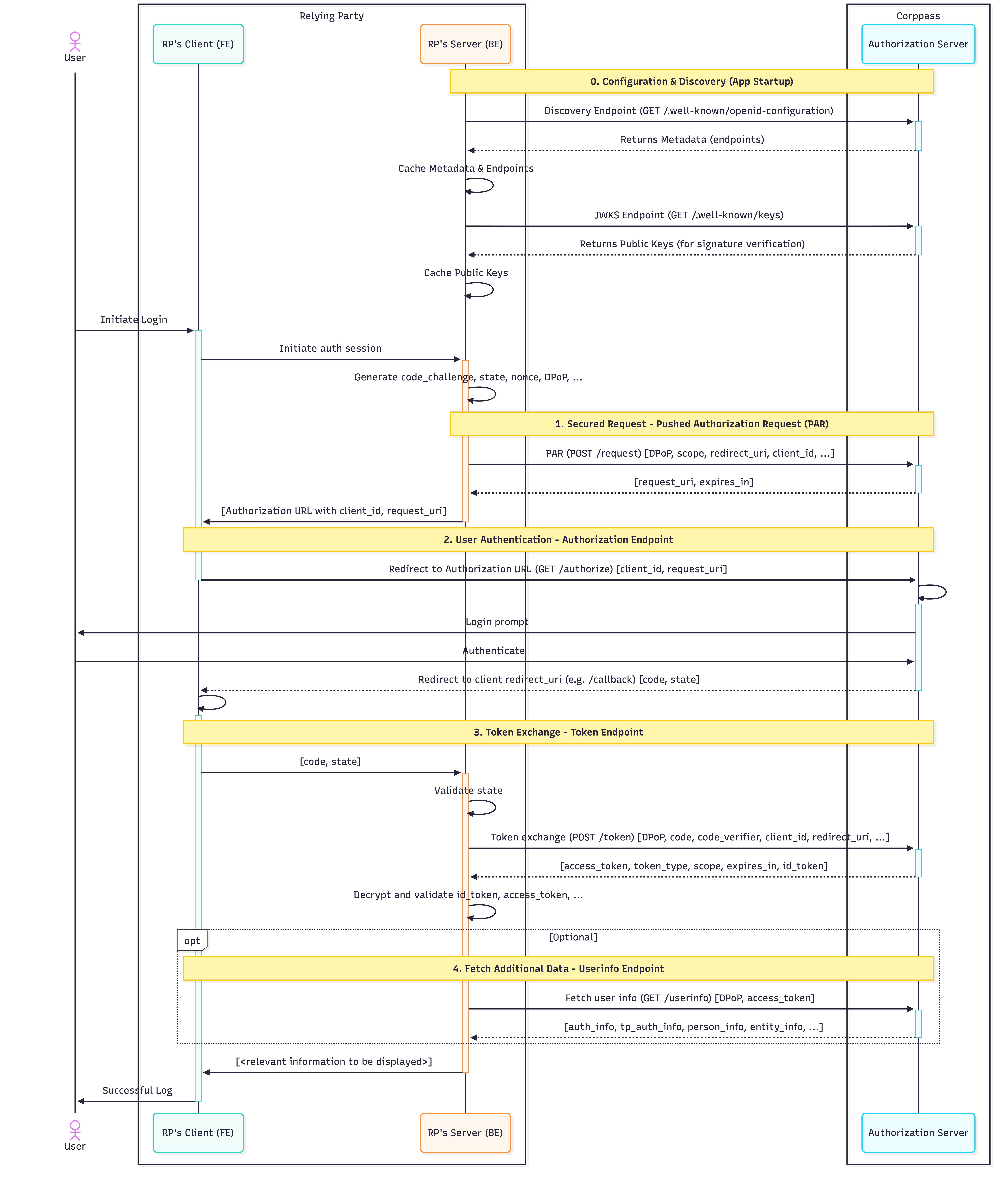
The following diagram illustrates the FAPI 2.0 Authorization Code Flow.

This flow requires a Confidential Client (Backend-for-Frontend) architecture.

* RP Client (FE): The browser / frontend handles user interaction and redirects.
* RP Server (BE): The backend maintains the secure session. All sensitive operations - including signing requests, handling DPoP keys, and token exchange - must occur on the backend to prevent credential leakage.

<div data-full-width="true"><figure><img src="https://1605527357-files.gitbook.io/~/files/v0/b/gitbook-x-prod.appspot.com/o/spaces%2FpwMYYKh1MoYyFF7hQI6N%2Fuploads%2FDErzphHahJ2UVMZLCdkO%2FFAPI%202.0%20Flow.png?alt=media&amp;token=813c826c-f47c-454c-a081-bf6f1f4fb4f0" alt=""><figcaption></figcaption></figure></div>

### 0. Configuration & Discovery

**Endpoint:** `/.well-known/openid-configuration` | [View Specification](/technical-specifications/corppass-authorization-api-fapi-2.0/integration-guide/0.-well-known-endpoints)

**Access:** Public TLS

Once registered, programmatically discover Corppass's current configuration at runtime.

* **Fetch Metadata (Discovery Endpoint):** Initiate a request to the [OpenID Discovery Endpoint](/technical-specifications/corppass-authorization-api-fapi-2.0/integration-guide/0.-well-known-endpoints/openid-discovery-endpoint) to retrieve the provider configuration. This provides endpoint URLs, supported scopes, algorithms, and JWKS locations needed for the authorization flow.
* **Fetch Public Keys (JWKS Endpoint):** Using the `jwks_uri` found in the metadata, fetch and cache Corppass's public keys. These are required later to verify the signatures of the ID Token and UserInfo response.

### 1. Secured Request - Pushed Authorization Request (PAR)

**Endpoint:** `/request` | [View Specification](/technical-specifications/corppass-authorization-api-fapi-2.0/integration-guide/1.-pushed-authorization-request-par-endpoint)

**Access:** Public TLS with Client Assertion and DPoP

**Trigger:** Initiate this flow immediately when the user initiates login with Corppass.

Corppass FAPI 2.0 requires the Pushed Authorization Request (PAR) flow. Authorization parameters are "pushed" securely via a back-channel API call rather than being exposed in the browser URL.

* **Action:** Send a `POST` request to the PAR endpoint.
* **Result:** The response contains a short-lived **`request_uri`**, which is required for the subsequent Authorization Endpoint step.

### 2. User Authentication - Authorization Endpoint

**Endpoint:** `/authorize` | [View Specification](/technical-specifications/corppass-authorization-api-fapi-2.0/integration-guide/2.-authorization-endpoint)

**Access:** Public TLS (Browser Redirect)

Once the request payload is registered via PAR, redirect the user's browser to Corppass to perform the actual Singpass login and consent.

* **Action:** Redirect the user to the Authorization Endpoint with the `request_uri` obtained from PAR.
* **Result:** After successful authentication, the user agent is redirected to the client's redirect URI with an **Authorization Code**, which is required for the subsequent Token Exchange step.

### 3. Token Exchange - Token Endpoint

**Endpoint:** `/token` | [View Specification](/technical-specifications/corppass-authorization-api-fapi-2.0/integration-guide/3.-token-endpoint)

**Access:** Public TLS with Client Assertion and DPoP

This is a secure back-channel exchange where the Authorization Code is swapped for actual credentials (Tokens).

* **Action:** Send a `POST` request to the Token Endpoint, with the Authorization Code obtained from the authorization request.
* **Result:** The response contains:
  * **ID Token:** A signed and encrypted JWE that includes the entity and user information. Relying Parties (RPs) must decrypt it using their private encryption key, then verify the JWT's signature using Corppass' public keys, available at the Corppass JWKS endpoint.
  * **Access Token:** A signed JWS intended for the Corppass resource server(s). This sender-constrained token is required to query the UserInfo Endpoint for additional data.

### 4. Fetch Additional Data - Userinfo Endpoint

**Endpoint:** `/userinfo` | [View Specification](/technical-specifications/corppass-authorization-api-fapi-2.0/integration-guide/4.-userinfo-endpoint)

**Access:** Public TLS with Access Token and DPoP

If the application requires additional entity or user information - that is not present in the ID Token, query the UserInfo endpoint.

* **Action:** Send a `GET` request to the Userinfo endpoint, with the Access Token obtained from the Token Endpoint.
* **Result:** The response contains information based on the requested scopes, where applicable.
  * Authorization details for the authenticated user
  * Personal information for the authenticated user
  * Entity information for the transacting entity


# 0. Well-known Endpoints

Corppass supports industry-standard **OpenID Connect (OIDC) Discovery** mechanisms. These publicly accessible endpoints allow Relying Parties (RPs) to programmatically discover Corppass' current configuration, endpoint locations, and cryptographic keys.

By utilizing these endpoints, your application can configure itself dynamically, reducing the risk of hardcoded errors and ensuring resilience against infrastructure changes.

#### Why use these endpoints?

* **Dynamic Configuration:** Automatically updates endpoint URLs if Corppass infrastructure changes.
* **Zero-Downtime Key Rotation:** Automatically fetches new keys when Corppass rotates signatures, preventing service outages.
* **Standard Compliance:** Ensures seamless integration with standard OIDC client libraries.

***

### Integration Workflow

To integrate successfully, your application should implement the following logic to "bootstrap" its configuration at startup and handle key rotation at runtime.

#### Step 1: Fetch Provider Metadata

When: Application Startup

* Initiate a `GET` request to the OpenID Discovery Endpoint.
* This returns a JSON document containing critical configuration data, including the locations of the Authorization, Token, and JWKS endpoints.
* Refer to [OpenID Discovery Endpoint](/technical-specifications/corppass-authorization-api-fapi-2.0/integration-guide/0.-well-known-endpoints/openid-discovery-endpoint) for more details.

#### Step 2: Extract & Configure

When: Immediately after Step 1

* Parse the JSON response.
* Configure Endpoints: Update your OIDC client with the dynamic URLs (e.g., for `pushed_authorization_request_endpoint`, `authorization_endpoint`, and `token_endpoint`).
* Locate Keys: Extract the `jwks_uri` field. This URL is required for the next step.

#### Step 3: Fetch & Cache Public Keys

When: Application Startup (and periodically)

* Initiate a `GET` request to the URL found in `jwks_uri`.
* Cache Strategy: Store the retrieved JSON Web Key Set (JWKS) in a local cache (e.g., Redis or memory).
* TTL (Time-To-Live): Set a reasonable expiration (e.g., 1 hour) to balance performance with freshness.
* Refer to [JWKS Endpoint](/technical-specifications/corppass-authorization-api-fapi-2.0/integration-guide/0.-well-known-endpoints/jwks-endpoint) for more details.

#### Step 4: Handle Key Rotation (Runtime)

When: Token Verification Fails

* If your application receives a token with a Key ID (`kid`) that is missing from your local cache:
  1. Do not reject immediately.
  2. Force Refresh: Trigger an immediate request to the `jwks_uri` to fetch the latest keys.
  3. Retry Verification: Attempt to verify the token signature again with the updated key set.
  4. Reject: If the key is still missing after the refresh, reject the request.

***

{% content-ref url="/pages/IwZgaFw7FMqg56MsCuSh" %}
[OpenID Discovery Endpoint](/technical-specifications/corppass-authorization-api-fapi-2.0/integration-guide/0.-well-known-endpoints/openid-discovery-endpoint)
{% endcontent-ref %}

{% content-ref url="/pages/AYiVcdjCesILoJyr9nXE" %}
[JWKS Endpoint](/technical-specifications/corppass-authorization-api-fapi-2.0/integration-guide/0.-well-known-endpoints/jwks-endpoint)
{% endcontent-ref %}


# OpenID Discovery Endpoint

The **OpenID Discovery Endpoint** provides essential metadata about OpenID Provider (OP) - in this case, Corppass - configuration. This JSON document allows Relying Parties (RPs) to dynamically configure their interactions, ensuring they always use the correct endpoints, cryptographic algorithms, and supported features.

## Request

```http
GET /.well-known/openid-configuration
```

## Response

The response is a JSON object containing the OpenID Provider (OP) metadata.

{% hint style="info" %}
**Performance Note: Caching**

Responses from the OpenID Discovery Endpoint should be cached for at least 1 hour to minimize repeated requests during OIDC / OAuth2 operations.
{% endhint %}

<table data-full-width="true"><thead><tr><th width="443.17578125">Field</th><th width="101.09375">Type</th><th>Description</th></tr></thead><tbody><tr><td><code>issuer</code></td><td>String</td><td>The URL identifying the OpenID Provider (OP) as the issuer of tokens. Defined in <a href="https://tools.ietf.org/html/rfc7519#section-4.1.1">RFC 7519, Section 4.1.1</a>.</td></tr><tr><td><code>jwks_uri</code></td><td>String</td><td>The URL of the OP's JSON Web Key Set (JWKS) endpoint. Clients use this endpoint to retrieve public keys for validating token signatures. Refer to <a href="https://tools.ietf.org/html/rfc7517#section-4">RFC 7517, Section 4</a>.</td></tr><tr><td><code>scopes_supported</code></td><td>Array</td><td>JSON array listing the OAuth 2.0 <code>scope</code> values that the OP supports, such as <code>openid</code>, which is mandatory for OpenID Connect flows.</td></tr><tr><td><code>claims_supported</code></td><td>Array</td><td>JSON array containing a list of Claim Names the OP may supply in tokens or the UserInfo response. Defined in <a href="https://openid.net/specs/openid-connect-core-1_0.html#Claims">OpenID Connect Core 1.0, Section 5.1</a>.</td></tr><tr><td><code>claim_types_supported</code></td><td>Array</td><td>JSON array listing the Claim Types supported by the OP, such as <code>normal</code>, <code>aggregated</code>, or <code>distributed</code>. Defined in <a href="https://openid.net/specs/openid-connect-core-1_0.html#IndividualClaimsRequests">OpenID Connect Core 1.0, Section 5.6</a>.</td></tr><tr><td><code>claims_parameter_supported</code></td><td>Boolean</td><td>Boolean value indicating whether the OP supports the <code>claims</code> parameter to request specific claims. If omitted, the default value is <code>false</code>. Refer to <a href="https://openid.net/specs/openid-connect-core-1_0.html#IndividualClaimsRequests">OpenID Connect Core 1.0, Section 5.5</a>.</td></tr><tr><td><code>subject_types_supported</code></td><td>Array</td><td>JSON array containing a list of Subject Identifier types that the OP supports, such as <code>public</code> or <code>pairwise</code>. Refer to <a href="https://openid.net/specs/openid-connect-core-1_0.html#SubjectIDTypes">OpenID Connect Core 1.0, Section 8</a>.</td></tr><tr><td><code>code_challenge_methods_supported</code></td><td>Array</td><td>JSON array listing the Proof Key for Code Exchange (PKCE) <code>code_challenge</code> methods supported by the OP, such as <code>S256</code>. Defined in <a href="https://tools.ietf.org/html/rfc7636#section-4.3">RFC 7636, Section 4.3</a>.</td></tr><tr><td><code>grant_types_supported</code></td><td>Array</td><td>JSON array listing the OAuth 2.0 <code>grant_type</code> values supported by the OP, such as <code>authorization_code</code> or <code>refresh_token</code>. Refer to RFC 6749, Section 4.</td></tr><tr><td><code>request_parameter_supported</code></td><td>Boolean</td><td>Boolean indicating whether the OP supports the <code>request</code> parameter for JWT-based requests. Default is <code>false</code> if omitted.</td></tr><tr><td><code>request_uri_parameter_supported</code></td><td>Boolean</td><td>Boolean indicating whether the OP supports the <code>request_uri</code> parameter. Default is <code>true</code> if omitted.</td></tr><tr><td><code>response_types_supported</code></td><td>Array</td><td>JSON array containing a list of OAuth 2.0 <code>response_type</code> values that the OP supports. Defined in OAuth 2.0 Multiple Response Type Encoding Practices.</td></tr><tr><td><code>response_modes_supported</code></td><td>Array</td><td>JSON array listing OAuth 2.0 <code>response_mode</code> values supported by the OP, such as <code>query</code> or <code>fragment</code>. Defined in OAuth 2.0 Multiple Response Type Encoding Practices.</td></tr><tr><td><code>authorization_endpoint</code></td><td>String</td><td>The URL of the OP's OAuth 2.0 Authorization Endpoint, where users authenticate and provide consent. Refer to <a href="https://openid.net/specs/openid-connect-core-1_0.html#AuthorizationEndpoint">OpenID Connect Core 1.0, Section 3.1.2</a>.</td></tr><tr><td><code>authorization_response_iss_parameter_supported</code></td><td>Boolean</td><td>Boolean indicating whether the OP includes the <code>iss</code> parameter in the authorization response. This is set to <code>true</code>. If you are using an OpenID/OAuth2 client, this instructs the library to expect and validate the <code>iss</code> parameter in the authorization responses.</td></tr><tr><td><code>token_endpoint</code></td><td>String</td><td>The URL of the OP's OAuth 2.0 Token Endpoint. Clients exchange an authorization code for tokens at this endpoint.</td></tr><tr><td><code>token_endpoint_auth_methods_supported</code></td><td>Array</td><td>JSON array listing the client authentication methods supported by the Token Endpoint, such as <code>private_key_jwt</code>. Refer to <a href="https://openid.net/specs/openid-connect-core-1_0.html#ClientAuthentication">OpenID Connect Core 1.0, Section 9</a>.</td></tr><tr><td><code>token_endpoint_auth_signing_alg_values_supported</code></td><td>Array</td><td>JSON array listing the JWS signing algorithms (<code>alg</code> values) supported by the Token Endpoint for JWT authentication. Refer to <a href="https://tools.ietf.org/html/rfc7518#section-3.1">RFC 7518, Section 3.1</a>.</td></tr><tr><td><code>id_token_signing_alg_values_supported</code></td><td>Array</td><td>JSON array listing the JWS signing algorithms (<code>alg</code> values) supported by the OP for signing ID Tokens. Defined in <a href="https://tools.ietf.org/html/rfc7518#section-3.1">RFC 7518, Section 3.1</a>.</td></tr><tr><td><code>id_token_encryption_alg_values_supported</code></td><td>Array</td><td>JSON array listing the JWE encryption algorithms (<code>alg</code> values) supported by the OP for encrypting ID Tokens. Defined in <a href="https://tools.ietf.org/html/rfc7516#section-4.1.1">RFC 7516, Section 4.1.1</a>.</td></tr><tr><td><code>id_token_encryption_enc_values_supported</code></td><td>Array</td><td>JSON array listing the JWE encryption algorithms (<code>enc</code> values) supported by the OP for encrypting ID Tokens. Defined in <a href="https://tools.ietf.org/html/rfc7516#section-4.1.2">RFC 7516, Section 4.1.2</a>.</td></tr><tr><td><code>userinfo_endpoint</code></td><td>String</td><td>The URL of the OP's UserInfo Endpoint, used to retrieve claims about the authenticated user. Defined in <a href="https://openid.net/specs/openid-connect-core-1_0.html#UserInfo">OpenID Connect Core 1.0, Section 5.3</a>.</td></tr><tr><td><code>userinfo_signing_alg_values_supported</code></td><td>Array</td><td>JSON array listing JWS signing algorithms (<code>alg</code> values) supported by the UserInfo Endpoint for encoding claims in a JWT. Defined in <a href="https://tools.ietf.org/html/rfc7515#section-4">RFC 7515, Section 4</a>.</td></tr><tr><td><code>userinfo_encryption_alg_values_supported</code></td><td>Array</td><td>JSON array listing JWE encryption algorithms (<code>alg</code> values) supported by the UserInfo Endpoint for encrypting claims in a JWT. Defined in <a href="https://tools.ietf.org/html/rfc7516#section-4.1.1">RFC 7516, Section 4.1.1</a>.</td></tr><tr><td><code>userinfo_encryption_enc_values_supported</code></td><td>Array</td><td>JSON array listing JWE encryption algorithms (<code>enc</code> values) supported by the UserInfo Endpoint for encrypting claims in a JWT. Defined in <a href="https://tools.ietf.org/html/rfc7516#section-4.1.2">RFC 7516, Section 4.1.2</a>.</td></tr><tr><td><code>userinfo_signing_alg_values_supported</code></td><td>Array</td><td>JSON array listing JWS signing algorithms (<code>alg</code> values) supported by the UserInfo Endpoint for encoding claims in a JWT. Defined in <a href="https://tools.ietf.org/html/rfc7515#section-4">RFC 7515, Section 4</a>.</td></tr></tbody></table>

### Sample Response

```http
HTTP/2 200
content-type: application/json; charset=utf-8
content-length: 1667  

{
  "name": "corppass",
  "issuer": "https://id.corppass.gov.sg",
  "jwks_uri": "https://id.corppass.gov.sg/.well-known/keys",
  "scopes_supported": [...],
  "claims_supported": [...],
  "claim_types_supported": [...],
  "claims_parameter_supported": false,
  "subject_types_supported": [...],
  "code_challenge_methods_supported": [...],
  "grant_types_supported": [...],
  "request_parameter_supported": false,
  "request_uri_parameter_supported": false,
  "response_types_supported": [...],
  "response_modes_supported": [...],
  "pushed_authorization_request_endpoint": "https://id.corppass.gov.sg/request",
  "authorization_endpoint": "https://id.corppass.gov.sg/mga/sps/oauth/oauth20/authorize",
  "authorization_response_iss_parameter_supported": true,
  "token_endpoint": "https://id.corppass.gov.sg/mga/sps/oauth/oauth20/token",
  "token_endpoint_auth_methods_supported": [...],
  "token_endpoint_auth_signing_alg_values_supported": [...],
  "id_token_signing_alg_values_supported": [...],
  "id_token_encryption_alg_values_supported": [...],
  "id_token_encryption_enc_values_supported": [...],
  "userinfo_endpoint": "https://id.corppass.gov.sg/userinfo",
  "userinfo_signing_alg_values_supported": [...],
  "userinfo_encryption_alg_values_supported": [...],
  "userinfo_encryption_enc_values_supported": [...]
}
```


# JWKS Endpoint

The **JSON Web Key Set (JWKS) Endpoint** hosts the **Public Signing Keys** used by Corppass.

Corppass signs all sensitive tokens (including the ID Token and Userinfo Response) using a dedicated private key. To validate the integrity and authenticity of these tokens, Relying Parties (RPs) must retrieve the corresponding public key from this endpoint.

## Request

Dynamically obtain this URL from the [OpenID Discovery Endpoint](/technical-specifications/corppass-authorization-api-fapi-2.0/integration-guide/0.-well-known-endpoints/openid-discovery-endpoint) (`jwks_uri`).

```http
GET /.well-known/keys
```

## Response

The response is a JSON object containing an array of keys (`keys`). Each key follows the JSON Web Key (JWK) specification.

{% hint style="info" %}
**Performance Note: Caching**

Responses from this endpoint, or individual keys within the JWKS, should be cached by the RP for at least 1 hour to avoid retrieving the JWKS for every JWT validation.
{% endhint %}

### Sample Reponse

```http
HTTP/2 200
content-type: application/jwk-set+json; charset=utf-8
content-length: 955
{
  "keys": [
    {
      "kty": "EC",
      "use": "sig",
      "kid": "OvNklZwNmhiE6tu9mtWTDAv218k2DMjuRaGhkBgFdOo",
      "alg": "ES256",
      "crv": "P-256",
      "x": "gnbm-h8k3ZzeegHK0x87wO_SP_MLFts9XPZm7pE8U04",
      "y": "JvtZtPUqAS6837asiImtx-oO05wQS-Z6lOneq9zi_qQ",
    }
  ]
}

```

## How to Validate a Signature

This endpoint returns one or more public keys in JSON Web Key (JWK) format.

To validate a JWT signature, your application (or OIDC library) must follow these steps:

1. **Extract Header:** Parse the JOSE Header of the received JWT (ID Token or Userinfo).
2. **Read Key ID:** Note the `kid` (Key ID) value in that header.
3. **Find Key:** Look up the key in the JWKS response where the `kid` matches the token's `kid`.
4. **Check Usage:** Ensure the matched key has the attribute `"use": "sig"` (that indicates a signing key).
5. **Verify:** Use this public key to verify the JWT signature.

## Key Rotation

Corppass reserves the right to rotate / update its signing keys at any time, and without prior notice.

**When a key rotation occurs:**

1. New keys will be published to the JWKS endpoint, each with a unique `kid` value.
2. JWTs issued after the rotation will reference the updated `kid` in their JOSE headers.
3. RPs must refresh their cached JWKS by querying the JWKS endpoint to retrieve the updated keys.

**Handling Rotation (Best Practice):** To ensure zero downtime, RPs should implement a "Lazy Refresh" strategy:

1. **Cache** the JWKS response locally (e.g., for 1 hour).
2. **Check:** When verifying a token, check if the `kid` exists in your cache.
3. **Refresh:** If you receive a token with an unknown `kid`, immediately refresh your cache by calling this endpoint again.
4. **Retry:** Attempt validation again with the newly fetched keys.


# 1. Pushed Authorization Request (PAR) Endpoint

The **Pushed Authorization Request (PAR)** flow is a **mandatory** extension of the OIDC authorization code flow for FAPI 2.0, as defined in [RFC 9126](https://datatracker.ietf.org/doc/html/rfc9126).

It allows the Relying Party (RP) to register sensitive authorization request parameters directly with Corppass via a *secure back-channel `POST` request*. By "pushing" these parameters directly to the server instead of encoding them in the browser URL, this significantly reduces the risk of leaking sensitive data (e.g., `scope`, `redirect_uri`) and ensures integrity by authenticating the request before the user interaction begins.

#### Supported TLS Cipher Suites

Please ensure you are using a supported cipher suite for this endpoint. Refer to [Supported TLS Cipher Suites](/technical-specifications/corppass-authorization-api-fapi-2.0/integration-guide/supported-tls-cipher-suites) for the full list.

## Request

To initiate the flow, send a `POST` request to the PAR Endpoint URL obtained from the [OpenID Discovery Endpoint](/technical-specifications/corppass-authorization-api-fapi-2.0/integration-guide/0.-well-known-endpoints/openid-discovery-endpoint) (`pushed_authorization_request_endpoint`).

```http
POST /request
```

### Request Headers

<table><thead><tr><th width="190.41796875">Header</th><th width="114.15625">Required</th><th>Description</th></tr></thead><tbody><tr><td><code>Content-Type</code></td><td>Yes</td><td><p>Indicates the encoding format of the request body.</p><p><strong>Validation:</strong></p><ul><li>Must be set to <code>application/x-www-form-urlencoded</code>.</li></ul></td></tr><tr><td><code>DPoP</code></td><td>Yes</td><td><p>DPoP Proof JWT. A distinct JSON Web Token (JWT) that proves the client possesses the private key corresponding to the public key used for token binding.</p><p><strong>Validation:</strong></p><ul><li>Optional only if the <code>dpop_jkt</code> parameter is provided in the request body.</li><li>Mandatory if the <code>dpop_jkt</code> parameter is missing.</li><li>If both are provided, the thumbprint derived from this header must match the <code>dpop_jkt</code> value.<br></li></ul><p><strong>Recommendation:</strong> We strongly recommend sending this Header rather than relying on the <code>dpop_jkt</code> parameter, as the <code>DPoP</code> header is mandatory for all subsequent token interactions.<br><br>Refer to the <a href="/technical-specifications/technical-concepts/demonstrating-proof-of-possession-dpop">Demonstrating Proof of Possession</a> section for more details.</p></td></tr></tbody></table>

### Request Body

<table><thead><tr><th width="193.078125">Field</th><th width="114.41796875">Required</th><th>Description</th></tr></thead><tbody><tr><td><code>client_id</code></td><td>Yes</td><td>The unique identifier assigned to the Relying Party application during onboarding.</td></tr><tr><td><code>client_assertion</code></td><td>Yes</td><td><p>A signed JWT that identifies and authenticates the client application.</p><p><strong>Validation:</strong></p><ul><li>Must be generated afresh for each authorization session.</li><li>Must contain a unique <code>jti</code> (JWT ID) claim to prevent replay attacks.</li><li>Must be signed using the Private Key corresponding to the public key registered in your JWKS.</li></ul><p>Refer to <a href="/technical-specifications/technical-concepts/client-assertion-jwt">Client Assertion JWT</a> section for more details.</p></td></tr><tr><td><code>client_assertion_type</code></td><td>Yes</td><td><p>Specifies the format of the client assertion.</p><p><strong>Validation:</strong></p><ul><li>Must be set to <code>urn:ietf:params:oauth:client-assertion-type:jwt-bearer</code>, as mandated by OIDC specifications.</li></ul></td></tr><tr><td><code>code_challenge</code></td><td>Yes</td><td><p>PKCE challenge. The base64url-encoded SHA-256 hash of the client-generated <code>code_verifier</code>.</p><p>Refer to <a href="/technical-specifications/technical-concepts/proof-key-of-code-exchange-pkce">Proof Key of Code Exchange</a> section for more details.</p></td></tr><tr><td><code>code_challenge_method</code></td><td>Yes</td><td><p>PKCE transformation method. The hashing method used to generate the <code>code_challenge</code> from the <code>code_verifier</code>.</p><p><strong>Validation:</strong></p><ul><li>Must be set to <code>S256</code>, as mandated by FAPI 2.0 specifications.</li></ul></td></tr><tr><td><code>response_type</code></td><td>Yes</td><td><p>Indicates the authorization flow to be executed.</p><p><strong>Validation:</strong></p><ul><li>Must be set to <code>code</code>, as mandated by FAPI 2.0 specifications.</li></ul></td></tr><tr><td><code>redirect_uri</code></td><td>Yes</td><td><p>The callback URL where the authorization server will redirect the user after successful authorization.<br><br><strong>Validation:</strong></p><ul><li><p>Must be <strong><code>https</code></strong> scheme</p><ul><li>Custom scheme URLs are no longer allowed. Clients are advised to use universal links for app deep-linking instead.</li></ul></li><li>Must exactly match one of the Redirect URIs pre-registered during onboarding.</li><li>Partial matches or wildcard domains are not supported.</li></ul></td></tr><tr><td><code>scope</code></td><td>Yes</td><td><p>A space-delimited list of requested scopes.</p><p>Each scope grants access to a set of <em>entity</em> or <em>acting user</em>'s attributes called claims. Once authorised, these claims are returned in the <em>ID Token</em> (via the <a href="/technical-specifications/corppass-authorization-api-fapi-2.0/integration-guide/3.-token-endpoint">Token Endpoint</a>) and/or made available via the <a href="/technical-specifications/corppass-authorization-api-fapi-2.0/integration-guide/4.-userinfo-endpoint"><em>Userinfo Endpoint</em></a>.</p><p><br><strong>Validation:</strong></p><ul><li>Must include the <code>openid</code> scope.</li><li>Must only contain scopes authorized for your Client ID. Unrecognized scopes will result in an error.</li></ul><p>Refer to <a href="/technical-specifications/corppass-authorization-api-fapi-2.0/scopes">Scopes</a> section for the full list of available values.</p></td></tr><tr><td><code>state</code></td><td>Yes</td><td><p>An opaque value used to maintain state between the request and callback. It serves as the primary defense against Cross-Site Request Forgery (CSRF) attacks.</p><p><strong>Validation:</strong></p><ul><li>Must be unique, non-guessable, and cryptographically random.</li><li>Must be generated afresh for each authorization session.</li><li>The Relying Party must validate that the <code>state</code> returned in the authorization request callback matches the value originally sent.</li></ul></td></tr><tr><td><code>nonce</code></td><td>Yes</td><td><p>A client-provided value used to mitigate replay attacks.</p><p><strong>Validation:</strong></p><ul><li>Must be unique, non-guessable, and cryptographically random.</li><li>Must be generated afresh for each authorization session.</li><li>The Relying Party must verify that the <code>nonce</code> returned in the ID Token strictly matches this value.</li></ul></td></tr><tr><td><code>acr_values</code></td><td>No</td><td><p>Optional. A space-delimited string indicating desired level of assurance (LoA) for the authentication session.</p><p><br>If multiple values are provided, they should be listed in descending order of preference. The authorization server will attempt to satisfy the first available or supported value.</p><p>If omitted, the authorization server defaults to the client application's configured LoA.</p><p><strong>Validation:</strong></p><ul><li>If provided, must correspond to a supported LoA.</li></ul><p><strong>Supported values:</strong></p><ul><li><code>urn:singpass:authentication:loa:2</code> - LoA 2 (High): Requires 2-Factor Authentication (2FA).</li></ul><p>Note: Additional LoA values may be introduced in the future to support different authentication standards.</p></td></tr><tr><td><code>authentication_context_type</code></td><td>Yes</td><td><p>A value from a predefined list describing the type of transaction for which the user is authenticating. This context is used by Corppass for risk assessment and anti-fraud monitoring.</p><p><br><strong>Validation:</strong></p><ul><li>Must be one of the supported types configured for your specific client application.</li><li>Values not allow-listed for your client ID will be rejected.</li><li>This parameter is applicable only for Corppass Login application. If provided for Myinfo Business application, the request will be rejected.</li></ul><p><br>Refer to <a href="/technical-specifications/corppass-authorization-api-fapi-2.0/integration-guide/1.-pushed-authorization-request-par-endpoint/authentication-context-parameters">Authentication Context Parameters</a> section for more details.</p></td></tr><tr><td><code>authentication_context_message</code></td><td>No</td><td><p>Optional. A string providing context on the purpose of the authentication request.</p><p><strong>Validation:</strong></p><ul><li>Must contain only alphanumeric characters and spaces</li><li>Maximum length of 100 characters.</li><li>This parameter is applicable only for Corppass Login application. If provided for Myinfo Business application, the request will be rejected.</li></ul><p><strong>Note on usage:</strong> While currently optional, this value is slated for future enhancements where it will be displayed directly to the user during login. It is strongly advised to provide a clear, user-comprehensible message.</p></td></tr><tr><td><code>dpop_jkt</code></td><td>No</td><td><p>DPoP JWK Thumbprint. The base64url-encoded SHA-256 hash of your DPoP public key (JWK). This binds the authorization code to your specific key.<br><br><strong>Validation:</strong></p><ul><li>Optional if <code>DPoP</code> header is provided.</li><li>Mandatory if the <code>DPoP</code> header is missing.</li><li>If both are provided, the thumbprint derived from the <code>DPoP</code> header must match the <code>dpop_jkt</code> value.</li></ul><p><strong>Recommendation:</strong> We recommend relying on the <code>DPoP</code> HTTP header rather than this parameter, as the header is mandatory for all subsequent token requests.<br><br>Refer to <a href="/technical-specifications/technical-concepts/demonstrating-proof-of-possession-dpop">Demonstrating Proof of Possession</a> section for more details.</p></td></tr></tbody></table>

### Sample Request

```http
POST /request
Content-Type: application/x-www-form-urlencoded
DPoP: <signed-DPoP-JWT>

client_id=51YUlwazLASM7aqMiBNW
&client_assertion=eyJ...
&client_assertion_type=urn:ietf:params:oauth:client-assertion-type:jwt-bearer
&code_challenge=VQbq2FQzvY12kTkE-FoLmGHim5W7LRknTNYTUKuCKcE
&code_challenge_method=S256
&response_type=code
&redirect_uri=https%3A%2F%2Fclient.example.org%2Fcallback
&scope=openid%20authinfo
&state=5de6a954-a762-4975-a8f4-b692cc35b964
&nonce=4a0bb161-e3bb-4a56-9d75-ebea5de7a32c
&acr_values=urn:singpass:authentication:loa:2
&authentication_context_type=APP_AUTHENTICATION_DEFAULT
&authentication_context_message=login%20as%20corporate%20user
&dpop_jkt=boPCS...
```

## Success Response

If the request is valid, Corppass registers the provided parameters and returns a JSON response containing a `request_uri`.

### Response Body

<table><thead><tr><th width="214.66796875">Field</th><th width="136.328125">Type</th><th>Description</th></tr></thead><tbody><tr><td><code>request_uri</code></td><td>String</td><td><p>A unique URI that references the stored authorization payload.</p><p>Use the exact value as the <code>request_uri</code> query parameter when redirecting the user to the <a href="/technical-specifications/corppass-authorization-api-fapi-2.0/integration-guide/2.-authorization-endpoint">Authorization Endpoint</a>.</p></td></tr><tr><td><code>expires_in</code></td><td>Number</td><td><p>The lifetime of the <code>request_uri</code> in seconds.</p><p>This is set to <strong>60 seconds</strong>. The client must initiate the redirect to the <a href="/technical-specifications/corppass-authorization-api-fapi-2.0/integration-guide/2.-authorization-endpoint">Authorization Endpoint</a> within this time window, otherwise the <code>request_uri</code> will become invalid.</p></td></tr></tbody></table>

### Sample Response

```json
{
  "request_uri": "urn:ietf:params:oauth:request_uri:h8YQPVV0Dgm5MGaD_koAm",
  "expires_in": 60
}
```

## Error Response

If the request is malformed, unauthorised, or contains invalid parameters, Corppass returns a JSON response containing an error code and description.

### Response Body

<table><thead><tr><th width="214.66796875">Field</th><th width="136.328125">Type</th><th>Description</th></tr></thead><tbody><tr><td><code>error</code></td><td>String</td><td><p>A standardised error code identifying the type of error that occurred.</p><p><br>See <a href="#error-codes">Error Codes</a> below for a complete list of possible values.</p></td></tr><tr><td><code>error_description</code></td><td>String</td><td>A human-readable text description providing additional details about the error.</td></tr><tr><td><code>state</code></td><td>String</td><td>The opaque value originally provided by the client in the request body, returned unmodified.</td></tr></tbody></table>

#### Error Codes

<table><thead><tr><th width="204.31640625">Error Code</th><th width="166.359375">HTTP Status</th><th>Error Description</th></tr></thead><tbody><tr><td>invalid_request</td><td>400</td><td><p>This may be due to one of the following:</p><ul><li>A required request parameter is missing.</li><li>A request parameter is malformed or does not meet the expected format.</li><li>Unsupported parameters are included for the selected product (e.g. Corppass Login app parameters used in MyInfo Business requests).</li><li>The client’s JWKS endpoint is not reachable.</li><li>The TLS cipher suite used for the connection is not compliant with <a href="https://openid.bitbucket.io/fapi/fapi-2_0-baseline.html#section-4.2">FAPI 2.0 security requirements</a>.</li></ul><p>Please ensure that:</p><ul><li>All required parameters are provided and correctly formatted.</li><li>Only parameters applicable to the intended product are included in the request.</li><li>Your JWKS endpoint is accessible and returns a valid key set that complies with the required <a href="/technical-specifications/technical-concepts/client-jwks">specification</a>.</li></ul></td></tr><tr><td>invalid_client</td><td>400 / 401</td><td><p>This may be due to one of the following:</p><ul><li>Missing client credential</li><li>Invalid client credential</li><li>Expired client credential</li><li>Improperly formatted client credential or assertion (e.g., malformed JWT)</li><li>The client’s JWKS does not contain the required signing key</li></ul><p>Please ensure that:</p><ul><li>The client credential is present, valid, and not expired</li><li>Your JWKS endpoint is accessible and returns a valid key set that complies with the required <a href="/technical-specifications/technical-concepts/client-jwks">specification</a>.</li></ul></td></tr><tr><td>invalid_scope</td><td>400</td><td>The requested scope is invalid, unknown, malformed, or exceeds the scope granted to the client.</td></tr><tr><td>invalid_dpop_proof</td><td>401</td><td><p>This may due to the one of the following:</p><ul><li>The DPoP proof is expired.</li><li>The DPoP proof is malformed.</li><li>The DPoP proof failed signature verification.</li><li>The DPoP proof contains missing or invalid required claims.</li></ul><p>Please ensure that:</p><ul><li>The DPoP proof is correctly structured and signed using the client's private key.</li><li>The DPoP proof complies with the required <a href="/technical-specifications/technical-concepts/demonstrating-proof-of-possession-dpop">specification</a>.</li></ul></td></tr><tr><td>server_error</td><td>500</td><td>The authorization server encountered an unexpected internal error while processing the request.</td></tr><tr><td>temporarily_unavailable</td><td>503</td><td>The server is temporarily unable to handle the request due to maintenance or high load.</td></tr></tbody></table>

### Sample Response

```json
{
  "error": "invalid_client",
  "error_description": "Client authentication failed due to a missing, invalid, expired, or improperly formatted client credential or assertion.",
  "state": "5de6a954-a762-4975-a8f4-b692cc35b964"
 }
```

## Next Steps

**Redirect the User:** Upon successful retrieval of the `request_uri` from the PAR response, the next step is to redirect the user's browser to the *Authorization Endpoint*.

The `request_uri` serves as a secure reference to the parameters registered in this step and is used to construct the redirect URL, replacing the full list of query parameters typically used in legacy flows.

**Proceed to** [**2. Authorization Endpoint**](/technical-specifications/corppass-authorization-api-fapi-2.0/integration-guide/2.-authorization-endpoint) **to redirect the user and obtain the Authorization Code.**


# Authentication Context Parameters

New parameters have been introduced in the authorization flow to help contextualise each authorization request via [Pushed Authorization Request](/technical-specifications/corppass-authorization-api-fapi-2.0/integration-guide/1.-pushed-authorization-request-par-endpoint).

These parameters are not part of the standard OpenID Connect (OIDC) specification and are specific to the [Corppass Login](/products/corppass-login).

<table data-header-hidden><thead><tr><th width="296.75" valign="top">Field</th><th width="110.55859375" valign="top">Required</th><th valign="top">Description</th></tr></thead><tbody><tr><td valign="top"><code>authentication_context_type</code></td><td valign="top">Yes</td><td valign="top"><p>A value from a predefined list describing the type of transaction for which the user is authenticating. This context is used by Corppass for risk assessment and anti-fraud monitoring.</p><p><strong>Validation:</strong></p><ul><li>Must be one of the supported types configured for your specific client application.</li><li>Values not allow-listed for your client ID will be rejected.</li><li>This parameter is applicable only for Corppass Login application. If provided for Myinfo Business application, the request will be rejected.</li></ul><p>The list of supported values is provided below.</p></td></tr><tr><td valign="top"><code>authentication_context_message</code></td><td valign="top">No</td><td valign="top"><p>Optional. A string providing context on the purpose of the authentication request.​</p><p><strong>Validation:</strong></p><ul><li>Must contain only alphanumeric characters and spaces</li><li>Maximum length of 100 characters.</li><li>This parameter is applicable only for Corppass Login application. If provided for Myinfo Business application, the request will be rejected.</li></ul></td></tr></tbody></table>

### Supported authentication\_context\_type values

Currently, Corppass only supports one possible value:

<table><thead><tr><th width="289.6171875">Event</th><th>authentication_context_type Value</th></tr></thead><tbody><tr><td>General authentication</td><td><code>APP_AUTHENTICATION_DEFAULT</code></td></tr></tbody></table>

Additional values may be added in the future as new use cases arise.

### Guidance on `authentication_context_type` usage

* If none of the predefined use cases above accurately describe your transaction, use the default value `APP_AUTHENTICATION_DEFAULT` for the general authentication use case.
* For general authentication to an e-service that performs a variety of actions, use the default value: `APP_AUTHENTICATION_DEFAULT`. This is expected to cover the majority of e-services.
* For more sensitive or transaction-specific actions that require step-up verification, a more specific `authentication_context_type` should be used.


# 2. Authorization Endpoint

The **Authorization Endpoint** is the entry point for the user's authentication journey.

After successfully registering the request parameters via the [Pushed Authorization Request (PAR) endpoint](/technical-specifications/corppass-authorization-api-fapi-2.0/integration-guide/1.-pushed-authorization-request-par-endpoint), the user's browser must be redirected to this endpoint to authenticate with Corppass.

## Request (Redirect the User)

To initiate the authentication session, redirect the user's browser to the Authorization Endpoint URL obtained from the [OpenID Discovery Endpoint](/technical-specifications/corppass-authorization-api-fapi-2.0/integration-guide/0.-well-known-endpoints/openid-discovery-endpoint) (`authorization_endpoint`).

```http
GET /mga/sps/oauth/oauth20/authorize 
```

### Query Parameters

Unlike legacy flows, this request does *not* contain sensitive parameters (such as `scope` or `redirect_uri`) in the query string. Instead, it utilises the `request_uri` obtained from the PAR response to reference the pre-validated payload.

<table><thead><tr><th width="169.57421875">Parameter</th><th width="106">Required</th><th>Description</th></tr></thead><tbody><tr><td><code>client_id</code></td><td>Yes</td><td><p>The unique identifier assigned to the Relying Party application during onboarding.<br></p><p><strong>Validation:</strong></p><ul><li>Must strictly match the <code>client_id</code> used in the preceding Pushed Authorization Request (PAR).</li></ul></td></tr><tr><td><code>request_uri</code></td><td>Yes</td><td><p>The unique Uniform Resource Identifier (URI) that references the authorization parameters stored during the PAR step.</p><p><strong>Validation:</strong></p><ul><li>Must be the exact <code>request_uri</code> value returned in the response from the PAR Endpoint.</li><li>This URI is short-lived. The client must redirect the user to the Authorization Endpoint before the URI expires (within 60 seconds).</li></ul></td></tr></tbody></table>

### Sample Request (Redirect URL)

{% code overflow="wrap" %}

```http
GET /mga/sps/oauth/oauth20/authorize
?client_id=51YUlwazLASM7aqMiBNW
&request_uri=urn:ietf:params:oauth:request_uri:h8YQPVV0Dgm5MGaD_koAm HTTP/1.1
Host: id.corppass.gov.sg
```

{% endcode %}

## Success Response (Callback)

Upon successful authentication, the user agent is redirected to the `redirect_uri` registered in the PAR step via a `302 Found` response.

The following paramters are appended to the query string.

### Query Parameters

<table><thead><tr><th width="185">Parameter</th><th>Description</th></tr></thead><tbody><tr><td><code>code</code></td><td><p><strong>Authorization Code</strong>. A short-lived, single-use credential required to retrieve Access Token and ID Token at the <a href="/technical-specifications/corppass-authorization-api-fapi-2.0/integration-guide/3.-token-endpoint">Token Endpoint</a>.</p><p><br>The code is valid for <strong>60 seconds</strong> and can only be used once.</p></td></tr><tr><td><code>state</code></td><td><p>The opaque value originally provided by the client in the authorization request (PAR), returned unmodified. This is to mitigate Cross-Site Request Forgery (CSRF, XSRF) attacks.</p><p><strong>Validation:</strong></p><ul><li>The Relying Party <strong>must</strong> verify that this value strictly matches the <code>state</code> stored in the user's session from the initial request (PAR).</li><li>If the values do not match, the response is invalid and likely part of a Cross-Site Request Forgery (CSRF) attack. Reject the request immediately.</li></ul></td></tr><tr><td><code>iss</code></td><td>The issuer identifier of the Corppass authorization server (See the <code>issuer</code> field in the <a href="https://docs.corppass.gov.sg/technical-specifications/corppass-authorization-api-fapi-2.0/integration-guide/0.-well-known-endpoints/openid-discovery-endpoint#response">OpenID Discovery Endpoint</a>). Both success and failure response redirects will contain this parameter. For security, it is recommended that clients verify this value against the expected Corppass issuer before acting on the response. If you are using an OpenID/OAuth2 client, this will be validated by the library for you.</td></tr></tbody></table>

{% hint style="warning" %}
**It is strongly recommended** to use a [certified OIDC Relying Party library](https://openid.net/developers/certified-openid-connect-implementations/), as the standard checks are automatically handled by the library.
{% endhint %}

### Sample Reponse (Callback URL)

```http
HTTP/1.1 302 Found
Location: https://client.example.org/callback
?code=KxygiAyIIHu4OCCqjF9XAxpCjKk0uUkKNA6mfVD9HZw
&state=5de6a954-a762-4975-a8f4-b692cc35b964
&iss=https%3A%2F%2Fid.corppass.gov.sg
```

## Error Response (Callback)

If authentication fails, is denied by the user, or a processing error occurs, the user agent is redirected to the `redirect_uri` (provided in the PAR step), where applicable, with the following error parameters appended to the query string.

{% hint style="warning" %}
Clients **must** handle the error parameters to provide appropriate feedback or guidance to the user, to ensure smooth user experience.
{% endhint %}

### Query Parameters

<table><thead><tr><th width="256.484375">Query Parameter</th><th>Description</th></tr></thead><tbody><tr><td><code>error</code></td><td><p>A standardised error code identifying the type of error that occurred.</p><p><br>See <a href="#error-codes">Error Codes</a> below for a complete list of possible values.</p></td></tr><tr><td><code>error_description</code></td><td>A human-readable text description providing additional details about the error.</td></tr><tr><td><code>state</code></td><td><p>The opaque value originally provided by the client in the authorization request (PAR), returned unmodified if available.</p><p><strong>Validation:</strong></p><ul><li>Used to correlate the error response with the correct user session.</li></ul></td></tr><tr><td><code>iss</code></td><td>The issuer identifier of the Corppass authorization server (See the <code>issuer</code> field in the <a href="https://docs.corppass.gov.sg/technical-specifications/corppass-authorization-api-fapi-2.0/integration-guide/0.-well-known-endpoints/openid-discovery-endpoint#response">OpenID Discovery Endpoint</a>). Both success and failure response redirects will contain this parameter. For security, it is recommended that clients verify this value against the expected Corppass issuer before acting on the response.</td></tr></tbody></table>

#### Error Codes

<table><thead><tr><th width="256.484375">Error Code</th><th>Description</th></tr></thead><tbody><tr><td>login_required</td><td>The user does not have an active session, the session has expired, or the session has been invalidated.</td></tr><tr><td>access_denied</td><td>The resource owner or authorization server denied the request.</td></tr><tr><td>server_error</td><td>The authorization server encountered an unexpected internal error while processing the request.<br>The error can potentially be due to the RP’s JWK endpoint being unreachable or returning a malformed JWK.</td></tr><tr><td>temporarily_unavailable</td><td>The server is temporarily unable to handle the request due to maintenance or high load.</td></tr></tbody></table>

### Sample Response (Callback URL)

<pre class="language-http" data-overflow="wrap"><code class="lang-http">HTTP/1.1 302 Found
<strong>Location: https://client.example.org/callback
</strong><strong>?error=server_error
</strong><strong>&#x26;error_description=The+server+encountered+an+unexpected+internal+error+while+processing+the+request.
</strong><strong>&#x26;state=Zw_r_a2uBDoy-kR7562RjM4-C9K3C2zDRQg-AJsDwb4
</strong>&#x26;iss=https%3A%2F%2Fid.corppass.gov.sg
</code></pre>

## Next Steps

**Exchange the Code for Tokens:** Once the Authorization Code is received, exchange it for the Access Token and ID Token via a secure back-channel call.

**Proceed to** [**3. Token Endpoint**](/technical-specifications/corppass-authorization-api-fapi-2.0/integration-guide/3.-token-endpoint) **to perform the token exchange.**


# 3. Token Endpoint

The **Token Endpoint** is used by the client to exchange an authorization code for tokens after the user successfully authenticates. This is a *secure back-channel request* made directly between the client and Corppass.

#### Returned Tokens

* **ID Token:** A signed and encrypted JWE that includes the entity and user information. Relying Parties (RPs) must decrypt it using their private encryption key, then verify the JWT's signature using Corppass' public keys, available at the Corppass JWKS endpoint.
* **Access Token:** A signed JWS intended for the Corppass resource server(s).

#### Supported Grant Types

Grant types define the method by which a client obtains tokens from the authorization server.

For the Open ID Connect (OIDC) authentication flow, Corppass supports the following grant types:

<table><thead><tr><th width="266">Grant Type</th><th>Description</th></tr></thead><tbody><tr><td><code>authorization_code</code></td><td><p>Used to securely exchange an authorization code for an ID token and Access Token. Requires prior user authentication and is suitable for confidential clients.</p><p>Refer to <a href="https://openid.net/specs/openid-connect-core-1_0.html#CodeFlowAuth">Section 3.1 of the OIDC Core Specification </a>for more details.</p></td></tr></tbody></table>

#### Supported TLS Cipher Suites

Please ensure you are using a supported cipher suite for this endpoint. Refer to [Supported TLS Cipher Suites](/technical-specifications/corppass-authorization-api-fapi-2.0/integration-guide/supported-tls-cipher-suites) for the full list.

## Request

To obtain the Access Token and ID Token, send a `POST` request to the Token Endpoint URL obtained from the [OpenID Discovery Endpoint](/technical-specifications/corppass-authorization-api-fapi-2.0/integration-guide/0.-well-known-endpoints/openid-discovery-endpoint) (`token_endpoint`).

```http
POST /mga/sps/oauth/oauth20/token
```

### Request Headers

<table><thead><tr><th width="225.18359375">Field</th><th width="108.93359375">Required</th><th>Description</th></tr></thead><tbody><tr><td><code>Content-Type</code></td><td>Yes</td><td><p>Indicates the encoding format of the request body.</p><p><strong>Validation:</strong></p><ul><li>Must be set to <code>application/x-www-form-urlencoded</code>.</li></ul></td></tr><tr><td><code>DPoP</code></td><td>Yes</td><td><p>DPoP Proof JWT. A distinct JSON Web Token (JWT) that proves the client possesses the private key corresponding to the public key used for token binding.</p><p><strong>Validation:</strong></p><ul><li>Must be signed using the exact same private key as the DPoP proof presented in the Pushed Authorization Request (PAR) step.</li></ul><p>Refer to <a href="/technical-specifications/technical-concepts/demonstrating-proof-of-possession-dpop">Demonstrating Proof of Possession</a> section for more details.</p></td></tr></tbody></table>

### Request Body

<table><thead><tr><th width="226.19140625">Field</th><th width="128.8359375">Required</th><th>Description</th></tr></thead><tbody><tr><td><code>code</code></td><td>Yes</td><td><p><strong>Authorization Code</strong>. The authorization code issued during the callback step at <a href="/technical-specifications/corppass-authorization-api-fapi-2.0/integration-guide/2.-authorization-endpoint">Authorization Endpoint</a>.<br></p><p><strong>Validation:</strong></p><ul><li>The code is valid for 60 seconds. Expired codes will result in an error.</li><li>The code can only be exchanged once.</li></ul></td></tr><tr><td><code>redirect_uri</code></td><td>Yes</td><td><p>The absolute URI used in the initial authorization request (PAR).<br></p><p><strong>Validation:</strong></p><ul><li>Must strictly match the <code>redirect_uri</code> provided in the original Pushed Authorization Request (PAR).</li></ul></td></tr><tr><td><code>grant_type</code></td><td>Yes</td><td><p>The type of authorization grant being requested.</p><p><strong>Validation:</strong></p><ul><li>Must be set to <code>authorization_code</code>.</li></ul></td></tr><tr><td><code>client_id</code></td><td>No</td><td><p>Optional. The unique identifier assigned to the Relying Party during onboarding.<br></p><p><strong>Validation:</strong></p><ul><li>If provided, this value must match the <code>sub</code> (subject) claim in the Client Assertion JWT.</li></ul></td></tr><tr><td><code>client_assertion_type</code></td><td>Yes</td><td><p>Specifies the format of the client assertion.</p><p><strong>Validation:</strong></p><ul><li>Must be set to <code>urn:ietf:params:oauth:client-assertion-type:jwt-bearer</code>, as mandated by OIDC specifications.</li></ul></td></tr><tr><td><code>client_assertion</code></td><td>Yes</td><td><p>A signed JWT used to authenticate the client application.</p><p><strong>Validation:</strong></p><ul><li>Must be generated afresh for each authorization session.</li><li>Must contain a unique <code>jti</code> (JWT ID) claim to prevent replay attacks.</li><li>Must be signed using the Private Key corresponding to the public key registered in your JWKS.</li></ul><p>Refer to <a href="/technical-specifications/technical-concepts/client-assertion-jwt">Client Assertion JWT</a> section for more details.</p></td></tr><tr><td><code>code_verifier</code></td><td>Yes</td><td><p>PKCE Verifier. The cryptographically random string generated by the client to prove possession of the <code>code_challenge</code>.</p><p><strong>Validation:</strong></p><ul><li>Must be the original plain-text value used to generate the <code>code_challenge</code> provided at PAR.</li></ul><p>Refer to <a href="/technical-specifications/technical-concepts/proof-key-of-code-exchange-pkce">Proof Key of Code Exchange</a> section for more details.</p></td></tr></tbody></table>

### Sample Request

```http
POST /mga/sps/oauth/oauth20/token
Content-Type: application/x-www-form-urlencoded
DPoP: <signed-DPoP-JWT>

grant_type=authorization_code
&code=SplxlOBeZQQYbYS6WxSbIA
&redirect_uri=https%3A%2F%2Fclient.example.org%2Fcb
&client_id=51YUlwazLASM7aqMiBNW
&client_assertion_type=urn:ietf:params:oauth:client-assertion-type:jwt-bearer
&client_assertion=eyJ...
&code_verifier=hJ1GZ4ekBQ-NNlc4t62KsLqWhM6p1ZpwRc1cwFtoLp
```

## Success Response

If the request is valid, Corppass returns a JSON response containing the tokens.

### Response Body

<table><thead><tr><th width="153">Field</th><th width="107">Type</th><th>Description</th></tr></thead><tbody><tr><td><code>token_type</code></td><td>String</td><td><p>Indicates the type of access token issued.</p><p>Value is always set to <code>DPoP</code>.</p></td></tr><tr><td><code>access_token</code></td><td>JWS</td><td><p><strong>Access Token</strong>. A signed JSON Web Signature (JWS) used to access protected resources (e.g., Userinfo Endpoint).</p><p><br>The token is valid for <strong>10 minutes</strong> from time of issuance.</p><p>Refer to <a href="/technical-specifications/corppass-authorization-api-fapi-2.0/integration-guide/3.-token-endpoint/access-token">Access Token</a> section for more details.</p></td></tr><tr><td><code>id_token</code></td><td>JWE</td><td><p><strong>ID Token</strong>. A signed and encrypted JSON Web Encryption (JWE) containing user and entity identities, and authentication claims.</p><p><br><strong>Processing:</strong></p><ul><li>The RP must decrypt this token using their Private Encryption Key.</li><li>After decryption, the inner JWT signature must be verified using Corppass' public keys.</li></ul><p>Refer to <a href="/technical-specifications/corppass-authorization-api-fapi-2.0/integration-guide/3.-token-endpoint/id-token">ID Token</a> section for more details.</p></td></tr><tr><td><code>scope</code></td><td>String</td><td><p><strong>Granted Scopes</strong>. A space-delimited list of scopes actually granted to the Access Token.</p><p>This list typically matches the scopes requested during authorization, though the server may grant a subset of requested scopes based on user consent or policy.</p></td></tr><tr><td><code>expires_in</code></td><td>Numeric</td><td><p>The remaining lifetime of the Access Token in seconds.</p><p>Value is set to <strong>600 seconds</strong>.</p></td></tr></tbody></table>

### Sample Response

```json
{
    "token_type": "DPoP",
    "access_token": "eyJhbGciOiJFUzI1NiIsInR5cCI6IkpXVCIsImtpZCI6InhHbkJ4ZVYtWTFubUJlZi1KXzBTSWNxaU1hR2NlYWJzaVkxZjRJUkMya0kifQ.eyJmYXBpX2Zsb3ciOnRydWUsImFjdCI6eyJzdWIiOiJhOTg2NTgzNy03YmQ3LTQ2YWMtYmVmNC00MmE3NmE5NDY0MjQifSwiY25mIjp7ImprdCI6ImJvWVZEeFhTN1l6bF9yNFAyVnNvY2E5Ujkyd2dUSEdya25zZy13b2F2dnMifSwianRpIjoiV19YTmZQZGNaelIzMUl2aTFLVEJ2Iiwic3ViIjoiMTIwNjc0ODRaIiwiaWF0IjoxNzc2NDA3NDM3LCJleHAiOjE3NzY0MDgwMzYsInNjb3BlIjoib3BlbmlkIGF1dGhpbmZvIHRwYXV0aGluZm8gdXNlci5pZGVudGl0eSB1c2VyLm5hbWUgZW50aXR5LmlkZW50aXR5IGVudGl0eS5iYXNpY19wcm9maWxlLm5hbWUgZW50aXR5LmJhc2ljX3Byb2ZpbGUudWVuX3N0YXR1cyIsImNsaWVudF9pZCI6Ill3bUFmWXNXSURpTWpIbmg5MUpFIiwiaXNzIjoiaHR0cDovL2xvY2FsaG9zdDozMDAwIiwiYXVkIjpbImh0dHA6Ly9sb2NhbGhvc3Q6MzAwMC91c2VyaW5mbyIsImh0dHA6Ly9sb2NhbGhvc3Q6MzAwMC9hdXRob3JpemF0aW9uLWluZm8iXX0.v8qy-z4D5joXl12HHNs68sLS848KE6tfXm1q2-b3uqRQ0JCbHkHOvGlsGEJ0r1glWtoFcAdXNtuSjMyEbkQ8WA",
    "id_token": "eyJhbGciOiJFQ0RILUVTK0EyNTZLVyIsImVuYyI6IkEyNTZDQkMtSFM1MTIiLCJjdHkiOiJKV1QiLCJraWQiOiJkZXYtZW5jIiwiaXNzIjoiaHR0cDovL2xvY2FsaG9zdDozMDAwIiwiYXVkIjoiWXdtQWZZc1dJRGlNakhuaDkxSkUiLCJlcGsiOnsieCI6Ik9VV3NDODJlQnNxYXN5cDFvbDJITmFhRHpOczlQaGpseUFJS0NnQUNCM1UiLCJjcnYiOiJQLTI1NiIsImt0eSI6IkVDIiwieSI6IkJRVDNFZndDQ1llT2JpMlhQN2tTRVk4TEU4QVB6dU85ZDhoOUJWb0Z2MkUifX0.fFbY2sGO4OfpRLZymADtH_TXiZulpK_GR_f2cfTz3-3NTzO1ig7NC1WXbqv4Adk_7-XEz5EQ51naqA2flu3p18c1JpADYekq.egEfNqL7ySZHD0fWfZJYVQ.qyoBjRfPjKGSCHpKLGUxGRuKhDYC1rW53xCnmxDQ8_gocc5BX0gfPjTB_8KAwDIxw8NrgMN91aLF-Rp-wR3qyvCa8aLkX9zCrDfAzMoD6BlNBqHh8dPah5RMe9P0xSFqbPnB2yU2CWNvG-yoCVLWJTsdpoBQ8w37AdCol1bq53emih2ghREt3x8MU1z_mk1UUVZkJYvXGuLr_GvJWoQa7A3ffkaOdXleiOMSu69M65VrYNnfl_RI-SE1x6cSmgSWeeao6PPw0NpitbMSdIkv3AGjLiMoWVWPAJd955k9-gvp_VjANzN38tumOx6jetLkIru-9HenIUDKfw1hZIaJDj-ZdFJHtrZoROig_4LQ62uvKkf_T8yhHsLCAffyO4kOBeGXYtAItdAtcP70vlMjISptOPrhofNSYWHUTo8v_rfOz7F4tG7H2fp3lNKN6vZPLGBeUpSvfgUFsVwbDfZH02NV852Dm9GoAphytgWLRR-Chic2xRUX2jiimqu28Zzf8o4dtWe93_qSKHBt1FgeIOr0zZMKkuzjRPzq5hEt4FgvprNTBy-LOMsULeTH6V25Ni7lfiyp2sqTk6aLdozfh2OQKau4-4hDpBPq-fUGSHAs95vpEr49MhGHNLk_D5RzVFI9IcOMVA8-iSVhERjhmVq6uvAe0l78c0hydRzj4GukTkBQYl3o3342WK98m0Wbl4-ftRsOpgY7H_QdGEbf1Wns18lSovqZyIDQGKikLgxxHGZGlqx1AxrLEswL_C25JRZvzsa3wNQJN465DDYoGHB3LWXHOy_Ndv5zRxYe53KR2KysMiOEBHY5PAu2iQ7FvGiY1-DQVx8_NkA0FGb0D7rT-yD2b75hC2udS3qLQzqklSg2Snf8-n4n9FUaUiyB9oUXMBiWIVQFwED_kIM2_121pfTN3cfgneqv1RpfZm1IdC2RkRiMEyi1Yb5IKj_Mb9IuMFXZhzqIlyhkIePZjQG3gW985ORSppgqjvSGYK93_yb9SZGpx65-RvFDVf-vyV-lfVo2E9UUzFFz6qba7ccviz1_iLLKDDfZe3-SV-VQt_QB4kglFKMyEN8CAZpAPzBsZSZpXgcCA1rvnoDRhjhf2UUMNtTlz7uiBZ5HUS9IzH_830lGGEdqH3KRj6_afY2iSSGDUYd0CrgMwIMghPxV146Yc_AsnJ2Wf7HuQb6GxlbUttLLvImUmnJhTAe8KscGTm6_k6AzN7GYw1fZirlHeG4jCC3_rLPm0rxmSSbIhvcZw-0MSrgq-j_oTapOAk2AeAU4cSKW5V_BeaW-dfXPTiBrv9pH6izY_6vnqX0.0OCnPEeCD5xOt_kPGTRqQypCKGjGdLmnNCOE50BNjGQ",
    "scope": "openid authinfo tpauthinfo user.identity user.name entity.identity entity.basic_profile.name entity.basic_profile.uen_status",
    "expires_in": 599
}
```

## Error Response

If the token exchange fails, Corppass returns a JSON response containing an error code and description.

### Response Body

<table><thead><tr><th width="179.3671875">Field</th><th width="107">Type</th><th width="459.3515625">Description</th></tr></thead><tbody><tr><td><code>error</code></td><td>String</td><td><p>A standardised error code identifying the type of error that occurred.</p><p><br>See <a href="#error-codes">Error Codes</a> below for a complete list of possible values.</p></td></tr><tr><td><code>error_description</code></td><td>String</td><td>A human-readable text description providing additional details about the error.</td></tr></tbody></table>

#### Error Codes

<table><thead><tr><th width="243.5859375">Error Code</th><th width="135.26953125">HTTP Status</th><th>Description</th></tr></thead><tbody><tr><td>invalid_request</td><td>400 / 401</td><td><p>This may be due to one of the following:</p><ul><li>A required request parameter is missing.</li><li>A request parameter is malformed or does not meet the expected format.</li><li>The client’s JWKS endpoint is not reachable.</li><li>The JWKS object is empty or the encryption key is not available.</li><li>The TLS cipher suite used for the connection is not compliant with <a href="https://openid.bitbucket.io/fapi/fapi-2_0-baseline.html#section-4.2">FAPI 2.0 security requirements</a>.</li></ul><p>Please ensure that:</p><ul><li>All required parameters are provided and correctly formatted.</li><li>Your JWKS endpoint is accessible and returns a valid key set that complies with the required <a href="/technical-specifications/technical-concepts/client-jwks">specification</a>.</li></ul></td></tr><tr><td>invalid_client</td><td>400 / 401</td><td><p>This may be due to one of the following:</p><ul><li>Missing client credential</li><li>Invalid client credential</li><li>Expired client credential</li><li>Improperly formatted client credential or assertion (e.g., malformed JWT)</li><li>The client’s JWKS does not contain the required signing key</li></ul><p>Please ensure that:</p><ul><li>The client credential is present, valid, and not expired</li><li>Your JWKS endpoint is accessible and returns a valid key set that complies with the required <a href="/technical-specifications/technical-concepts/client-jwks">specification</a>.</li></ul></td></tr><tr><td>invalid_grant</td><td>400 / 401</td><td>The provided authorization code is invalid, expired, revoked, or does not match the authenticated client.</td></tr><tr><td>invalid_dpop_proof</td><td>401</td><td><p>This may due to the one of the following:</p><ul><li>The DPoP proof is expired.</li><li>The DPoP proof is malformed.</li><li>The DPoP proof failed signature verification.</li><li>The DPoP proof contains missing or invalid required claims.</li></ul><p>Please ensure that:</p><ul><li>The DPoP proof is correctly structured and signed using the client's private key.</li><li>The DPoP proof complies with the required <a href="/technical-specifications/technical-concepts/demonstrating-proof-of-possession-dpop">specification</a>.</li></ul></td></tr><tr><td>unsupported_grant_type</td><td>400</td><td>The grant type is not supported.</td></tr><tr><td>server_error</td><td>500</td><td>The authorization server encountered an unexpected internal error while processing the request.</td></tr><tr><td>temporarily_unavailable</td><td>503</td><td>The server is temporarily unable to handle the request due to maintenance or high load.</td></tr></tbody></table>

### Sample Response

```json
{
  "error": "invalid_dpop_proof",
  "error_description": "DPoP proof iat is not recent enough"
}
```

## Next Steps

#### 1. Retrieve Entity & User Identity (ID Token)

The ID Token contains information about both the *Entity* and the *Acting User* performing the transaction.

**Proceed to** [**ID Token**](/technical-specifications/corppass-authorization-api-fapi-2.0/integration-guide/3.-token-endpoint/id-token) **section for decryption steps and claim mapping.**

#### 2. Fetch Additional Data (Userinfo Endpoint)

If your application requires more detailed entity and user attributes not present in the ID Token, use the Access Token to query the Userinfo Endpoint for additional information.

**Proceed to** [**4. Userinfo Endpoint**](/technical-specifications/corppass-authorization-api-fapi-2.0/integration-guide/4.-userinfo-endpoint) **to fetch additional data.**


# ID Token

The **ID Token** is a verifiable security token issued by Corppass after a successful authorization code exchange. It contains identity-related claims about the authenticated **Entity** and the **Acting User**.

The ID Token is returned as a **JSON Web Encryption (JWE) object**, encrypted using the client's public encryption key configured in their JWKS object / JWKS endpoint.

Inside the encrypted payload lies the **Signed JWT (JWS)**, signed using Corppass' private signing key.

To securely access this information, you must process the token in *three sequential steps*:

1. **Decrypt** the outer JWE layer.
2. **Verify** the inner JWS signature.
3. **Validate before using** the JWT claims.

## 1. Outer Layer: JWE (Encryption)

The outer JWE layer protects the confidentiality of the token. The payload is encrypted using the Client's Public Encryption Key (retrieved by Corppass from the Client's JWKS).

It consists of *five dot-separated Base64URL-encoded parts*.

<pre class="language-plaintext"><code class="lang-plaintext"><strong>&#x3C;protected header>.&#x3C;encrypted key>.&#x3C;initialisation vector>.&#x3C;ciphertext>.&#x3C;authentication tag>
</strong></code></pre>

Refer to [JWS and JWE](/technical-specifications/technical-concepts/jws-and-jwe#json-web-encryption-jwe) section for more details.

### JWE Protected Header

<table><thead><tr><th width="154.92578125">Field</th><th>Description</th></tr></thead><tbody><tr><td><code>alg</code></td><td>Key Management Algorithm. The algorithm used to encrypt the key that encrypts the payload.</td></tr><tr><td><code>enc</code></td><td>Content encryption algorithm. The algorithm used to encrypt the payload.</td></tr><tr><td><code>typ</code></td><td>Token type. Always set to <code>JWT</code>.</td></tr><tr><td><code>kid</code></td><td>Key ID. Identifies which Public Encryption Key from the RP's JWKS was used by Corppass to encrypt this token.</td></tr></tbody></table>

{% hint style="warning" %}
Clients **must** use the **`kid`** field in the JWE header to identify which Private Encryption Key from their local keystore is required to decrypt the payload.
{% endhint %}

#### Sample JWE Header

```json
{
  "alg": "ES256",
  "enc": "A256CGM",
  "typ": "JWT",
  "kid": "example-key-id"
}
```

### Action: Decrypt

1. Read the `kid` from the JWE header.
2. Look up the corresponding Private Encryption Key in your local keystore.
3. Decrypt the token using that private key.
4. The decrypted payload is a [Signed JWT (JWS)](#id-2.-inner-layer-jws-signature).

## 2. Inner Layer: JWS (Signature)

After decrypting the JWE in Step 1, the resulting payload is a Signed JWT (JWS). This layer ensures the token was issued by Corppass and has not been tampered with.

Refer to the [JWS and JWE](/technical-specifications/technical-concepts/jws-and-jwe#json-web-encryption-jwe) section for more details.

### JWT Header

<table><thead><tr><th width="172.67578125">Field</th><th>Description</th></tr></thead><tbody><tr><td><code>alg</code></td><td>Signing Algorithm. The algorithm used by Corppass to sign the token.</td></tr><tr><td><code>typ</code></td><td>Token type. Always set to <code>JWT</code>.</td></tr><tr><td><code>kid</code></td><td>Key ID. Identifies the key used for signing.</td></tr></tbody></table>

#### Sample JWT Header

```json
{
  "alg": "ES256",
  "typ": "JWT",
  "kid": "example-key-id"
}
```

### Action: Verify Signature

1. Read the `kid` from the JWS header.
2. Retrieve the matching Corppass Public Key from the [JWKS Endpoint](/technical-specifications/corppass-authorization-api-fapi-2.0/integration-guide/0.-well-known-endpoints/jwks-endpoint).
3. Verify the signature of the JWS using that public key.
4. If the signature is valid, you can now trust the content. The payload is the [JWT Claims Set](#jwt-claims-payload).

## 3. JWT Claims (Payload)

The decoded JSON payload from Step 2 contains the identity data, organized into three logical sections: **Metadata**, **Entity Identity**, and **Actor (Acting User) Identity**.

### Action: Validate

1. Validate the standard claims (`iss`, `aud`, `exp`, `nonce`) against your expected values.
   1. `iss`: Must match the `issuer` URL in Corppass' [OpenID Discovery Endpoint](/technical-specifications/corppass-authorization-api-fapi-2.0/integration-guide/0.-well-known-endpoints/openid-discovery-endpoint).
   2. `aud`: Must match your assigned Client ID.
   3. `exp`: Must be after current time (not expired).
   4. `nonce`: Must match the `nonce` value sent in the initial Authorization Request.
2. Validate the `at_hash` to ensure the Access Token is bound to this ID Token.
   1. `at_hash`: Must match the hashed value of the Access Token.

{% hint style="warning" %}
Before using this data, you **must validate the standard claims** to ensure the token is meant for you and is still valid.

For clients using a [**certified OIDC Relying Party library**](https://openid.net/developers/certified-openid-connect-implementations/), these checks will be automatically performed by the library, though clients must still pass the nonce to the library for it to perform the nonce check.
{% endhint %}

### A. Token Metadata

<table><thead><tr><th width="156.11871337890625">Claim</th><th width="120.90472412109375">Type</th><th width="471.766357421875">Description</th></tr></thead><tbody><tr><td><code>iss</code></td><td>String</td><td><p>The issuer identifier of the Corppass authorization server.</p><p><strong>Validation Required: Must Match:</strong> The <code>issuer</code> URL in Corppass' <a href="/technical-specifications/corppass-authorization-api-fapi-2.0/integration-guide/0.-well-known-endpoints/openid-discovery-endpoint">OpenID Discovery Endpoint</a>.</p></td></tr><tr><td><code>aud</code></td><td>String</td><td><p>Audience. The client ID of your client application as registered during onboarding.</p><p><strong>Validation Required: Must Match:</strong> Your assigned Client ID.</p></td></tr><tr><td><code>iat</code></td><td>Number</td><td>Issued at. The unix timestamp, in seconds, at which the token was issued.</td></tr><tr><td><code>exp</code></td><td>Number</td><td><p>Expiration time. The unix timestamp, in seconds, on or after which this token must not be accepted for processing.</p><p><strong>Validation Required: Must Check:</strong> Current time &#x3C; <code>exp</code>.</p></td></tr><tr><td><code>nonce</code></td><td>String</td><td><p>Nonce. The string value used to associate a Client session with an ID Token, and to mitigate replay attacks. Matches the value sent in the authorization request.</p><p><strong>Validation Required: Must Match:</strong> The <code>nonce</code> value sent in the initial Authorization Request.</p></td></tr><tr><td><code>amr</code></td><td>String Array</td><td>Authentication methods references used during Singpass Login.<br><br>Refer to <a href="#supported-amr-values">Supported AMR Values</a> section for list of supported values.</td></tr><tr><td><code>at_hash</code></td><td>String</td><td><p>Hash value of this access token.</p><p>Refer to <a href="https://openid.net/specs/openid-connect-core-1_0.html#CodeIDToken">Section 3.1.3.6 of OIDC Core 1.0</a> for more details.</p><p><strong>Validation Required: Must Verify:</strong> Hash the Access Token and compare to this value. This validates the ID Token and Access Token's integrity, ensuring they have not been tampered with.</p></td></tr></tbody></table>

#### Supported `AMR` Values

{% hint style="info" %}
The list is non-exhaustive. Singpass reserves the right to introduce new values without prior notice.
{% endhint %}

<table><thead><tr><th width="250.109375">Value</th><th>Description</th></tr></thead><tbody><tr><td>pwd</td><td>Password</td></tr><tr><td>otp-sms</td><td>SMS OTP</td></tr><tr><td>face</td><td>Face verification</td></tr><tr><td>face-alt</td><td>Alternative form of face verification.</td></tr><tr><td>swk</td><td>Software-secured key (i.e. QR/shortcut login via Singpass app)</td></tr><tr><td>swk-passkey</td><td>Software passkey</td></tr></tbody></table>

### B. Entity Identity (`sub`, `sub_attributes`)

These claims identify the **Entity** that the user is transacting on behalf of. In Corppass, the primary `sub` of the token is *always* the Entity.

<table><thead><tr><th width="156.11871337890625">Claim</th><th width="120.90472412109375">Type</th><th width="471.766357421875">Description</th></tr></thead><tbody><tr><td><code>sub</code></td><td>String</td><td><p>Subject identifier - the unique identifier of the entity. Represents the principal entity that is the subject of the JWT.<br></p><ul><li>For UEN entity type, this is the UEN.</li><li>For Non-UEN entity type, this is the Corppass Entity ID.</li></ul></td></tr><tr><td><code>sub_type</code></td><td>String</td><td><p>Subject type. Defines the type of the primary subject.<br></p><p>Always set to <code>entity</code>.</p></td></tr><tr><td><code>sub_attributes</code></td><td>JSON</td><td><p>Primary subject information. Contains profile information about the subject (entity) identified by the <code>sub</code> claim.</p><p><em>Optional.</em> Returned only if primary subject (entity) attributes are present - depending on the requested scopes.</p><p>Refer to <a href="#sub_attributes-fields"><code>sub_attributes</code> Fields</a> section below for more details.</p></td></tr></tbody></table>

#### `sub_attributes` Fields

Contains information about the Subject (Entity) identified by the `sub` claim.

{% hint style="info" %}
This claim is only returned if it contains data (i.e., non-empty).

The presence of specific fields depends on the scopes requested (e.g., `entity.identity`).
{% endhint %}

<table><thead><tr><th width="186.17578125">Claim</th><th width="90.10003662109375">Type</th><th width="471.8280029296875">Description</th></tr></thead><tbody><tr><td><code>entity_type</code></td><td>String</td><td><p>The entity type.</p><p>Available values:</p><ul><li><code>UEN</code></li><li><code>NON-UEN</code></li><li><code>GSTN</code></li></ul><p><em>Required scope:</em> <code>entity.identity</code></p></td></tr><tr><td><code>entity_reg_number</code></td><td>String</td><td><p>Entity registration number.</p><p><em>Required scope:</em> <code>entity.identity</code></p></td></tr><tr><td><code>entity_coi</code></td><td>String</td><td><p>Country of incorporation.</p><p>Two-letter country code (e.g., <code>SG</code>, <code>MY</code>).</p><p><em>Required scope:</em> <code>entity.identity</code></p></td></tr><tr><td><code>entity_name</code></td><td>String</td><td><p>The name of the registered entity.</p><p><em>Required scope:</em> <code>entity.basic_profile.name</code></p></td></tr><tr><td><code>entity_uen_status</code></td><td>String</td><td><p>The UEN entity status.<br>Returned only if the represented entity is of type <code>UEN</code>.</p><p>Available values:</p><ul><li><code>Registered</code></li><li><code>Deregistered</code></li><li><code>Withdrawn</code></li></ul><p><em>Required scope:</em> <code>entity.basic_profile.uen_status</code></p></td></tr></tbody></table>

#### Sample Entity Claims

<details>

<summary>Sample claims for a Singapore-registered Entity</summary>

```json
{
  ...
  "sub": "T09LL0001B",
  "sub_type": "entity",
  "sub_attributes": {
    "entity_type": "UEN",
    "entity_reg_number": "T09LL0001B",
    "entity_coi": "SG",
    "entity_name": "My Example Company",
    "entity_uen_status": "Registered"
  }
}
```

</details>

<details>

<summary>Sample claims for a Foreign Entity</summary>

```json
{
  ...
  "sub": "C19001125A",
  "sub_type": "entity",
  "sub_attributes": {
    "entity_type": "NON-UEN",
    "entity_reg_number": "202219428Z",
    "entity_coi": "MY",
    "entity_name": "My Example Malaysian Company"
  }
}
```

</details>

### C. Actor Identity (`act.sub`, `act.sub_attributes`)

These claims identify the **Acting User** performing the transaction on behalf of the Entity.

<table><thead><tr><th width="156.11871337890625">Claim</th><th width="120.90472412109375">Type</th><th width="471.766357421875">Description</th></tr></thead><tbody><tr><td><code>act</code></td><td>JSON</td><td><p>Represents the actor acting on behalf of the primary subject identified by the <code>sub</code> claim.</p><p>In this case, this refers to the acting user performing the transaction on behalf of the entity.</p><p>Refer to <a href="#act-fields"><code>act</code> Fields</a> section below for more details.</p></td></tr></tbody></table>

#### `act` Fields

<table><thead><tr><th width="160.41796875">Claim</th><th width="95.80316162109375">Type</th><th width="490.25390625">Description</th></tr></thead><tbody><tr><td><code>sub</code></td><td>String</td><td><p>Subject identifier. Represents the actor, which is the user acting on behalf of the primary entity subject.<br></p><p>This is the unique identifier of the user.</p></td></tr><tr><td><code>sub_type</code></td><td>String</td><td><p>Subject type. Defines the type of the actor subject.<br></p><p>Value: <code>"user"</code>.</p></td></tr><tr><td><code>sub_attributes</code></td><td>JSON</td><td><p>Actor subject information. Contains profile information about the subject (user) identified by the <code>act.sub</code> claim.</p><p><em>Optional.</em> Returned only if actor subject (user) attributes are present - depending on the requested scopes.<br></p><p>Refer to <a href="#act.sub_attributes-fields"><code>act.sub_attributes</code> Fields</a> section below for more details.</p></td></tr></tbody></table>

#### `act.sub_attributes` Fields

Contains information about the Subject (User) identified by the `act.sub` claim.

{% hint style="info" %}
This claim is only returned if it contains data (i.e., non-empty).

The presence of specific fields depends on the scopes requested (e.g., `user.identity`).
{% endhint %}

<table data-full-width="false"><thead><tr><th width="229.11328125">Claim</th><th width="104.25">Type</th><th width="415.97265625">Description</th></tr></thead><tbody><tr><td><code>account_type</code></td><td>String</td><td><p>The acting user's Singpass account type.</p><p>Available values:</p><ul><li><code>standard</code> - Singpass account holder (Singapore Citizen, PR, FIN holder)</li><li><code>foreign</code> - Singpass Foreign Account holder</li></ul><p><em>Required scope:</em> <code>user.identity</code></p></td></tr><tr><td><code>identity_number</code></td><td>String</td><td><p>The acting user's identity number.</p><ul><li><code>account_type="standard"</code> - NRIC or FIN number.</li><li><code>account_type="foreign"</code> - Foreign ID number (e.g., Passport or National ID)</li></ul><p><em>Required scope:</em> <code>user.identity</code></p></td></tr><tr><td><code>identity_coi</code></td><td>String</td><td><p>Country of issuance of the acting user's identity.</p><p>Two-letter country code (e.g., <code>SG</code>, <code>MY</code>).</p><p><em>Required scope:</em> <code>user.identity</code></p></td></tr><tr><td><code>name</code></td><td>String</td><td><p>The acting user's full name.</p><p><em>Required scope:</em> <code>user.name</code></p></td></tr></tbody></table>

#### Sample Acting User Claims

<details>

<summary>Sample claims for an SC/PR / FIN user</summary>

```json
{
  ...
  "act": {
    "sub": "1c0cee38-3a8f-4f8a-83bc-7a0e4c59d6a9",
    "sub_type": "user",
    "sub_attributes": {
      "account_type": "standard", 
      "identity_number": "S1234567P", // NRIC / FIN
      "identity_coi": "SG",
      "name": "John Grisham"
    }
  }
}
```

</details>

<details>

<summary>Sample claims for an SFA user</summary>

<pre class="language-json"><code class="lang-json">{
  ...
  "act": {
    "sub": "1c0cee38-3a8f-4f8a-83bc-7a0e4c59d6a9",
    "sub_type": "user",
    "sub_attributes": {
      "account_type": "foreign",
      "identity_number": "K28394589", // Foreign ID
      "identity_coi": "MY",
      "name": "John Grisham"
    },
<strong>  }
</strong>}
</code></pre>

</details>

### Sample Full JWT Payload

<details>

<summary>An SC/PR user, acting on behalf of a Singapore-registered company</summary>

```json
{
  "iss": "https://stg-id.corppass.gov.sg",
  "aud": "vOIljWVrGyBMK6f31QYq",
  "iat": 1623162109,
  "exp": 1623165709,
  "nonce": "ZEF+97zc3YZP7huv6nzKspfabDv0wRtce/aVNud23vU=",
  "amr": ["pwd", "sms"],
  "at_hash": "6J4VlBBQpbAyy1NL4NBW-Q",
  "sub": "T09LL0001B",
  "sub_type": "entity",
  "sub_attributes": {
    "entity_type": "UEN",
    "entity_reg_number": "T09LL0001B",
    "entity_coi": "SG",
    "entity_name": "My Example Company",
    "entity_uen_status": "Registered"
  },
  "act": {
    "sub": "1c0cee38-3a8f-4f8a-83bc-7a0e4c59d6a9",
    "sub_type": "user",
    "sub_attributes": {
      "account_type": "standard", 
      "identity_number": "S1234567P",
      "identity_coi": "SG",
      "name": "John Grisham"
    }
  }
}
```

</details>

<details>

<summary>An SC/PR user, acting on behalf of a foreign company</summary>

```json
{
  "iss": "https://stg-id.corppass.gov.sg",
  "aud": "vOIljWVrGyBMK6f31QYq",
  "iat": 1623162109,
  "exp": 1623165709,
  "nonce": "ZEF+97zc3YZP7huv6nzKspfabDv0wRtce/aVNud23vU=",
  "amr": ["pwd", "sms"],
  "at_hash": "6J4VlBBQpbAyy1NL4NBW-Q",
  "sub": "C19001125A",
  "sub_type": "entity",
  "sub_attributes": {
    "entity_type": "NON-UEN",
    "entity_reg_number": "202219428Z",
    "entity_coi": "MY",
    "entity_name": "My Example Malaysia Company"
  },
  "act": {
    "sub": "1c0cee38-3a8f-4f8a-83bc-7a0e4c59d6a9",
    "sub_type": "user",
    "sub_attributes": {
      "account_type": "standard", 
      "identity_number": "S1234567P",
      "identity_coi": "SG",
      "name": "John Grisham"
    }
  }
}
```

</details>

<details>

<summary>An SFA user, acting on behalf of a Singapore-registered company</summary>

```json
{
  "iss": "https://stg-id.corppass.gov.sg",
  "aud": "vOIljWVrGyBMK6f31QYq",
  "iat": 1623162109,
  "exp": 1623165709,
  "nonce": "ZEF+97zc3YZP7huv6nzKspfabDv0wRtce/aVNud23vU=",
  "amr": ["pwd", "sms"],
  "at_hash": "6J4VlBBQpbAyy1NL4NBW-Q",
  "sub": "T09LL0001B",
  "sub_type": "entity",
  "sub_attributes": {
    "entity_type": "UEN",
    "entity_reg_number": "T09LL0001B",
    "entity_coi": "SG",
    "entity_name": "My Example Company",
    "entity_uen_status": "Registered"
  },
  "act": {
    "sub": "1c0cee38-3a8f-4f8a-83bc-7a0e4c59d6a9",
    "sub_type": "user",
    "sub_attributes": {
      "account_type": "foreign", 
      "identity_number": "K28394589",
      "identity_coi": "MY",
      "name": "John Grisham"
    }
  }
}
```

</details>


# Access Token

The **Access Token** is a short-lived credential issued by Corppass after a successful authorization code exchange. It is used to authorize access to protected resources, such as the [Userinfo Endpoint](/technical-specifications/corppass-authorization-api-fapi-2.0/integration-guide/4.-userinfo-endpoint).

Unlike traditional Bearer tokens, this token is **Sender-Constrained**. It is cryptographically bound to the DPoP private key used during the token exchange request.

## Token Usage

To access a protected endpoint, the client must present the Access Token in the `Authorization` header using the `DPoP` scheme (not `Bearer`).

The request must also include a DPoP Proof in a separate header. This proof verifies that the client making the request holds the same private key that was used to request the token.

```http
GET /<resource-endpoint>
Authorization: DPoP eyJhbGciOiJSUzI1NiIsInR5cCI6IkpXVCJ9...
DPoP: <signed-DPoP-proof>
```

For a complete code sample showing how to construct the request headers and the accompanying DPoP proof, refer to [Userinfo Endpoint](/technical-specifications/corppass-authorization-api-fapi-2.0/integration-guide/4.-userinfo-endpoint).

## Token Opacity

Relying Parties (RPs) must treat the Access Token as an **opaque string**.

* **Do not attempt to decode, parse, or inspect the token structure**.
* **Do not rely on any internal claims** (e.g., `sub`, `exp`) found within the token for application logic.

While the token is technically issued as a Signed JWT (JWS), its internal structure is **intended solely for the Resource Server (Corppass)** - for internal validation and rotation without breaking client integrations.

## Token Lifecycle

* **Expiration:** The Access Token is valid for 10 minutes (600 seconds) from the time of issuance.
* **Renewal:** Once expired, the client must initiate a new Authorization Flow to obtain a new token (refresh tokens are currently not supported).


# 4. Userinfo Endpoint

The **Userinfo Endpoint** allows Relying Parties (RPs) to retrieve detailed information about the authenticated Entity and Acting User. These details are not included in the ID Token and must be fetched explicitly after authentication.

This is a Protected Resource, requiring a valid Access Token (obtained from the [Token Endpoint](/technical-specifications/corppass-authorization-api-fapi-2.0/integration-guide/3.-token-endpoint)) for access.

Currently, this endpoint primarily returns the user's Authorization Data (e.g., roles, authorized transactions), similar to the [Legacy Authorization Info Endpoint](/technical-specifications/corppass-authorization-api-legacy/endpoints/authorization-info-endpoint).

#### Supported TLS Cipher Suites

Please ensure you are using a supported cipher suite for this endpoint. Refer to [Supported TLS Cipher Suites](/technical-specifications/corppass-authorization-api-fapi-2.0/integration-guide/supported-tls-cipher-suites) for the full list.

## Request

To obtain additional entity or user information, send a `GET` request to the Userinfo Endpoint URL obtained from the [OpenID Discovery Endpoint](/technical-specifications/corppass-authorization-api-fapi-2.0/integration-guide/0.-well-known-endpoints/openid-discovery-endpoint) (`userinfo_endpoint`).

{% hint style="info" %}
Corppass supports both `GET` and `POST` methods for the Userinfo Endpoint.

The [OIDC Specification (Section 5.3.2)](https://openid.net/specs/openid-connect-core-1_0.html#UserInfo) **recommends using the `GET` method**.
{% endhint %}

#### Sample GET Request (Recommended)

```http
GET /userinfo HTTP/1.1
Authorization: DPoP eyJhbGciOiJSUzI1NiIsInR5cCI6IkpXVCJ9...
DPoP: <signed-dpop-proof-jwt>
```

#### Sample POST Request

Request body is not required and will be ignored for `POST` request.

```http
POST /userinfo HTTP/1.1
Content-Type: application/x-www-form-urlencoded; charset=utf-8
Authorization: DPoP eyJhbGciOiJSUzI1NiIsInR5cCI6IkpXVCJ9...
DPoP: <signed-dpop-proof-jwt>
```

### Request Headers

<table><thead><tr><th width="171.21875">Header</th><th width="128.24609375">Required</th><th>Description</th></tr></thead><tbody><tr><td><code>Content-Type</code></td><td><code>POST</code> only</td><td><p>Indicates the encoding format of the request body.</p><p><strong>Validation:</strong></p><ul><li>Must be set to <code>application/x-www-form-urlencoded; charset=utf-8</code>.</li></ul></td></tr><tr><td><code>Authorization</code></td><td>Yes</td><td><p>Carries the Access Token issued at the <a href="/technical-specifications/corppass-authorization-api-fapi-2.0/integration-guide/3.-token-endpoint">Token Endpoint</a>, using the <code>DPoP</code> scheme instead of the typical <code>Bearer</code> scheme.</p><p>Example:</p><p><code>Authorization: DPoP &#x3C;Access-Token></code></p></td></tr><tr><td><code>DPoP</code></td><td>Yes</td><td><p>DPoP Proof JWT. A signed proof-of-possession JWT bound to the Access Token.</p><p><strong>Validation:</strong></p><ul><li>This proof must include the <code>ath</code> (Access Token Hash) claim. This ensures the proof is cryptographically linked to the specific Access Token used in the request, preventing token misuse.</li></ul><p>Refer to <a href="/technical-specifications/technical-concepts/demonstrating-proof-of-possession-dpop">Demonstrating Proof of Possession</a> section for more details.</p></td></tr></tbody></table>

## Success Response

The Userinfo Endpoint returns a response in the form of a **JSON Web Encryption (JWE) object**, encrypted using the client's public encryption key configured in their JWKS object / JWKS endpoint.

Inside the encrypted payload lies the **Signed JWT (JWS)**, signed using Corppass' private signing key. Refer to [ID Token](/technical-specifications/corppass-authorization-api-fapi-2.0/integration-guide/3.-token-endpoint/id-token) section for the decryption steps.

### Response Structure (Decoded Payload)

The following table details the claims found in the decoded JWS payload:

<table><thead><tr><th width="169.38671875">Claim</th><th width="113.74609375">Type</th><th width="460.13671875">Description</th></tr></thead><tbody><tr><td><code>aud</code></td><td>String</td><td>Audience. The client ID of the Relying Party for whom this token is intended.</td></tr><tr><td><code>iss</code></td><td>String</td><td>Issuer. The URL of the Corppass server that issued the token.</td></tr><tr><td><code>iat</code></td><td>Number</td><td>Issued At. The time the JWT was issued, expressed as a UNIX timestamp.</td></tr><tr><td><code>exp</code></td><td>Number</td><td><p>Expiration Time. The expiration time of the JWT.</p><p>Value is set to 10 minutes from <code>iat</code>.</p></td></tr><tr><td><code>sub</code></td><td>String</td><td>Subject. The unique identifier for the authenticated user (in this case, we return Client ID).</td></tr><tr><td><code>auth_info</code></td><td>JSON String</td><td><p>Authorization information assigned to the user.</p><p>Refer to <a href="/technical-specifications/corppass-authorization-api-fapi-2.0/integration-guide/4.-userinfo-endpoint/auth-info">Auth Info</a> section for more details.<br></p><p><em>Required scope:</em> <code>authinfo</code></p></td></tr><tr><td><code>tp_auth_info</code></td><td>JSON String</td><td><p>Third-party authorization information assigned to the user.</p><p>Refer to <a href="/technical-specifications/corppass-authorization-api-fapi-2.0/integration-guide/4.-userinfo-endpoint/third-party-auth-info">Third-party Auth Info</a> section for more details.<br></p><p><em>Required scope:</em> <code>tpauthinfo</code></p></td></tr><tr><td><code>entity_info</code></td><td>JSON String</td><td><p>Business-related information about the entity the user is transacting on behalf of.</p><p>Refer to <a href="/technical-specifications/corppass-authorization-api-fapi-2.0/integration-guide/4.-userinfo-endpoint/entity-info">Entity Info</a> section for more details.</p><p><em>Returned when</em></p><ul><li><a href="/technical-specifications/corppass-authorization-api-fapi-2.0/scopes/myinfo-business-scopes/entity-scopes">Myinfo Business entity scopes</a> are requested.</li><li>The digital service is a <a href="/products/myinfo-business">Myinfo Business application</a>.</li></ul></td></tr><tr><td><code>person_info</code></td><td>JSON String</td><td><p>Personal information about the user acting on behalf of the entity.</p><p>Refer to <a href="/technical-specifications/corppass-authorization-api-fapi-2.0/integration-guide/4.-userinfo-endpoint/person-info">Person Info</a> section for more details.<br></p><p><em>Returned when</em></p><ul><li><a href="/technical-specifications/corppass-authorization-api-fapi-2.0/scopes/myinfo-business-scopes/person-scopes">Myinfo Business person scopes</a> are requested.</li><li>The digital service is a <a href="/products/myinfo-business">Myinfo Business application</a>.</li></ul></td></tr><tr><td><code>corppass_info</code></td><td>JSON String</td><td><p>Information about the transacting user’s Corppass account.</p><p>Refer to <a href="/technical-specifications/corppass-authorization-api-fapi-2.0/integration-guide/4.-userinfo-endpoint/corppass-info">Corppass Info</a> section for more details.<br></p><p><em>Returned when</em></p><ul><li><a href="/technical-specifications/corppass-authorization-api-fapi-2.0/scopes/myinfo-business-scopes/corppass-scopes">Myinfo Business Corppass scopes</a> are requested.</li><li>The digital service is a <a href="/products/myinfo-business">Myinfo Business application</a>.</li></ul></td></tr></tbody></table>

### Sample Response (Decoded Payload)

{% code overflow="wrap" %}

```json
{
  "iat": 1624086842,
  "exp": 1624087442,
  "aud": "vOIljWVrGyBMK6f31QYq",
  "iss": "https://id.corppass.gov.sg",
  "sub": "vOIljWVrGyBMK6f31QYq",
  "auth_info": {
    ... // truncated for brevity, refer to Auth Info page for more details
  },
  "tp_auth_info": {
    ... // truncated for brevity, refer to Thrid-party Auth Info page for more details
  },
  "entity_info": {
    ... // truncated for brevity, refer to Entity Info page for more details
  },
  "person_info": {
    ... // truncated for brevity, refer to Person Info page for more details
  },
  "corppass_info": {
    ... // truncated for brevity, refer to Corppass Info page for more details
  }
}
```

{% endcode %}

## Error Response

If the Access Token is invalid, expired, or the DPoP proof fails, Corppass returns a JSON response containing an error code and description.

{% hint style="warning" %}
If the request lacks authentication altogether (e.g., no `Authorization` header or unsupported scheme), **Corppass will return HTTP 401 without including any error code, description, or body.**

This prevents revealing information about authentication requirements to unauthenticated or potentially malicious clients, as recommended by [RFC 6750 Section 3.1.](https://www.rfc-editor.org/rfc/rfc6750.html#section-3.1)
{% endhint %}

### Response Header

The response will always include the `WWW-Authenticate` header when the access token is missing or invalid. For DPoP-bound tokens, this header specifically indicates issues with the token or its associated proof.

```http
WWW-Authenticate: DPoP error="invalid_dpop_proof", error_description="DPoP proof iat is not recent enough"
```

### Response Body

<table><thead><tr><th width="214.66796875">Field</th><th width="136.328125">Type</th><th>Description</th></tr></thead><tbody><tr><td><code>error</code></td><td>String</td><td><p>A standardised error code identifying the type of error that occurred.</p><p><br>See <a href="#error-codes">Error Codes</a> below for a complete list of possible values.</p></td></tr><tr><td><code>error_description</code></td><td>String</td><td>A human-readable text description providing additional details about the error.</td></tr></tbody></table>

#### Error Codes

<table><thead><tr><th width="194.41796875">Error Code</th><th width="144.0234375">HTTP Status</th><th>Description</th></tr></thead><tbody><tr><td>invalid_request</td><td>400</td><td><p>This may be due to one of the following:</p><ul><li>A required request parameter is missing.</li><li>A request parameter is malformed or does not meet the expected format.</li><li>The client’s JWKS endpoint is not reachable.</li><li>The JWKS object is empty or the encryption key is not available.</li><li>The TLS cipher suite used for the connection is not compliant with <a href="https://openid.bitbucket.io/fapi/fapi-2_0-baseline.html#section-4.2">FAPI 2.0 security requirements</a>.</li></ul><p>Please ensure that:</p><ul><li>All required parameters are provided and correctly formatted.</li><li>Your JWKS endpoint is accessible and returns a valid key set that complies with the required <a href="/technical-specifications/technical-concepts/client-jwks">specification</a>.</li></ul></td></tr><tr><td>invalid_client</td><td>401</td><td><p>This may be due to one of the following:</p><ul><li>Missing client credential</li><li>Invalid client credential</li><li>Expired client credential</li><li>Improperly formatted client credential or assertion (e.g., malformed JWT)</li><li>The client’s JWKS does not contain the required signing key</li></ul><p>Please ensure that:</p><ul><li>The client credential is present, valid, and not expired</li><li>Your JWKS endpoint is accessible and returns a valid key set that complies with the required <a href="/technical-specifications/technical-concepts/client-jwks">specification</a>.</li></ul></td></tr><tr><td>invalid_token</td><td>401</td><td>Access token is expired, invalid, or not properly bound.</td></tr><tr><td>invalid_dpop_proof</td><td>401</td><td><p>This may due to the one of the following:</p><ul><li>The DPoP proof is expired.</li><li>The DPoP proof is malformed.</li><li>The DPoP proof failed signature verification.</li><li>The DPoP proof contains missing or invalid required claims.</li></ul><p>Please ensure that:</p><ul><li>The DPoP proof is correctly structured and signed using the client's private key.</li><li>The DPoP proof complies with the required <a href="/technical-specifications/technical-concepts/demonstrating-proof-of-possession-dpop">specification</a>.</li></ul></td></tr></tbody></table>

### Sample Response

<pre class="language-json"><code class="lang-json"><strong>{
</strong>  "error": "invalid_dpop_proof",
  "error_description": "DPoP proof iat is not recent enough"
}
</code></pre>


# Auth Info

The `auth_info` claim provides **authorization details** about the **user acting on behalf of the entity**.

{% hint style="info" %}
This claim is only returned in the [Userinfo Endpoint](/technical-specifications/corppass-authorization-api-fapi-2.0/integration-guide/4.-userinfo-endpoint) response when **`authinfo`** scope is requested.
{% endhint %}

## `auth_info` Attributes

<table data-full-width="true"><thead><tr><th width="184.78125">Field</th><th width="149.86328125">Data Type</th><th width="99.79296875">Length</th><th>Description</th></tr></thead><tbody><tr><td><code>Result_Set</code></td><td>JSON</td><td>-</td><td>Digital Service authorization result set.</td></tr></tbody></table>

#### `auth_info.Result_Set` attributes

<table data-full-width="true"><thead><tr><th width="184.8515625">Field</th><th width="149.8828125">Data Type</th><th width="100.21875">Length</th><th>Description</th></tr></thead><tbody><tr><td><code>ESrvc_Row_Count</code></td><td>Integer</td><td>10</td><td><p>The number of Digital Services for which the authorizations are present in the <code>Result_Set.ESrvc_Result</code> JSON object.</p><p>Returns <code>0</code> if <code>ESrvc_Result</code> is empty.</p></td></tr><tr><td><code>ESrvc_Result</code></td><td>Array of JSON</td><td>-</td><td><p>Array of JSON objects, each containing authorization details for the Digital Service.</p><p>Refer to <a href="#e-service-item-attributes-auth_info.result_set.esrvc_result-item">E-Service item attributes</a> for more details.</p></td></tr></tbody></table>

#### E-Service item attributes (`auth_info.Result_Set.ESrvc_Result[]` item)

Contains authorization details for the digital service.

<table data-full-width="true"><thead><tr><th width="179.8515625">Field</th><th width="150.265625">Data Type</th><th width="99.93359375">Length</th><th>Description</th></tr></thead><tbody><tr><td><code>CPESrvcID</code></td><td>String</td><td>25</td><td>The readable ID of the Digital Service.</td></tr><tr><td><code>Auth_Result_Set</code></td><td>JSON</td><td>-</td><td><p>JSON object. Contains user assignment details for the Digital Service.</p><p>Refer to <a href="#user-assignment-result-set-attributes-auth_info.result_set.esrvc_result-.auth_result_set">User Assignment Result Set attributes</a> for more details.</p></td></tr></tbody></table>

#### User Assignment Result Set attributes (`auth_info.Result_Set.ESrvc_Result[].Auth_Result_Set`)

<table data-full-width="true"><thead><tr><th width="180.28515625">Field</th><th width="150.21484375">Data Type</th><th width="99.8359375">Length</th><th>Description</th></tr></thead><tbody><tr><td><code>Row_Count</code></td><td>Integer</td><td>10</td><td><p>The number of rows included in the auth result set (ie. number of assignments the user has for the e-service).</p><p><br>e.g. If the user is granted two separate assignments to the same e-service on behalf of the same entity, this value will be <code>2</code> . The following result set will contain then contain two objects, each representing one assignment.</p></td></tr><tr><td><code>Row</code></td><td>Array of JSON</td><td>-</td><td><p>Array of JSON objects, where each JSON object describes a single third-party assignment.</p><p>Refer to <a href="#user-assignment-item-attributes-auth_info.result_set.esrvc_result-.auth_result_set.row-item">User Assignment Item attributes</a> for more details.</p></td></tr></tbody></table>

#### User Assignment Item attributes (`auth_info.Result_Set.ESrvc_Result[].Auth_Result_Set.Row[]` item)

<table data-full-width="true"><thead><tr><th width="180.0625">Field</th><th width="149.625">Data Type</th><th width="100.125">Length</th><th>Description</th></tr></thead><tbody><tr><td><code>CPEntID_SUB</code></td><td>String</td><td>32</td><td>Sub-UEN value of that entity to which the user is assigned the authorization.<br><br>If the Digital Service requires a mandatory Sub-UEN attribute but no value was supplied, <code>"ERROR_MISSING_VALUE"</code> will be returned for the field.</td></tr><tr><td><code>CPRole</code></td><td>String</td><td>20</td><td>The role assigned to the user in this particular authorisation.</td></tr><tr><td><code>StartDate</code></td><td>String (format YYYY-MM-DD)</td><td>10</td><td>The start date for validity of the authorisation.</td></tr><tr><td><code>EndDate</code></td><td>String (format YYYY-MM-DD)</td><td>10</td><td>The end date for validity of the authorisation.</td></tr><tr><td><code>Parameter</code></td><td>Array of JSON</td><td>-</td><td><p>This is an optional array of parameters (JSON objects containing only name and value pair attributes) defined by Digital Service administrator.<br><br>These parameters will be populated as required. These parameters use a name-value pair format.<br><br>If no parameters are defined this will be returned as empty array.<br><br>If a parameter is defined as mandatory by the Digital Service administrator but no value was supplied, <code>"ERROR_MISSING_VALUE"</code> will be returned for the field.</p><p>Refer to <a href="#user-assignment-parameter-attributes-auth_info.result_set.esrvc_result-.auth_result_set.row-.paramet">User Assignment Parameter attributes</a> for more details.</p></td></tr></tbody></table>

#### User Assignment Parameter attributes (`auth_info.Result_Set.ESrvc_Result[].Auth_Result_Set.Row[].Parameter`)

<table data-full-width="true"><thead><tr><th width="179.54296875">Field</th><th width="150.12109375">Data Type</th><th width="99.56640625">Length</th><th>Description</th></tr></thead><tbody><tr><td><code>name</code></td><td>String</td><td>30</td><td>Parameter name defined by defined by Digital Service administrator</td></tr><tr><td><code>value</code></td><td>String</td><td>66</td><td>Parameter value defined by defined by Digital Service administrator</td></tr></tbody></table>

## Sample Payload

<details>

<summary>User with two authorisations</summary>

Authorization info payload for a User with two authorisations:

* One to e-service `SAMPLE-ESERVICE`
* One to e-service `OTHER-ESERVICE`

{% code lineNumbers="true" %}

```json
{
  "auth_info": {
    "Result_Set": {
      "ESrvc_Row_Count": 2,
      "ESrvc_Result": [
        {
          "CPESrvcID": "SAMPLE-ESERVICE",
          "Auth_Result_Set": {
            "Row_Count": 1,
            "Row": [
              {
                "CPEntID_SUB": "",
                "CPRole": "Approver",
                "StartDate": "2017-11-14",
                "EndDate": "9999-12-31",
                "Parameter": [
                  {
                    "name": "Effective YA",
                    "value": "2020"
                  },
                ]
              }
            ]
          }
        },
        {
          "CPESrvcID": "OTHER-ESERVICE",
          "Auth_Result_Set": {
            "Row_Count": 1,
            "Row": [
              {
                "CPEntID_SUB": "",
                "CPRole": "Editor",
                "StartDate": "2017-11-14",
                "EndDate": "9999-12-31",
                "Parameter": []
              }
            ]
          }
        }
      ]
    }
  }
}

```

{% endcode %}

</details>


# Third-party Auth Info

The `tp_auth_info` claim provides **third-party authorization details** about the **user acting on behalf of the entity**.

{% hint style="info" %}
This claim is only returned in the [Userinfo Endpoint](/technical-specifications/corppass-authorization-api-fapi-2.0/integration-guide/4.-userinfo-endpoint) response when

1. **`tpauthinfo`** scope is requested.
2. The digital service **supports third-party** functionality on Corppass.
3. The user has **third-party authorisations** for the digital service.
   {% endhint %}

{% hint style="info" %}
**Note:** A user may have multiple third-party authorizations for a given Digital Service.

*Example:* For the GST Digital Service, a user from a third-party firm is authorized to file GST on behalf of 5 client entities. In this case, all 5 third-party authorizations will be returned in the `tp_auth_info` claim.
{% endhint %}

## `tp_auth_info` **Attributes**

<table data-full-width="true"><thead><tr><th width="184.78125">Field</th><th width="149.86328125">Data Type</th><th width="99.79296875">Length</th><th>Description</th></tr></thead><tbody><tr><td><code>Result_Set</code></td><td>JSON</td><td>-</td><td>Digital Service authorization result set.</td></tr></tbody></table>

#### `tp_auth_info.Result_Set` attributes

<table data-full-width="true"><thead><tr><th width="184.8515625">Field</th><th width="149.8828125">Data Type</th><th width="100.21875">Length</th><th>Description</th></tr></thead><tbody><tr><td><code>ESrvc_Row_Count</code></td><td>Integer</td><td>10</td><td><p>The number of Digital Services for which the authorizations are present in the <code>Result_Set.ESrvc_Result</code> JSON object.</p><p>For third-party authorisations, this value will always be set to <code>1</code>.</p></td></tr><tr><td><code>ESrvc_Result</code></td><td>Array of JSON</td><td>-</td><td><p>Array of JSON objects, each containing third-party authorization details for the Digital Service.</p><p>For third-party authorisations, there will only be a single JSON object.</p><p>Refer to <a href="#e-service-item-attributes-tp_auth_info.result_set.esrvc_result-item">E-Service item attributes</a> for more details.</p></td></tr></tbody></table>

#### E-Service item attributes (`tp_auth_info.Result_Set.ESrvc_Result[]` item)

Contains authorization details for the digital service.

<table data-full-width="true"><thead><tr><th width="179.8515625">Field</th><th width="150.265625">Data Type</th><th width="99.93359375">Length</th><th>Description</th></tr></thead><tbody><tr><td><code>CPESrvcID</code></td><td>String</td><td>25</td><td>The readable ID of the Digital Service.</td></tr><tr><td><code>Auth_Set</code></td><td>JSON</td><td>-</td><td><p>JSON object. Contains third-party assignment details for the Digital Service.</p><p>Refer to <a href="#third-party-assignment-result-set-attributes-tp_auth_info.result_set.esrvc_result-.auth_set">Third-Party Assignment Result Set attributes</a> for more details.</p></td></tr></tbody></table>

#### Third-Party Assignment Result Set attributes (`tp_auth_info.Result_Set.ESrvc_Result[].Auth_Set`)

<table data-full-width="true"><thead><tr><th width="180.28515625">Field</th><th width="150.21484375">Data Type</th><th width="99.8359375">Length</th><th>Description</th></tr></thead><tbody><tr><td><code>ENT_ROW_COUNT</code></td><td>Integer</td><td>10</td><td>Indicates the number of rows in the third-party assignment.<br><br>This is equal to the number of client entities that the user is authorized as third party for that Digital Service.</td></tr><tr><td><code>TP_Auth</code></td><td>Array of JSON</td><td>-</td><td><p>Array of JSON objects, each JSON object represents an third-party authorization of the user for the client entity.</p><p>Refer to <a href="#third-party-assignment-item-attributes-tp_auth_info.result_set.esrvc_result-.auth_set.tp_auth-item">Third-Party Assignment Item attributes</a> for more details.</p></td></tr></tbody></table>

#### Third-Party Assignment Item attributes (`tp_auth_info.Result_Set.ESrvc_Result[].Auth_Set.TP_Auth[]` item)

<table data-full-width="true"><thead><tr><th width="180.0625">Field</th><th width="149.625">Data Type</th><th width="100.125">Length</th><th>Description</th></tr></thead><tbody><tr><td><code>CP_Clnt_ID</code></td><td>String</td><td>10</td><td>Client entity ID (eg. UEN).</td></tr><tr><td><code>CP_ClntEnt_TYPE</code></td><td>String</td><td>10</td><td><p>Client entity type. The possible values for entity type are:</p><ul><li>UEN</li><li>NON-UEN (Includes non-UEN entities as well as ASGD/ITR entities)</li><li>GSTN</li></ul></td></tr><tr><td><code>Auth_Result_Set</code></td><td>Array of JSON</td><td>-</td><td><p>JSON object. Contains third-party user assignment details for the client entity.</p><p>Refer to <a href="#user-assignment-result-set-attributes-tp_auth_info.result_set.esrvc_result-.auth_set.tp_auth-.auth_r">User Assignment Result Set attributes</a> for more details.</p></td></tr></tbody></table>

#### User Assignment Result Set attributes (`tp_auth_info.Result_Set.ESrvc_Result[].Auth_Set.TP_Auth[].Auth_Result_Set`)

<table data-full-width="true"><thead><tr><th width="180.28515625">Field</th><th width="150.21484375">Data Type</th><th width="99.8359375">Length</th><th>Description</th></tr></thead><tbody><tr><td><code>Row_Count</code></td><td>Integer</td><td>10</td><td><p>The count of the number of rows included in the result set (ie. number of third-party assignments the user has for the given client entity).</p><p>E.g. If the user is granted two separate third-party assignments to the same e-service on behalf of the same entity, this value will be <code>2</code> . The following result set will contain then contain two objects, each representing one assignment.</p></td></tr><tr><td><code>Row</code></td><td>Array of JSON</td><td>-</td><td><p>Array of JSON objects, where each JSON object describes a single third-party assignment.</p><p>Refer to <a href="#user-assignment-item-attributes-tp_auth_info.result_set.esrvc_result-.auth_result_set.row-item">User Assignment Item attributes</a> for more details.</p></td></tr></tbody></table>

#### User Assignment Item attributes (`tp_auth_info.Result_Set.ESrvc_Result[].Auth_Set.TP_Auth[].Auth_Result_Set.Row[]` item)

<table data-full-width="true"><thead><tr><th width="180.0625">Field</th><th width="149.625">Data Type</th><th width="100.125">Length</th><th>Description</th></tr></thead><tbody><tr><td><code>CP_ClntEnt_SUB</code></td><td>String</td><td>32</td><td>Sub-UEN value of that entity to which the user is assigned the authorization.<br><br>If the Digital Service requires a mandatory Sub-UEN attribute but no value was supplied, <code>"ERROR_MISSING_VALUE"</code> will be returned for the field.</td></tr><tr><td><code>CPRole</code></td><td>String</td><td>20</td><td>The role assigned to the user in this particular authorisation.</td></tr><tr><td><code>StartDate</code></td><td>String (format YYYY-MM-DD)</td><td>10</td><td>The start date for validity of the authorisation.</td></tr><tr><td><code>EndDate</code></td><td>String (format YYYY-MM-DD)</td><td>10</td><td>The end date for validity of the authorisation.</td></tr><tr><td><code>Parameter</code></td><td>Array of JSON</td><td>-</td><td><p>This is an optional array of parameters (JSON objects containing only name and value pair attributes) defined by Digital Service administrator.<br><br>These parameters will be populated as required. These parameters use a name-value pair format.<br><br>If no parameters are defined this will be returned as empty array.<br><br>If a parameter is defined as mandatory by the Digital Service administrator but no value was supplied, <code>"ERROR_MISSING_VALUE"</code> will be returned for the field.</p><p>Refer to <a href="#user-assignment-parameter-attributes-tp_auth_info.result_set.esrvc_result-.auth_set.tp_auth-.auth_re">User Assignment Parameter attributes</a> for more details.</p></td></tr></tbody></table>

#### User Assignment Parameter attributes (`tp_auth_info.Result_Set.ESrvc_Result[].Auth_Set.TP_Auth[].Auth_Result_Set.Row[].Parameter`)

<table data-full-width="true"><thead><tr><th width="179.54296875">Field</th><th width="150.12109375">Data Type</th><th width="99.56640625">Length</th><th>Description</th></tr></thead><tbody><tr><td><code>name</code></td><td>String</td><td>30</td><td>Parameter name defined by defined by Digital Service administrator</td></tr><tr><td><code>value</code></td><td>String</td><td>66</td><td>Parameter value defined by defined by Digital Service administrator</td></tr></tbody></table>

## Sample Payload

<details>

<summary>User with two third-party authorisations</summary>

Third-Party authorization info payload for a User with **two** third-party authorisations for the e-service `SAMPLE-ESERVICE`:

* One acting on behalf of entity `T00YY8888X`
* One acting on behalf of entity `T99BB0000A`

{% code lineNumbers="true" %}

```json
{
  "tp_auth_info": {
    "Result_Set": {
      "ESrvc_Row_Count": 1,
      "ESrvc_Result": [
        {
          "CPESrvcID": "SAMPLE-ESERVICE",
          "Auth_Set": {
            "ENT_ROW_COUNT": 2,
            "TP_Auth": [
              {
                "CP_Clnt_ID": "T00YY8888X",
                "CP_ClntEnt_TYPE": "UEN",
                "Auth_Result_Set": {
                  "Row_Count": 1,
                  "Row": [
                    {
                      "CP_ClntEnt_SUB": "",
                      "CPRole": "Maker",
                      "StartDate": "2025-09-05",
                      "EndDate": "9999-12-31",
                      "Parameter": []
                    }
                  ]
                }
              },
              {
                "CP_Clnt_ID": "T99BB0000A",
                "CP_ClntEnt_TYPE": "UEN",
                "Auth_Result_Set": {
                  "Row_Count": 1,
                  "Row": [
                    {
                      "CP_ClntEnt_SUB": "",
                      "CPRole": "Checker",
                      "StartDate": "2025-09-05",
                      "EndDate": "9999-12-31",
                      "Parameter": []
                    }
                  ]
                }
              }
            ]
          }
        }
      ]
    }
  },
}
```

{% endcode %}

</details>


# Entity Info

The `entity_info` claim provides **business-related information** about the **entity the user is transacting on behalf of**.

{% hint style="info" %}
This claim is only returned in the [Userinfo Endpoint](/technical-specifications/corppass-authorization-api-fapi-2.0/integration-guide/4.-userinfo-endpoint) response when

1. [**Myinfo Business entity scopes**](/technical-specifications/corppass-authorization-api-fapi-2.0/scopes/myinfo-business-scopes/entity-scopes) are requested.
2. The digital service is a [**Myinfo Business application**](/products/myinfo-business).
   {% endhint %}

## `entity_info` Attributes

Attributes in `entity_info` are scope-driven.

Each attribute maps directly to a requested [Entity Scope](/technical-specifications/corppass-authorization-api-fapi-2.0/scopes/myinfo-business-scopes/entity-scopes) and will only be included in the response if that scope is present.

For the full set of attributes and their structures, refer to the **OpenAPI specifications**:

{% file src="/files/lXMe7LqYQSE4LGboBJ16" %}

### Common Attribute Patterns

Depending on the type of data, attributes may follow one of the patterns below:

**Pattern A: Metadata + Value**

Used when the field contains a single value.

```json
{
  "classification": "C",
  "source": "1",
  "lastupdated": "2019-03-26",
  "value": "2018-01-31"
}
```

**Pattern B: Metadata + Code + Description**

Used for coded values with a human-readable description.

```json
{
  "classification": "C",
  "source": "1",
  "lastupdated": "2019-03-26",
  "code": "LC",
  "desc": "Local Company"
}
```

**Pattern C: Metadata at Parent Level, Value in Child Fields**

Used when multiple related values share the same metadata.

```json
{
  "appointment_date": {
    "value": "2018-01-31"
  },
  "classification": "C",
  "source": "1",
  "lastupdated": "2019-03-26"
}
```

**Pattern D: Metadata at Parent Level, Code/Desc in Child Fields**

Used when child fields contain coded values.

```json
{
 "position": {
    "code": "23",
    "desc": "Partner"
  },
  "classification": "C",
  "source": "1",
  "lastupdated": "2019-01-01"
}
```

**Pattern E: Unavailable Data**

Used when data is not available from the source.

```json
{
  "classification": "C",
  "source": "1",
  "lastupdated": "2019-03-26",
  "unavailable": true
}
```

**Note:**

* Not all attributes follow the same structure.
* The exact structure depends on the type of data being returned.
* Developers should refer to the OpenAPI specification for the complete schema definition.

## Sample Payload

<details>

<summary><code>entity_info.basic_profile.name</code> attribute for the scope <code>entity.basic_profile.name</code></summary>

```json
{
  "entity_info": {
    "basic_profile": {
      "name": {
        "classification": "C",
        "lastupdated": "2018-01-31",
        "source": "1",
        "value": "ABC LL"
      }
    }
  }
}
```

</details>


# Person Info

The `person_info` claim provides **personal information** about the **user acting on behalf of the entity**.

{% hint style="info" %}
This claim is only returned in the [Userinfo Endpoint](/technical-specifications/corppass-authorization-api-fapi-2.0/integration-guide/4.-userinfo-endpoint) response when

1. [**Myinfo Business person scopes**](/technical-specifications/corppass-authorization-api-fapi-2.0/scopes/myinfo-business-scopes/person-scopes) are requested.
2. The digital service is a [**Myinfo Business application**](/products/myinfo-business).
   {% endhint %}

## `person_info` Attributes

Attributes in `person_info` are scope-driven.

Each attribute maps directly to a requested [Person Scope](/technical-specifications/corppass-authorization-api-fapi-2.0/scopes/myinfo-business-scopes/person-scopes) and will only be included in the response if that scope is present.

For the full set of attributes and their structures, refer to the **OpenAPI specifications**:

{% file src="/files/lXMe7LqYQSE4LGboBJ16" %}

Refer to [common attribute patterns](/technical-specifications/corppass-authorization-api-fapi-2.0/integration-guide/4.-userinfo-endpoint/entity-info#common-attribute-patterns) for some of the common attribute patterns.

## Sample Payload

<details>

<summary><code>person_info.name</code> attribute for the scope <code>user.name</code></summary>

```json
{
  "person_info": {
    "name": {
       "classification": "C",
       "lastupdated": "2019-03-26",
       "source": "1",
       "value": "TAN XIAO HUI"
    }
  }
}
```

</details>


# Corppass Info

The `corppass_info` claim provides information about the **transacting user’s Corppass account**.

{% hint style="info" %}
This claim is only returned in the [Userinfo Endpoint](/technical-specifications/corppass-authorization-api-fapi-2.0/integration-guide/4.-userinfo-endpoint) response when

1. [**Myinfo Business Corppass scopes**](/technical-specifications/corppass-authorization-api-fapi-2.0/scopes/myinfo-business-scopes/corppass-scopes) are requested.
2. The digital service is a [**Myinfo Business application**](/products/myinfo-business).
   {% endhint %}

## `corppass_info` Attributes

<table data-full-width="true"><thead><tr><th width="184.78125">Field</th><th width="149.86328125">Data Type</th><th>Description</th></tr></thead><tbody><tr><td><code>email</code></td><td>String</td><td><p>Corppass registered email address.</p><p><em>Required scope:</em> <code>corppass.email</code></p></td></tr><tr><td><code>email_verified</code></td><td>Boolean</td><td><p>Indicates if the Corppass registered email has been verified.</p><p><em>Required scope:</em> <code>corppass.email</code></p></td></tr></tbody></table>

## Sample Payload

<details>

<summary><code>email</code> attributes for the scope <code>corppass.email</code></summary>

```json
{
  "corppass_info": {
    "email": "john@corppass.gov.sg",
    "email_verified": true
  }
}
```

</details>


# Supported TLS Cipher Suites

In line with the enhanced security requirements of FAPI 2.0, only the following cipher suites are supported:

| TLS Version | Allowed Ciphers                                                                                                                                               |
| ----------- | ------------------------------------------------------------------------------------------------------------------------------------------------------------- |
| TLS v1.3    | All ciphers                                                                                                                                                   |
| TLS v1.2    | <ul><li>ECDHE-RSA-AES128-GCM-SHA256</li><li>ECDHE-RSA-AES256-GCM-SHA384</li><li>ECDHE-ECDSA-AES128-GCM-SHA256</li><li>ECDHE-ECDSA-AES256-GCM-SHA384</li></ul> |


# Scopes

Scopes define the level of access a Relying Party (RP) is requesting from Corppass during an authorization request. Each scope corresponds to a specific set of claims or datasets that the RP may access.

Once the user authorises the request, the claims associated with the requested scopes are returned either in ID token (via the [Token Endpoint](/technical-specifications/corppass-authorization-api-fapi-2.0/integration-guide/3.-token-endpoint)) and/or through the [Userinfo Endpoint](/technical-specifications/corppass-authorization-api-fapi-2.0/integration-guide/4.-userinfo-endpoint), depending on the type of digital service application.

## Usage

When initiating an authorization request via , RPs specify the required scopes in the `scope` parameter. Multiple scopes are space-separated.

Example:

```
scope=openid authinfo user.identity entity.identity entity.basic_profile.name
```

Refer to [Pushed Authorization Request (PAR)](/technical-specifications/corppass-authorization-api-fapi-2.0/integration-guide/1.-pushed-authorization-request-par-endpoint) for detailed specifications on constructing the request.

## Available Scopes

<table><thead><tr><th width="262.6953125" valign="top">Scope Category</th><th valign="top">Description</th></tr></thead><tbody><tr><td valign="top"><a href="/technical-specifications/corppass-authorization-api-fapi-2.0/scopes/corppass-standard-scopes">Standard Scopes</a></td><td valign="top"><p>Corppass standard scopes provide access to identity information about the transacting user, and the entity that the user is transacting on behalf of.</p><p>These include:</p><ul><li><a href="/technical-specifications/corppass-authorization-api-fapi-2.0/scopes/corppass-standard-scopes#protocol-scopes">Protocol scopes</a>.</li><li><a href="/technical-specifications/corppass-authorization-api-fapi-2.0/scopes/corppass-standard-scopes#authorization-scopes">Authorization scopes</a>, providing access to authorization details about the transacting user.</li><li><a href="/technical-specifications/corppass-authorization-api-fapi-2.0/scopes/corppass-standard-scopes#entity-scopes">Entity profile scopes</a>, providing access to profile information about the entity that the user is transacting on behalf of.</li><li><a href="/technical-specifications/corppass-authorization-api-fapi-2.0/scopes/corppass-standard-scopes#user-scopes">User profile scopes</a>, providing access to profile information about the transacting user.</li></ul><p><em>Available to all Corppass applications.</em></p></td></tr><tr><td valign="top"><a href="/technical-specifications/corppass-authorization-api-fapi-2.0/scopes/myinfo-business-scopes">Myinfo Business Scopes</a></td><td valign="top"><p>Myinfo Business scopes provide access to entity and personal information about the acting user and the entity they represent.</p><p>These include:</p><ul><li><a href="/technical-specifications/corppass-authorization-api-fapi-2.0/scopes/myinfo-business-scopes/entity-scopes">Entity scopes</a>, providing access to business-related information about the entity the user is transacting on behalf of.</li><li><a href="/technical-specifications/corppass-authorization-api-fapi-2.0/scopes/myinfo-business-scopes/person-scopes">Person scopes</a>, providing access to personal information about the transacting user.</li><li><a href="/technical-specifications/corppass-authorization-api-fapi-2.0/scopes/myinfo-business-scopes/corppass-scopes">Corppass scopes</a>, providing access to information about the transacting user's Corppass account.</li></ul><p><em>Available to only Myinfo Business applications.</em></p></td></tr></tbody></table>


# Corppass Standard Scopes

Corppass standard scopes provide access to identity information about the transacting user, and the entity that the user is transacting on behalf of.

These scopes are **available to all Corppass applications**.

## Protocol Scopes

Protocol scopes are mandatory scopes required for authentication and authorization.

<table><thead><tr><th width="199.6171875" valign="top">Scope</th><th>Description</th></tr></thead><tbody><tr><td valign="top"><code>openid</code></td><td><p><strong>Mandatory</strong> scope to indicate the request is an OpenID Connect flow.</p><p>The scope must be included in the <code>scope</code> parameter of an authorization request.</p></td></tr></tbody></table>

## Authorization Scopes

Authorization scopes provide access to authorization details about the transacting user.

<table><thead><tr><th width="200.38671875" valign="top">Scope</th><th width="360.30859375" valign="top">Description</th><th valign="top">Data Access</th><th valign="top">Endpoint</th></tr></thead><tbody><tr><td valign="top"><code>authinfo</code></td><td valign="top">View authorization details about the transacting user.</td><td valign="top"><pre><code>auth_info
</code></pre></td><td valign="top"><a href="/technical-specifications/corppass-authorization-api-fapi-2.0/integration-guide/4.-userinfo-endpoint">UserInfo</a></td></tr><tr><td valign="top"><code>tpauthinfo</code></td><td valign="top">View third-party authorization details about the transacting user.</td><td valign="top"><pre><code>tp_auth_info
</code></pre></td><td valign="top"><a href="/technical-specifications/corppass-authorization-api-fapi-2.0/integration-guide/4.-userinfo-endpoint">UserInfo</a></td></tr></tbody></table>

## Entity Scopes

Entity scopes provide access to profile information about the entity that the user is transacting on behalf of.

<table><thead><tr><th width="200.08984375" valign="top">Scope</th><th width="360.4921875" valign="top">Description &#x26; Endpoint</th><th valign="top">Data Access</th><th valign="top">Endpoint</th></tr></thead><tbody><tr><td valign="top"><code>entity.identity</code></td><td valign="top"><p>View entity identity, includes:</p><ul><li>entity type</li><li>registration number</li><li>country of incorporation using ISO 3166-1 alpha-2 standard<br>Refer to <a href="https://www.iso.org/iso-3166-country-codes.html">ISO 3166</a> for possible values.</li></ul></td><td valign="top"><pre><code><strong>sub_attributes:
</strong>- entity_type
- entity_reg_number
- entity_coi
</code></pre></td><td valign="top"><a href="/technical-specifications/corppass-authorization-api-fapi-2.0/integration-guide/3.-token-endpoint">Token</a></td></tr><tr><td valign="top"><code>entity.basic_profile.name</code></td><td valign="top">View entity name.</td><td valign="top"><pre><code>sub_attributes:
- entity_name
</code></pre></td><td valign="top"><a href="/technical-specifications/corppass-authorization-api-fapi-2.0/integration-guide/3.-token-endpoint">Token</a></td></tr><tr><td valign="top"><code>entity.basic_profile.uen_status</code></td><td valign="top">View entity UEN status.</td><td valign="top"><pre><code>sub_attributes:
- entity_uen_status
</code></pre></td><td valign="top"><a href="/technical-specifications/corppass-authorization-api-fapi-2.0/integration-guide/3.-token-endpoint">Token</a></td></tr></tbody></table>

## User Scopes

User scopes provide access to profile information about the transacting user.

<table><thead><tr><th width="199.69921875" valign="top">Scope</th><th width="360.08984375" valign="top">Description</th><th valign="top">Data Access</th><th valign="top">Endpoint</th></tr></thead><tbody><tr><td valign="top"><code>user.identity</code></td><td valign="top"><p>View acting user's identity, includes:</p><ul><li>account type</li><li>identity number</li><li>country of issuance using ISO 3166-1 alpha-2 standard<br>Refer to <a href="https://www.iso.org/iso-3166-country-codes.html">ISO 3166</a> for possible values.</li></ul></td><td valign="top"><pre><code>act.sub_attributes:
- account_type
- identity_number
- identity_coi
</code></pre></td><td valign="top"><a href="/technical-specifications/corppass-authorization-api-fapi-2.0/integration-guide/3.-token-endpoint">Token</a></td></tr><tr><td valign="top"><code>user.name</code></td><td valign="top">View acting user's name.</td><td valign="top"><pre><code>act.sub_attributes:
- name
</code></pre></td><td valign="top"><a href="/technical-specifications/corppass-authorization-api-fapi-2.0/integration-guide/3.-token-endpoint">Token</a></td></tr></tbody></table>


# Myinfo Business Scopes

Myinfo Business scopes provide access to entity and personal information about the acting user and the entity they represent.

These scopes are **only available to** [**Myinfo Business applications**](/products/myinfo-business).

Corresponding Myinfo Business data is returned via the [**Userinfo Endpoint**](/technical-specifications/corppass-authorization-api-fapi-2.0/integration-guide/4.-userinfo-endpoint) as:

* `entity_info` for [Myinfo Business entity scopes](/technical-specifications/corppass-authorization-api-fapi-2.0/scopes/myinfo-business-scopes/entity-scopes), with the **`entity.`** prefix
* `person_info` for [Myinfo Business person scopes](/technical-specifications/corppass-authorization-api-fapi-2.0/scopes/myinfo-business-scopes/person-scopes), with the **`user.`** prefix
* `corppass_info` for [Myinfo Business Corppass scopes](/technical-specifications/corppass-authorization-api-fapi-2.0/scopes/myinfo-business-scopes/corppass-scopes), with the **`corppass.`** prefix

#### Example

<table><thead><tr><th width="276.6796875">Scope</th><th>Data returned in Userinfo Response</th></tr></thead><tbody><tr><td><strong><code>entity.</code></strong><code>basic_profile.name</code></td><td><p><strong><code>entity_info.</code></strong><code>basic_profile.name</code></p><pre class="language-json"><code class="lang-json">{
  "entity_info": {
    "basic_profile": {
      "name": {
        "classification": "C",
        "lastupdated": "2018-01-31",
        "source": "1",
        "value": "ABC LL"
      }
    }
  }
}
</code></pre></td></tr><tr><td><strong><code>user.</code></strong><code>name</code></td><td><p><strong><code>person_info.</code></strong><code>name</code></p><pre class="language-json"><code class="lang-json">{
  "person_info": {
    "name": {
       "classification": "C",
       "lastupdated": "2019-03-26",
       "source": "1",
       "value": "TAN XIAO HUI"
    }
  }
}
</code></pre></td></tr><tr><td><strong><code>corppass.</code></strong><code>email</code></td><td><p><strong><code>corppass_info.</code></strong><code>email</code></p><p><strong><code>corppass_info.</code></strong><code>email_verified</code></p><pre class="language-json"><code class="lang-json">{
  "corppass_info": {
    "email": "john@corppass.gov.sg",
    "email_verified": true
  }
}
</code></pre></td></tr></tbody></table>


# Entity Scopes

Myinfo Business entity scopes provide access to **business-related information** about the **entity the user is transacting on behalf of**.

These scopes are only available to [Myinfo Business applications](/products/myinfo-business).

The corresponding data is returned via the [Userinfo Endpoint](/technical-specifications/corppass-authorization-api-fapi-2.0/integration-guide/4.-userinfo-endpoint) under `entity_info`. Refer to [Entity Info](/technical-specifications/corppass-authorization-api-fapi-2.0/integration-guide/4.-userinfo-endpoint/entity-info) for more details.

## Basic Profile

<table><thead><tr><th width="214.703125" valign="top">Name</th><th width="259.81640625" valign="top">Scope</th><th valign="top">Description</th></tr></thead><tbody><tr><td valign="top">Company Type</td><td valign="top"><code>entity.basic_profile.company_type</code></td><td valign="top">Type of company.<br>Refer to the <a href="/technical-specifications/corppass-authorization-api-fapi-2.0/integration-guide/4.-userinfo-endpoint/entity-info">OpenAPI</a> specification for possible values.</td></tr><tr><td valign="top">Constitution</td><td valign="top"><code>entity.basic_profile.constitution</code></td><td valign="top">Constitution of Business or Public Accounting Firms.<br>Refer to the <a href="/technical-specifications/corppass-authorization-api-fapi-2.0/integration-guide/4.-userinfo-endpoint/entity-info">OpenAPI</a> specification for possible values.</td></tr><tr><td valign="top">Country of Incorporation</td><td valign="top"><code>entity.basic_profile.country_of_incorporation</code></td><td valign="top">Country of incorporation using ISO 3166-1 alpha-2 standard. Refer to <a href="https://www.iso.org/iso-3166-country-codes.html">ISO 3166</a> for possible values.</td></tr><tr><td valign="top">Expiry Date</td><td valign="top"><code>entity.basic_profile.expiry_date</code></td><td valign="top">Expiry date in "YYYY-MM-DD" format.</td></tr><tr><td valign="top">Name</td><td valign="top"><code>entity.basic_profile.name</code></td><td valign="top">Entity's registered name.</td></tr><tr><td valign="top">Primary Activity</td><td valign="top"><code>entity.basic_profile.primary_activity</code></td><td valign="top">Primary activity using Singapore Standard Industrial Classification (SSIC) 2025 edition.<br>Refer to <a href="https://www.singstat.gov.sg/standard-classifications/national-classifications/singapore-standard-industrial-classification-ssic">Singapore Standard Industrial Classification (SSIC)</a> for possible values.</td></tr><tr><td valign="top">Registration Date</td><td valign="top"><code>entity.basic_profile.registration_date</code></td><td valign="top">Registration date in "YYYY-MM-DD" format.</td></tr><tr><td valign="top">Registration Number</td><td valign="top"><code>entity.basic_profile.registration_number</code></td><td valign="top">Unique Entity Number (UEN).</td></tr><tr><td valign="top">Secondary Activity</td><td valign="top"><code>entity.basic_profile.secondary_activity</code></td><td valign="top">Secondary activity using Singapore Standard Industrial Classification (SSIC) 2025 edition.<br>Refer to <a href="https://www.singstat.gov.sg/standard-classifications/national-classifications/singapore-standard-industrial-classification-ssic">Singapore Standard Industrial Classification (SSIC)</a> for possible values.</td></tr><tr><td valign="top">Type</td><td valign="top"><code>entity.basic_profile.type</code></td><td valign="top"><p>Type of entity.</p><p>Refer to the <a href="/technical-specifications/corppass-authorization-api-fapi-2.0/integration-guide/4.-userinfo-endpoint/entity-info">OpenAPI</a> specification for possible values. If this field is LC or FC, refer to <code>company_type</code>. If this field is BN or PF, refer to <code>constitution</code>.</p></td></tr><tr><td valign="top">UEN Status</td><td valign="top"><code>entity.basic_profile.uen_status</code></td><td valign="top"><p>UEN registration status.</p><p>Refer to the <a href="/technical-specifications/corppass-authorization-api-fapi-2.0/integration-guide/4.-userinfo-endpoint/entity-info">OpenAPI</a> specification for possible values.</p></td></tr></tbody></table>

## Address

<table><thead><tr><th width="215.0390625" valign="top">Name</th><th width="259.66015625" valign="top">Scope</th><th valign="top">Description</th></tr></thead><tbody><tr><td valign="top">Address</td><td valign="top"><code>entity.address</code></td><td valign="top">Entity's latest registered address details.</td></tr></tbody></table>

## History

<table><thead><tr><th width="215.0390625" valign="top">Name</th><th width="259.90234375" valign="top">Scope</th><th valign="top">Description</th></tr></thead><tbody><tr><td valign="top">Previous Name</td><td valign="top"><code>entity.history.previous_names.previous_name</code></td><td valign="top">Previous name.</td></tr><tr><td valign="top">Previous Name Effective Date</td><td valign="top"><code>entity.history.previous_names.previous_name_effective_date</code></td><td valign="top">Previous name effective date in "YYYY-MM-DD" date.</td></tr><tr><td valign="top">Previous Registration Number</td><td valign="top"><code>entity.history.previous_registration_numbers.previous_registration_number</code></td><td valign="top">Previous registration number.</td></tr></tbody></table>

## Appointments

<table><thead><tr><th width="214.94921875" valign="top">Name</th><th width="260.203125" valign="top">Scope</th><th valign="top">Description</th></tr></thead><tbody><tr><td valign="top">Appointment Date</td><td valign="top"><code>entity.appointments.appointment_date</code></td><td valign="top">Position appointment date in "YYYY-MM-DD" format.</td></tr><tr><td valign="top">Appointment Position</td><td valign="top"><code>entity.appointments.position</code></td><td valign="top"><p>Position of the appointment holder.</p><p>Refer to the <a href="/technical-specifications/corppass-authorization-api-fapi-2.0/integration-guide/4.-userinfo-endpoint/entity-info">OpenAPI</a> specification for possible values.</p></td></tr><tr><td valign="top">Appointment Position Category</td><td valign="top"><code>entity.appointments.category</code></td><td valign="top"><p>Position category of the appointment holder.</p><p>Refer to the <a href="/technical-specifications/corppass-authorization-api-fapi-2.0/integration-guide/4.-userinfo-endpoint/entity-info">OpenAPI</a> specification for possible values.</p></td></tr><tr><td valign="top">Designation</td><td valign="top"><code>entity.appointments.designation</code></td><td valign="top">Designation of the appointment holder.</td></tr><tr><td valign="top">Entity Appointment - Name</td><td valign="top"><code>entity.appointments.entity_appointment.name</code></td><td valign="top">Entity's registered name.</td></tr><tr><td valign="top">Entity Appointment - Registration Number</td><td valign="top"><code>entity.appointments.entity_appointment.registration_number</code></td><td valign="top">Unique Entity Number (UEN) / Foreign Business Registration Number (FBRN).</td></tr><tr><td valign="top">Entity Appointment - Type</td><td valign="top"><code>entity.appointments.entity_appointment.type</code></td><td valign="top"><p>Type of entity.</p><p>Refer to the <a href="/technical-specifications/corppass-authorization-api-fapi-2.0/integration-guide/4.-userinfo-endpoint/entity-info">OpenAPI</a> specification for possible values.</p></td></tr><tr><td valign="top">Individual Appointment - ID Number</td><td valign="top"><code>entity.appointments.individual_appointment.id_number</code></td><td valign="top"><p>ID number of person as lodged by the entity at registration.</p><p>Note: This ID is not verified by government.</p></td></tr><tr><td valign="top">Individual Appointment - ID Type</td><td valign="top"><code>entity.appointments.individual_appointment.id_type</code></td><td valign="top">Type of identification document. Refer to the <a href="/technical-specifications/corppass-authorization-api-fapi-2.0/integration-guide/4.-userinfo-endpoint/entity-info">OpenAPI</a> specification for possible values.</td></tr><tr><td valign="top">Individual Appointment - Name</td><td valign="top"><code>entity.appointments.individual_appointment.name</code></td><td valign="top"><p>Name of person as lodged by entity at registration.</p><p>Note: This name is not verified by government.</p></td></tr><tr><td valign="top">Individual Appointment - Nationality</td><td valign="top"><code>entity.appointments.individual_appointment.nationality</code></td><td valign="top"><p>Nationality/Citizenship using SG-DRM data standard.</p><p>Refer to the <a href="/technical-specifications/corppass-authorization-api-fapi-2.0/integration-guide/4.-userinfo-endpoint/entity-info">OpenAPI</a> specification for possible values.</p></td></tr></tbody></table>

## Stakeholders

<table><thead><tr><th width="214.61328125" valign="top">Name</th><th width="259.67578125" valign="top">Scope</th><th valign="top">Description</th></tr></thead><tbody><tr><td valign="top">Entity Shareholder - Name</td><td valign="top"><code>entity.shareholders.entity_shareholder.name</code></td><td valign="top">Entity's registered name.</td></tr><tr><td valign="top">Entity Shareholder - Registration Number</td><td valign="top"><code>entity.shareholders.entity_shareholder.registration_number</code></td><td valign="top">Unique Entity Number (UEN) / Foreign Business Registration Number (FBRN).</td></tr><tr><td valign="top">Entity Shareholder - Type</td><td valign="top"><code>entity.shareholders.entity_shareholder.type</code></td><td valign="top"><p>Type of entity.</p><p>Refer to the <a href="/technical-specifications/corppass-authorization-api-fapi-2.0/integration-guide/4.-userinfo-endpoint/entity-info">OpenAPI</a> specification for possible values.</p></td></tr><tr><td valign="top">Individual Shareholder - ID Number</td><td valign="top"><code>entity.shareholders.individual_shareholder.id_number</code></td><td valign="top"><p>ID number of person as lodged by the entity at registration.</p><p>Note: This ID is not verified by government.</p></td></tr><tr><td valign="top">Individual Shareholder - ID Type</td><td valign="top"><code>entity.shareholders.individual_shareholder.id_type</code></td><td valign="top"><p>Type of identification document.</p><p>Refer to the <a href="/technical-specifications/corppass-authorization-api-fapi-2.0/integration-guide/4.-userinfo-endpoint/entity-info">OpenAPI</a> specification for possible values.</p></td></tr><tr><td valign="top">Individual Shareholder - Name</td><td valign="top"><code>entity.shareholders.individual_shareholder.name</code></td><td valign="top"><p>Name of person as lodged by entity at registration.</p><p>Note: This name is not verified by government.</p></td></tr><tr><td valign="top">Individual Shareholder - Nationality</td><td valign="top"><code>entity.shareholders.individual_shareholder.nationality</code></td><td valign="top"><p>Nationality/Citizenship using SG-DRM data standard.</p><p>Refer to the <a href="/technical-specifications/corppass-authorization-api-fapi-2.0/integration-guide/4.-userinfo-endpoint/entity-info">OpenAPI</a> specification for possible values.</p></td></tr><tr><td valign="top">Shareholders - Allocation</td><td valign="top"><code>entity.shareholders.allocation</code></td><td valign="top">Number of shares allotted.</td></tr><tr><td valign="top">Shareholders - Category</td><td valign="top"><code>entity.shareholders.category</code></td><td valign="top"><p>Shareholder category.</p><p>Refer to the <a href="/technical-specifications/corppass-authorization-api-fapi-2.0/integration-guide/4.-userinfo-endpoint/entity-info">OpenAPI</a> specification for possible values.</p></td></tr><tr><td valign="top">Shareholders - Currency</td><td valign="top"><code>entity.shareholders.currency</code></td><td valign="top"><p>Indicates the currency that the shares are held in.</p><p>Refer to the <a href="/technical-specifications/corppass-authorization-api-fapi-2.0/integration-guide/4.-userinfo-endpoint/entity-info">OpenAPI</a> specification for possible values.</p></td></tr><tr><td valign="top">Shareholders - Share Type</td><td valign="top"><code>entity.shareholders.share_type</code></td><td valign="top"><p>Type of shares.</p><p>Refer to the <a href="/technical-specifications/corppass-authorization-api-fapi-2.0/integration-guide/4.-userinfo-endpoint/entity-info">OpenAPI</a> specification for possible values.</p></td></tr></tbody></table>

## Capitals

<table><thead><tr><th width="214.50390625" valign="top">Name</th><th width="260.37109375" valign="top">Scope</th><th valign="top">Description</th></tr></thead><tbody><tr><td valign="top">Capitals - Currency</td><td valign="top"><code>entity.capitals.currency</code></td><td valign="top"><p>Currency.</p><p>Refer to the <a href="/technical-specifications/corppass-authorization-api-fapi-2.0/integration-guide/4.-userinfo-endpoint/entity-info">OpenAPI</a> specification for possible values.</p></td></tr><tr><td valign="top">Capitals - Issued Amount</td><td valign="top"><code>entity.capitals.issued_amount</code></td><td valign="top"><p>Issued capital monetary amount.</p><p>Refer to <code>currency</code> for the currency.</p></td></tr><tr><td valign="top">Capitals - Paid-up Amount</td><td valign="top"><code>entity.capitals.paid_up_amount</code></td><td valign="top"><p>Paid-up capital monetary amount.</p><p>Refer to <code>currency</code> for the currency.</p></td></tr><tr><td valign="top">Capitals - Share Allotted Number</td><td valign="top"><code>entity.capitals.share_allotted_number</code></td><td valign="top">Allotted number of capital shares, not to be confused with currency as monetary sense.</td></tr><tr><td valign="top">Capitals - Share Type</td><td valign="top"><code>entity.capitals.share_type</code></td><td valign="top"><p>Type of capital shares.</p><p>Refer to the <a href="/technical-specifications/corppass-authorization-api-fapi-2.0/integration-guide/4.-userinfo-endpoint/entity-info">OpenAPI</a> specification for possible values.</p></td></tr></tbody></table>

## Financials

<table><thead><tr><th width="215.4921875" valign="top">Name</th><th width="260.23046875" valign="top">Scope</th><th valign="top">Description</th></tr></thead><tbody><tr><td valign="top">Audit status</td><td valign="top"><code>entity.financials.is_audited</code></td><td valign="top">Whether financial statements are audited.</td></tr><tr><td valign="top">Company Financial - Profit Loss After Tax</td><td valign="top"><code>entity.financials.company_financial.profit_loss_after_tax</code></td><td valign="top"><p>Monetary value for company profit (loss) after tax from continuing operations in the fiscal period.</p><p>Refer to <code>currency</code> for the currency.</p></td></tr><tr><td valign="top">Company Financial - Profit Loss Before Tax</td><td valign="top"><code>entity.financials.company_financial.profit_loss_before_tax</code></td><td valign="top"><p>Monetary value for company profit (loss) before tax from continuing operations in the fiscal period.</p><p>Refer to <code>currency</code> for the currency.</p></td></tr><tr><td valign="top">Company Financial - Revenue</td><td valign="top"><code>entity.financials.company_financial.revenue</code></td><td valign="top"><p>Monetary value for company revenue in the fiscal period.</p><p>Refer to <code>currency</code> for the currency.</p></td></tr><tr><td valign="top">Currency</td><td valign="top"><code>entity.financials.currency</code></td><td valign="top"><p>Currency.</p><p>Refer to the <a href="/technical-specifications/corppass-authorization-api-fapi-2.0/integration-guide/4.-userinfo-endpoint/entity-info">OpenAPI</a> specification for possible values.</p></td></tr><tr><td valign="top">Financial Period End Date</td><td valign="top"><code>entity.financials.current_period_end_date</code></td><td valign="top">Current financial period end date in "YYYY-MM-DD" format.</td></tr><tr><td valign="top">Financial Period Start Date</td><td valign="top"><code>entity.financials.current_period_start_date</code></td><td valign="top">Current financial period start date in "YYYY-MM-DD" format.</td></tr><tr><td valign="top">Group Financial - Profit Loss After Tax</td><td valign="top"><code>entity.financials.group_financial.profit_loss_after_tax</code></td><td valign="top"><p>Monetary value for group profit (loss) after tax from continuing operations in the fiscal period.</p><p>Refer to <code>currency</code> for the currency.</p></td></tr><tr><td valign="top">Group Financial - Profit Loss Before Tax</td><td valign="top"><code>entity.financials.group_financial.profit_loss_before_tax</code></td><td valign="top"><p>Monetary value for group profit (loss) before tax from continuing operations in the fiscal period.</p><p>Refer to <code>currency</code> for the currency.</p></td></tr><tr><td valign="top">Group Financial - Revenue</td><td valign="top"><code>entity.financials.group_financial.revenue</code></td><td valign="top"><p>Monetary value for group revenue in the fiscal period.</p><p>Refer to <code>currency</code> for the currency.</p></td></tr><tr><td valign="top">Group Financial - Share Capital</td><td valign="top"><code>entity.financials.group_financial.share_capital</code></td><td valign="top"><p>Monetary value for group share capital in the fiscal period.</p><p>Refer to <code>currency</code> for the currency.</p></td></tr></tbody></table>

## Grants

<table><thead><tr><th width="215.23046875" valign="top">Name</th><th width="259.625" valign="top">Scope</th><th valign="top">Description</th></tr></thead><tbody><tr><td valign="top">Development Category</td><td valign="top"><code>entity.grants.development_category</code></td><td valign="top"><p>Development category.</p><p>Refer to the <a href="/technical-specifications/corppass-authorization-api-fapi-2.0/integration-guide/4.-userinfo-endpoint/entity-info">OpenAPI</a> specification for possible values.</p></td></tr><tr><td valign="top">Functional Area</td><td valign="top"><code>entity.grants.functional_area</code></td><td valign="top"><p>Functional area.</p><p>Refer to the <a href="/technical-specifications/corppass-authorization-api-fapi-2.0/integration-guide/4.-userinfo-endpoint/entity-info">OpenAPI</a> specification for possible values.</p></td></tr><tr><td valign="top">Grant Submitted Date</td><td valign="top"><code>entity.grants.submitted_on_date</code></td><td valign="top">Date that the grant was submitted in "YYYY-MM-DD" format.</td></tr><tr><td valign="top">Grants Approved Amount</td><td valign="top"><code>entity.grants.approved_amount</code></td><td valign="top">Monetary amount approved by the grant. Currency is in SGD (Singapore Dollar).</td></tr><tr><td valign="top">Grants Last Update Date</td><td valign="top"><code>entity.grants.last_update_date</code></td><td valign="top">Date that the grant was last updated in "YYYY-MM-DD" format.</td></tr><tr><td valign="top">Grants Status</td><td valign="top"><code>entity.grants.status</code></td><td valign="top"><p>Status.</p><p>Refer to the <a href="/technical-specifications/corppass-authorization-api-fapi-2.0/integration-guide/4.-userinfo-endpoint/entity-info">OpenAPI</a> specification for possible values.</p></td></tr><tr><td valign="top">Grants type</td><td valign="top"><code>entity.grants.type</code></td><td valign="top"><p>Type of grant.</p><p>Refer to the <a href="/technical-specifications/corppass-authorization-api-fapi-2.0/integration-guide/4.-userinfo-endpoint/entity-info">OpenAPI</a> specification for possible values.</p></td></tr></tbody></table>

## Licences

<table><thead><tr><th width="214.56640625" valign="top">Name</th><th width="259.76171875" valign="top">Scope</th><th valign="top">Description</th></tr></thead><tbody><tr><td valign="top">Issuance Agency</td><td valign="top"><code>entity.licences.issuance_agency</code></td><td valign="top"><p>Licence issuance agency.</p><p>Refer to the <a href="/technical-specifications/corppass-authorization-api-fapi-2.0/integration-guide/4.-userinfo-endpoint/entity-info">OpenAPI</a> specification for possible values.</p></td></tr><tr><td valign="top">Licence Expiry Date</td><td valign="top"><code>entity.licences.expiry_date</code></td><td valign="top">Licence expiry date in "YYYY-MM-DD" format.</td></tr><tr><td valign="top">Licence Issue Date</td><td valign="top"><code>entity.licences.issue_date</code></td><td valign="top">Licence issue date in "YYYY-MM-DD" format.</td></tr><tr><td valign="top">Licence Name</td><td valign="top"><code>entity.licences.licence_name</code></td><td valign="top">Licence name.</td></tr><tr><td valign="top">Licence Number</td><td valign="top"><code>entity.licences.licence_number</code></td><td valign="top">Unique licence number assign by agencies.</td></tr></tbody></table>

## Builders

<table><thead><tr><th width="215.14453125" valign="top">Name</th><th width="259.6171875" valign="top">Scope</th><th valign="top">Description</th></tr></thead><tbody><tr><td valign="top">Builders Licence</td><td valign="top"><code>entity.builders.licence</code></td><td valign="top"><p>Type of builder licence.</p><p>Refer to the <a href="/technical-specifications/corppass-authorization-api-fapi-2.0/integration-guide/4.-userinfo-endpoint/entity-info">OpenAPI</a> specification for possible values.</p></td></tr><tr><td valign="top">Builders Licence Expiry Date</td><td valign="top"><code>entity.builders.licence_expiry_date</code></td><td valign="top">Builder licence expiry date in "YYYY-MM-DD" format.</td></tr></tbody></table>

## Contractors

<table><thead><tr><th width="215.09765625" valign="top">Name</th><th width="260.4921875" valign="top">Scope</th><th valign="top">Description</th></tr></thead><tbody><tr><td valign="top">Contractors CRS Expiry Date</td><td valign="top"><code>entity.contractors.crs_expiry_date</code></td><td valign="top">Contractors Registration System (CRS) expiry date in "YYYY-MM-DD" format.</td></tr><tr><td valign="top">Contractors Workhead</td><td valign="top"><code>entity.contractors.workhead</code></td><td valign="top"><p>Type of contractor workhead.</p><p>Refer to the <a href="/technical-specifications/corppass-authorization-api-fapi-2.0/integration-guide/4.-userinfo-endpoint/entity-info">OpenAPI</a> specification for possible values.</p></td></tr><tr><td valign="top">Contractors Workhead Financial Grade</td><td valign="top"><code>entity.contractors.workhead_financial_grade</code></td><td valign="top"><p>Contractor workhead financial grade.</p><p>Refer to the <a href="/technical-specifications/corppass-authorization-api-fapi-2.0/integration-guide/4.-userinfo-endpoint/entity-info">OpenAPI</a> specification for possible values.</p></td></tr></tbody></table>


# Person Scopes

Myinfo Business person scopes provide access to **personal information** about the **user acting on behalf of the entity**.

These scopes are only available to [Myinfo Business applications](/products/myinfo-business).

The corresponding data is returned via the [Userinfo Endpoint](/technical-specifications/corppass-authorization-api-fapi-2.0/integration-guide/4.-userinfo-endpoint) under `person_info`. Refer to [Person Info](/technical-specifications/corppass-authorization-api-fapi-2.0/integration-guide/4.-userinfo-endpoint/person-info) for more details.

## Personal

<table><thead><tr><th width="151.22265625" valign="top">Name</th><th width="164.2734375" valign="top">Scope</th><th width="119.92578125">Available For</th><th valign="top">Description</th></tr></thead><tbody><tr><td valign="top">NRIC / FIN</td><td valign="top"><code>user.uinfin</code></td><td>SC, PR, FIN</td><td valign="top">NRIC number or FIN of user. NRIC number is the unique identifier given to every Singapore Citizens (SC) and Permanent Residents (PR), while FIN is the unique identifier for Foreigners.</td></tr><tr><td valign="top">Alias Name</td><td valign="top"><code>user.aliasname</code></td><td>SC, PR</td><td valign="top">Refers to an alternate/additional name of the user that is legally recognised.</td></tr><tr><td valign="top">Date of Birth</td><td valign="top"><code>user.dob</code></td><td>SC, PR, FIN</td><td valign="top"></td></tr><tr><td valign="top">Employment Sector</td><td valign="top"><code>user.employmentsector</code></td><td>FIN</td><td valign="top">Refers to the employment sector of a FIN holder. Only applies to a FIN holder with a valid pass issued by MOM.</td></tr><tr><td valign="top">Hanyu Pinyin Name</td><td valign="top"><code>user.hanyupinyinname</code></td><td>SC, PR</td><td valign="top">Refers to the officially romanised Chinese name of the user.</td></tr><tr><td valign="top">Hanyu Pinyin Alias Name</td><td valign="top"><code>user.hanyupinyinaliasname</code></td><td>SC, PR</td><td valign="top">Refers to the legally-recognised alternate officially romanised Chinese name of the user.</td></tr><tr><td valign="top">Type of Housing</td><td valign="top"><code>user.housingtype</code></td><td>SC, PR, FIN</td><td valign="top">Note that this is determined based on user's Registered Address (if it is not a HDB flat). It has no association with housing ownership.<br>Refer to the <a href="/technical-specifications/corppass-authorization-api-fapi-2.0/integration-guide/4.-userinfo-endpoint/person-info">OpenAPI</a> specification for possible values.</td></tr><tr><td valign="top">Married Name</td><td valign="top"><code>user.marriedname</code></td><td>SC, PR</td><td valign="top">Refers to the family name or surname adopted by the user upon marriage.</td></tr><tr><td valign="top">Marital Status</td><td valign="top"><code>user.marital</code></td><td>SC, PR</td><td valign="top"><p>Marital status is based on records that had been reasonably verified by the relevant Government agency upon receipt.</p><p>Marital Status must be made editable at digital services even though data source is MSF.</p><p>Refer to the <a href="/technical-specifications/corppass-authorization-api-fapi-2.0/integration-guide/4.-userinfo-endpoint/person-info">OpenAPI</a> specification for possible values.</p></td></tr><tr><td valign="top">Principal Name</td><td valign="top"><code>user.name</code></td><td>SC, PR, FIN</td><td valign="top">Full name of user printed on NRIC or FIN card. Includes Surname if any.</td></tr><tr><td valign="top">Nationality/Citizenship</td><td valign="top"><code>user.nationality</code></td><td>SC, PR, FIN</td><td valign="top">Refer to the <a href="/technical-specifications/corppass-authorization-api-fapi-2.0/integration-guide/4.-userinfo-endpoint/person-info">OpenAPI</a> specification for possible values.</td></tr><tr><td valign="top">Passport Expiry Date</td><td valign="top"><code>user.passportexpirydate</code></td><td>SC</td><td valign="top">Passport expiry date of the user.</td></tr><tr><td valign="top">Passport Number</td><td valign="top"><code>user.passportnumber</code></td><td>SC</td><td valign="top">Passport number of the user.</td></tr><tr><td valign="top">Pass Type</td><td valign="top"><code>user.passtype</code></td><td>FIN</td><td valign="top">Refer to the <a href="/technical-specifications/corppass-authorization-api-fapi-2.0/integration-guide/4.-userinfo-endpoint/person-info">OpenAPI</a> specification for possible values.</td></tr><tr><td valign="top">Pass Status</td><td valign="top"><code>user.passstatus</code></td><td>FIN</td><td valign="top"><p>This refers to the pass status of a FIN holder.</p><p>Available values:</p><ul><li>Live</li><li>Approved. (Interim status in which the FIN holder has yet to receive the pass)</li></ul><p>Note that this only applies to a FIN holder with a valid pass issued by ICA/MOM.</p></td></tr><tr><td valign="top">Residential Status</td><td valign="top"><code>user.residentialstatus</code></td><td>SC, PR</td><td valign="top">Indicate if the user is a Citizen, PR or others. Blank value will be returned for FIN holder.<br>Refer to the <a href="/technical-specifications/corppass-authorization-api-fapi-2.0/integration-guide/4.-userinfo-endpoint/person-info">OpenAPI</a> specification for possible values.</td></tr><tr><td valign="top">Secondary Race</td><td valign="top"><code>user.secondaryrace</code></td><td>SC, PR</td><td valign="top"><p>Refers to secondary racial category of the Person, if any.</p><p>Refer to the <a href="/technical-specifications/corppass-authorization-api-fapi-2.0/integration-guide/4.-userinfo-endpoint/person-info">OpenAPI</a> specification for possible values.</p></td></tr><tr><td valign="top">Race</td><td valign="top"><code>user.race</code></td><td>SC, PR, FIN</td><td valign="top">Refer to the <a href="/technical-specifications/corppass-authorization-api-fapi-2.0/integration-guide/4.-userinfo-endpoint/person-info">OpenAPI</a> specification for possible values.</td></tr><tr><td valign="top">Sex</td><td valign="top"><code>user.sex</code></td><td>SC, PR, FIN</td><td valign="top"><p>Gender of the user.</p><p>Refer to the <a href="/technical-specifications/corppass-authorization-api-fapi-2.0/integration-guide/4.-userinfo-endpoint/person-info">OpenAPI</a> specification for possible values.</p></td></tr><tr><td valign="top">Registered Address</td><td valign="top"><code>user.regadd</code></td><td>SC, PR, FIN</td><td valign="top"><p>For SC/PR - Registered address is the address that is printed on the NRIC card.</p><p>For FIN - Registered address is applicable for foreigners under the following Pass Types:</p><ul><li><p>ICA-issued Passes</p><ul><li>Long Term Visit Pass / Long Term Visit Pass +</li><li>Student Pass</li><li>Immigration Exemption Order</li></ul></li><li><p>MOM-issued Passes</p><ul><li>S Pass</li><li>Employment Pass</li><li>Personalised Employment Pass</li><li>EntrePass</li><li>Dependent Pass</li></ul></li></ul></td></tr></tbody></table>

## Vehicle and Driving License

<table><thead><tr><th width="214.6328125" valign="top">Name</th><th width="259.51953125" valign="top">Scope</th><th valign="top">Description</th></tr></thead><tbody><tr><td valign="top">Driving Licence - Provisional Driving Licence Validity</td><td valign="top"><code>user.drivinglicence.pdl.validity</code></td><td valign="top">Validity of PDL (e.g. V - Valid, E - Expired, I - Invalid, N - Not Holding PDL).</td></tr><tr><td valign="top">Driving Licence - Qualified Driving Licence Class</td><td valign="top"><code>user.drivinglicence.qdl.classes</code></td><td valign="top">QDL Class. Includes Issue Date (e.g. 2B, 2018-01-01).</td></tr><tr><td valign="top">Driving Licence - Qualified Driving Licence Validity</td><td valign="top"><code>user.drivinglicence.qdl.validity</code></td><td valign="top">Validity of QDL (e.g. V - Valid, E - Expired, I - Invalid, N - Not Holding QDL).</td></tr><tr><td valign="top">Vehicles - Vehicle Make</td><td valign="top"><code>user.vehicles.make</code></td><td valign="top">Vehicle Make such as 'TOYOTA', 'HONDA', 'AUDI'.</td></tr><tr><td valign="top">Vehicles - Vehicle Model</td><td valign="top"><code>user.vehicles.model</code></td><td valign="top">Vehicle Model such as 'COROLLA ALTIS CLASSIC 1.6 CVT', 'HRV 1.5 DX CVT'.</td></tr><tr><td valign="top">Vehicles - Vehicle Number</td><td valign="top"><code>user.vehicles.vehicleno</code></td><td valign="top">Vehicle Registration Number displayed on the vehicle number plates.</td></tr></tbody></table>

## Property

<table><thead><tr><th width="215.1171875" valign="top">Name</th><th width="260.27734375" valign="top">Scope</th><th valign="top">Description</th></tr></thead><tbody><tr><td valign="top">HDB Ownership - Address</td><td valign="top"><code>user.hdbownership.address</code></td><td valign="top">Flat Address.</td></tr><tr><td valign="top">HDB Ownership - Date of Purchase</td><td valign="top"><code>user.hdbownership.dateofpurchase</code></td><td valign="top">Effective Date of flat purchase.</td></tr><tr><td valign="top">HDB Ownership - Type of HDB Dwelling</td><td valign="top"><code>user.hdbownership.hdbtype</code></td><td valign="top"><p>HDB Flat Type.</p><p>Refer to the <a href="/technical-specifications/corppass-authorization-api-fapi-2.0/integration-guide/4.-userinfo-endpoint/person-info">OpenAPI</a> specification for possible values.</p></td></tr><tr><td valign="top">HDB Ownership - Monthly Loan Instalment</td><td valign="top"><code>user.hdbownership.monthlyloaninstalment</code></td><td valign="top">Monthly instalment payable to HDB.</td></tr><tr><td valign="top">HDB Ownership - Number of Owners</td><td valign="top"><code>user.hdbownership.noofowners</code></td><td valign="top"><p>Number of Owners.</p><p>Note that this does not include executors, administrators or trustees.</p></td></tr><tr><td valign="top">HDB Ownership - Outstanding HDB Loan Balance</td><td valign="top"><code>user.hdbownership.outstandingloanbalance</code></td><td valign="top">Outstanding amount payable to HDB.</td></tr><tr><td valign="top">HDB Ownership - Type of HDB Dwelling</td><td valign="top"><code>user.hdbtype</code></td><td valign="top"><p>HDB Flat Type.</p><p>Refer to the <a href="/technical-specifications/corppass-authorization-api-fapi-2.0/integration-guide/4.-userinfo-endpoint/person-info">OpenAPI</a> specification for possible values.</p></td></tr></tbody></table>

## Finance

<table><thead><tr><th width="215.3671875" valign="top">Name</th><th width="260.18359375" valign="top">Scope</th><th valign="top">Description</th></tr></thead><tbody><tr><td valign="top">CPF Contribution History (up to 15 months)</td><td valign="top"><code>user.cpfcontributions</code></td><td valign="top"><p>The Central Provident Fund is a mandatory social security savings scheme funded by contributions from employers and employees.</p><p>For each contribution record, the 4 fields (Paid for Month, Paid On, Employer Name, Contribution Total) will be provided.</p><p>Only Contribution(s) related to employment will be provided. Other contributions, such as self-employed or government top-ups, are presently excluded.</p><p>CPF will return the contributions received (or paid on) in the past 15 months up to the preceding month. Note that a member could have multiple contributions per month from the same employer.</p><ul><li><strong>Example 1:</strong><br>If the query is made in March-24, contribution provided will be for contribution received in the period from January-23 to March-24 (inclusive). This is provided that March-24 contribution had been received, else contribution provided will be January-23 to February-24.</li><li><strong>Example 2:</strong><br>Assuming a member has a late CPF contribution for work done in Nov-22 (beyond January-23 to March-24) that was credited only in Jan-23. If the query is made in March-24, contribution provided will include the late contribution as it was received in the period from January-23 to March-24. The contribution period range of January-23 to March-24 (inclusive) remains.</li></ul><p>Refer to the <a href="https://docs.developer.singpass.gov.sg/docs/products/myinfo/data-display-guidelines">CPF display guidelines</a>.</p></td></tr><tr><td valign="top">CPF Housing Withdrawal</td><td valign="top"><code>user.cpfhousingwithdrawal</code></td><td valign="top"><p>The Central Provident Fund is a mandatory social security savings scheme funded by contributions from employers and employees.</p><p>The CPF Housing Withdrawal data include the following for the purpose of financing a HDB flat or private residential property:</p><ul><li>Address: This is the registered address of property which withdrawal is made.</li><li>Principal Withdrawal Amount: This is the CPF principal amount user has withdrawn under the CPF housing schemes.</li><li>Monthly Instalment Amount: This is the monthly CPF deduction for payment of user's property.</li><li>Accrued Interest Amount: This is the interest that user would have earned had user's savings remained in the CPF account.</li><li>Total Amount of CPF Allowed for Property: The maximum CPF savings allowed to be used for the financing the property, excluding the amount used for stamp duty and legal fees.</li></ul><p>Refer to the <a href="https://docs.developer.singpass.gov.sg/docs/products/myinfo/data-display-guidelines">CPF display guidelines</a>.</p></td></tr><tr><td valign="top">Notice of Assessment (Basic, Latest Year)</td><td valign="top"><code>user.noa-basic</code></td><td valign="top"><p>This refers to the taxpayer's total income after deducting allowable expenses and approved donations. Total income includes:</p><ul><li>Trade</li><li>Employment</li><li>Rent</li><li>Interest</li></ul><p>This field will only return:</p><ul><li>1 yearly assessable income and</li><li><p>the corresponding year value. The yearly assessable income will be the latest available income up to the last 2 Years of Assessments. If the subscriber does not have any assessment record for up to 2 back years, Myinfo will return the following:</p><ul><li>Assessable Income= 'NA' or '-'</li><li>Year Assessed='NA'.</li></ul></li></ul><p>To note:</p><ul><li>Assessable Income details is only available for finalised assessment. Thus, income information will not be available if the subscriber has a Default Assessment (e.g. taxpayers who have not submitted their tax return).</li><li>This may not be applicable for foreigners depending on their tax residency. For example, in the case of double tax treaties with other countries, foreigner may not need to pay Singapore tax.</li></ul></td></tr><tr><td valign="top">Notice of Assessment (Detailed, Latest Year)</td><td valign="top"><code>user.noa</code></td><td valign="top"><p>Similar to 'Notice of Assessment (Basic, Latest Year)' data field, including the following income breakdown</p><ul><li>Employment</li><li>Trade</li><li>Rent</li><li>Interest</li></ul><p>Additional details in this data field:</p><ul><li>Tax clearance : Indicator will be 'Y' for scenario where non-Singapore Citizen employee that ceases employment in Singapore, and goes on an overseas posting or plans to leave Singapore for more than three months. Only need to display this field if the value = 'Y'.</li><li>Tax Category : Type of Income Tax Bill.<br>Refer to <a href="https://www.iras.gov.sg/taxes/individual-income-tax/basics-of-individual-income-tax/receive-tax-bill-pay-tax-check-refunds/understanding-my-tax-assessment">IRAS tax assessment</a> for details.</li></ul></td></tr><tr><td valign="top">Notice of Assessment (Detailed, Last 2 Years)</td><td valign="top"><code>user.noahistory</code></td><td valign="top">Similar to 'Notice of Assessment (Basic, Latest Year)' data field, but for the last 2 years instead.</td></tr><tr><td valign="top">Notice of Assessment (Basic, Last 2 Years)</td><td valign="top"><code>user.noahistory-basic</code></td><td valign="top">Similar to 'Notice of Assessment (Basic, Latest Year)' data field, but for the last 2 years instead.</td></tr><tr><td valign="top">Ownership of Private Residential Property</td><td valign="top"><code>user.ownerprivate</code></td><td valign="top"><p>This refers to the ownership of private residential property.</p><p>Note that this does not include shophouses which are assessed as commercial properties.</p><p>This field will be 'Y', if the corresponding NRIC/FIN, in IRAS records, is a primarily, secondary or CC owner of an active private residential property and is required to pay property tax. Otherwise will be 'N'.</p><p>Where the NRIC/FIN is not found in IRAS records, it will be returned as 'NA'.</p></td></tr></tbody></table>

## Employment

<table><thead><tr><th width="215.3671875" valign="top">Name</th><th width="260.18359375" valign="top">Scope</th><th valign="top">Description</th></tr></thead><tbody><tr><td valign="top">CPF Employers</td><td valign="top"><code>user.cpfemployers</code></td><td valign="top"><p>Employer Name for the CPF Contribution. Includes contribution month/year.</p><p>Only Contribution(s) related to employment will be provided. Other contributions, such as self-employed or government top-ups, are presently excluded.</p><p>CPF will return the contributions received (or paid on) in the past 15 months up to the preceding month. Note that a member could have multiple contributions per month from the same employer.</p></td></tr><tr><td valign="top">Name of Employer</td><td valign="top"><code>user.employment</code></td><td valign="top"><p>This refers to the employment sector of a FIN holder.</p><p>Note that this only applies to a FIN holder with a valid pass issued by MOM.</p></td></tr></tbody></table>


# Corppass Scopes

Myinfo Business Corppass scopes provide access to information about the **transacting user’s Corppass account**.

These scopes are only available to [Myinfo Business applications](/products/myinfo-business).

The corresponding data is returned via the [Userinfo Endpoint](/technical-specifications/corppass-authorization-api-fapi-2.0/integration-guide/4.-userinfo-endpoint) under `corppass_info`. Refer to [Corppass Info](/technical-specifications/corppass-authorization-api-fapi-2.0/integration-guide/4.-userinfo-endpoint/corppass-info) for more details.

{% hint style="info" %}
In the Singpass Developer Portal, Corppass scopes can be found under the Person scopes tab when configuring your Myinfo Business application.
{% endhint %}

<table><thead><tr><th width="214.84375" valign="top">Name</th><th width="259.57421875" valign="top">Scope</th><th width="329.03515625" valign="top">Description</th></tr></thead><tbody><tr><td valign="top">Corppass Registered Email</td><td valign="top"><code>corppass.email</code></td><td valign="top"><p>Corppass registered email address of the transacting user’s Corppass account.</p><p><em>Source: Corppass</em></p></td></tr></tbody></table>


# Migration Guides


# Migration Guide: Legacy to FAPI 2.0

This guide assists partners in transitioning existing integrations from the [Corppass Authorization API (Legacy)](/technical-specifications/corppass-authorization-api-legacy) to the new **FAPI 2.0‑compliant Authorization API**.

The new implementation strengthens security by adopting the **Financial-grade API (FAPI) 2.0 Security Profile**, built on OAuth 2.0 and OpenID Connect.

## Why Migrate?

FAPI 2.0 introduces enhanced security mechanisms, mandated flows, and updated token structures that improve confidentiality, integrity, and replay protection compared to the Legacy Security Profile. These changes align with global security best practices and provide long‑term reliability.

Legacy Security Profile will be deprecated, and partners must migrate to continue using the service.

***

## Key Changes

See [Changelog: FAPI 2.0 Launch](/technical-specifications/corppass-authorization-api-fapi-2.0/changelog/corppass-authorization-api-fapi-2.0-launch)

<table data-full-width="true"><thead><tr><th width="194.8046875">Feature</th><th>Legacy Security Profile</th><th>FAPI 2.0 Security Profile</th></tr></thead><tbody><tr><td><strong>Enhanced Security</strong></td><td>Standard authorization code flow</td><td><p>Enhanced security with</p><ul><li><strong>Stricter TTL</strong> requirements.</li><li><strong>Stricter</strong> <a href="/technical-specifications/technical-concepts/client-assertion-jwt"><strong>Client Assertion</strong></a> requirements.</li><li><strong>Mandatory</strong> <a href="/technical-specifications/technical-concepts/proof-key-of-code-exchange-pkce"><strong>Proof Key of Code Exchange (PKCE)</strong></a>.</li><li><strong>Mandatory</strong> <a href="/technical-specifications/technical-concepts/demonstrating-proof-of-possession-dpop"><strong>Demonstrating Proof of Possession (DPoP)</strong></a> (sender-constrained tokens).</li><li><strong>Stricter</strong> set of allowed <strong>TLS cipher suites</strong>.</li><li>Enforce <strong>HTTPS</strong> scheme for callback redirect URLs</li></ul></td></tr><tr><td><strong>Authorization Flow</strong></td><td>Authorization parameters provided via <em>front-channel</em> (params in URL).</td><td><p>Authorization parameters provided via <em>back-channel</em> <strong>Pushed Authorization Request (PAR)</strong> endpoint.</p><p>The requests are also contextualised with new parameters for Corppass Login applications:</p><ul><li><code>authentication_context_type</code></li><li><code>authentication_context_message</code></li></ul><p>Refer to <a href="/technical-specifications/corppass-authorization-api-fapi-2.0/integration-guide/1.-pushed-authorization-request-par-endpoint">Pushed Authorization Request</a> for more details.</p></td></tr><tr><td><strong>Authorization Request Parameters</strong></td><td><p>Authorization Endpoint:</p><ul><li><code>client_id</code></li><li><code>code_challenge</code></li><li><code>code_challenge_method</code></li><li><code>response_type</code></li><li><code>redirect_uri</code></li><li><code>scope</code></li><li><code>state</code></li><li><code>nonce</code></li></ul></td><td><p>Pushed Authorization Request:</p><ul><li><code>client_id</code></li><li><strong><code>client_assertion</code></strong></li><li><strong><code>client_assertion_type</code></strong></li><li><code>code_challenge</code></li><li><code>code_challenge_method</code></li><li><code>response_type</code></li><li><code>redirect_uri</code></li><li><code>scope</code></li><li><code>state</code></li><li><code>nonce</code></li><li><strong><code>acr_values</code></strong></li><li><strong><code>dpop_jkt</code></strong></li></ul><p>Authorization Endpoint:</p><ul><li><code>client_id</code></li><li><strong><code>request_uri</code></strong></li></ul><p>Refer to <a href="/technical-specifications/corppass-authorization-api-fapi-2.0/integration-guide/1.-pushed-authorization-request-par-endpoint">Pushed Authorization Request</a> and <a href="/technical-specifications/corppass-authorization-api-fapi-2.0/integration-guide/2.-authorization-endpoint">Authorization Endpoint</a> for more details.</p></td></tr><tr><td><strong>ID Token</strong></td><td><p>Flat, custom structure.</p><ul><li><code>sub</code> encapsulating user information.</li><li><code>entityInfo</code> encapsulating entity information.</li><li><code>userInfo</code> encapsulating acting user's information.</li></ul></td><td><p>Structured, hierarchical structure.</p><ul><li><strong><code>sub</code></strong> representing subject (entity / user) identifier.</li><li><strong><code>sub_attributes</code></strong> encapsulating profile information about the subject (entity on primary / root level, user on actor level).</li><li><strong><code>act</code></strong> encapsulating information about the subject acting on behalf of the primary subject.</li></ul><p>Refer to <a href="/technical-specifications/corppass-authorization-api-fapi-2.0/integration-guide/3.-token-endpoint/id-token">ID Token</a> section for more details.</p></td></tr><tr><td><p><strong>Userinfo Endpoint</strong></p><p><strong>(Additional User / Authorization Data Retrieval)</strong></p></td><td><p>Endpoint: <code>/authorization-info</code>.</p><p>Returns PascalCase keys:</p><ul><li><code>AuthInfo</code></li><li><code>TPAuthInfo</code></li></ul><p>Format: JWS</p></td><td><p><strong>Endpoint: <code>/userinfo</code></strong> (Standard OIDC endpoint name)</p><p>Returns snake_case keys:</p><ul><li><code>auth_info</code></li><li><code>tp_auth_info</code></li></ul><p><strong>Format: JWE</strong></p><p>Refer to <a href="/technical-specifications/corppass-authorization-api-fapi-2.0/integration-guide/4.-userinfo-endpoint">Userinfo Endpoint</a> for more details.</p></td></tr><tr><td><strong>Error Handling</strong></td><td>Legacy / custom error formats.</td><td><p><strong>Standardised OAuth 2.0 Errors</strong>.</p><ul><li><code>error</code></li><li><code>error_description</code></li><li><code>state</code></li></ul></td></tr><tr><td><strong>Scopes</strong></td><td>Standard scopes (<code>openid</code>, <code>authinfo</code>, <code>tpauthinfo</code>)</td><td><p><strong>Finer-grained scopes</strong> (e.g., <code>entity.identity</code>, <code>user.identity</code>, <code>user.name</code>), allowing for more precise data access control.</p><p>Refer to <a href="/technical-specifications/corppass-authorization-api-fapi-2.0/scopes">Scopes</a> section for more details.</p></td></tr></tbody></table>

***

## Migration Steps

### Step 1: Review Client Configuration & Scopes

Review your client configuration on the [**Corppass Developer Portal**](https://developer.corppass.gov.sg/) to accommodate new mandatory parameters and scope changes.

1. **Review Authentication Context Type:**\
   FAPI 2.0 introduces `authentication_context_type` as a mandatory parameter to define the transaction context.

   1. **Configuration:** Your client profile now includes a list of "Supported Authentication Context Types". Currently, only `APP_AUTHENTICATION_DEFAULT` is supported. This value will be automatically backfilled for all existing clients.
   2. **Constraint:** During an authorization request, you can only request a context type that is explicitly configured for your client. For now, you must use `APP_AUTHENTICATION_DEFAULT` value in your requests.

   Refer to [Authentication Context Parameters](/technical-specifications/corppass-authorization-api-fapi-2.0/integration-guide/1.-pushed-authorization-request-par-endpoint/authentication-context-parameters) section for more details.<br>
2. **Review Scopes:**\
   FAPI 2.0 introduces new finer-grained scopes.

   1. **Configuration:** To ensure continuity, Corppass will automatically backfill your client profile with finer-grained FAPI 2.0 scopes corresponding to your legacy access.
   2. **Review:** Audit the backfilled scopes in your client configuration. Remove any that provides access to data your application no longer needs.

   Refer to [Scopes](/technical-specifications/corppass-authorization-api-fapi-2.0/scopes) section for more details.
3. **Review OIDC Redirect URLs:**\
   FAPI 2.0 now mandates the use of redirect URLs with `https` scheme.
   1. **Configuration:** Make sure you have at least one usable redirect URL with `https` scheme configured.
   2. **Constraint**: During an authorization request, you must provide a redirect URL with `https` scheme, or else you will not be allowed to initialise authorization on FAPI 2.0.

### Step 2: Retrieve new metadata from OpenID discovery endpoint

The OpenID Connect Discovery URL remains the same as the Legacy API.

1. **New Endpoints Metadata:** Query the existing Discovery URL to retrieve updated provider metadata. Configure your application to use the new endpoint values found in the metadata:
   1. `pushed_authorization_request_endpoint` (New: Required for PAR)
   2. `userinfo_endpoint` (Replaces `/authorization-info`)

Refer to [OpenID Discovery Endpoint](/technical-specifications/corppass-authorization-api-fapi-2.0/integration-guide/0.-well-known-endpoints/openid-discovery-endpoint) for more details.

### Step 3: Authorization Request

**Significant Change:** You can no longer construct the authorization URL directly in the browser. You need to implement **Pushed Authorization Request (PAR)**.

1. **Call the PAR Endpoint (`/request`):**
   1. Initiate the flow via a *back-channel `POST` request*.
   2. Include DPoP proof in the request.
   3. Include the necessary OIDC parameters (e.g., `client_id`, `scope`, `redirect_uri`) along with the new mandatory fields (e.g., `client_assertion`, `code_challenge`, `authentication_context_type`).
   4. Corppass returns a `request_uri` that references your payload.
2. **Browser Redirect to Authorization Endpoint (`/authorize`):**
   1. Redirect the user to the Authorization Endpoint using only `client_id` and the returned `request_uri` returned in the previous step.
   2. This replaces the Legacy method of exposing sensitive parameters directly in the browser URL.

Refer to [Pushed Authorization Request (PAR) Endpoint](/technical-specifications/corppass-authorization-api-fapi-2.0/integration-guide/1.-pushed-authorization-request-par-endpoint) for more details.

### Step 4: Token Exchange

The Token Endpoint (`/token`) now enforces strict security proofs.

1. **Prepare the Request:**
   1. **Mandatory Client Authentication:** Use `client_assertion` (Private Key JWT).
   2. **Mandatory PKCE:** Include the `code_verifier` matching the `code_challenge` from PAR.
   3. **Mandatory DPoP:** Include a `DPoP` HTTP header. The public key in this header will be bound to the resulting Access Token.
2. **Handle the Response:**
   1. **Access Token:** Store the opaque token for subsequent API calls where needed.
      1. Note: The token is sender-constrained; you must use the same DPoP private key from the request to sign the DPoP header when using this token later.
   2. **ID Token:** Decrypt the JWE using your private encryption key to retrieve the signed payload, then validate the signature. See Step 5.

Refer to [Token Endpoint](/technical-specifications/corppass-authorization-api-fapi-2.0/integration-guide/3.-token-endpoint) for more details.

### Step 5: Decrypt & Map ID Token

The ID Token is an Encrypted JWT (JWE).

1. **Decrypt:** Use your private encryption key (from Step 2) to decrypt the token.
2. **Validate:** Verify the signature of the decrypted payload using Corppass's public signing key.
3. **Map New Claims:** Update your parsing logic to the new hierarchical structure.

<table data-full-width="true"><thead><tr><th width="127.703125">Data</th><th>Legacy Claim</th><th>FAPI 2.0 Claim</th></tr></thead><tbody><tr><td>Entity Details</td><td><p><code>entityInfo.*</code></p><pre class="language-json"><code class="lang-json">{
  "entityInfo": {
    "CPEntID": "T09LL0001B",
    "CPEnt_TYPE": "UEN",
    "CPEnt_Status": "Registered",
    "CPNonUEN_Country": "",
    "CPNonUEN_RegNo": "",
    "CPNonUEN_Name": ""
  }
} 
</code></pre></td><td><p><code>sub</code>, <code>sub_attributes.*</code></p><pre class="language-json"><code class="lang-json">{
  "sub": "T09LL0001B",
  "sub_type": "entity",
  "sub_attributes": {
    "entity_type": "UEN",
    "entity_reg_number": "T09LL0001B",
    "entity_coi": "SG",
    "entity_name": "My Example Company",
    "entity_uen_status": "Registered"
  }
}
</code></pre></td></tr><tr><td>User Details</td><td><p><code>sub</code></p><pre class="language-json"><code class="lang-json">{
  "sub": "s=S1234567P,uuid=0f14a2fc-09c2-4780-95f0-8c28347f2780,u=CP192,c=SG"
} 
</code></pre><p><code>userInfo.*</code></p><pre class="language-json"><code class="lang-json">{
  "userInfo":{
    "CPAccType": "User",
    "CPUID_FullName": "John Grisham",
    "ISSPHOLDER": "YES"
  }
}
</code></pre></td><td><p><code>act.*</code></p><pre class="language-json"><code class="lang-json">{
  "act": {
    "sub": "0f14a2fc-09c2-4780-95f0-8c28347f2780",
    "sub_type": "user",
    "sub_attributes": {
      "account_type": "standard", 
      "identity_number": "S1234567P",
      "identity_coi": "SG",
      "name": "John Grisham"
    }
  }
}
</code></pre></td></tr></tbody></table>

Refer to [ID Token](/technical-specifications/corppass-authorization-api-fapi-2.0/integration-guide/3.-token-endpoint/id-token) section for more details.

### Step 6: Userinfo Endpoint

This is applicable if your application fetches additional user / authorization data.

1. **Use the new userinfo URL**
   1. In the legacy API, this was available on the `/authorization-info` endpoint.
   2. In the FAPI 2.0 API, this is served on the `/userinfo` endpoint (the metadata retrieved in Step 2, under `userinfo_endpoint`).
2. **Update Authorization header prefix to be DPoP instead of Bearer**
   1. In the legacy API, the Authorization header would have been sent as a bearer token:

      ```
      Authorization: Bearer <your_access_token>
      ```
   2. In the FAPI 2.0 API, this needs to be sent with a `DPoP` prefix:

      ```
      Authorization: DPoP <your_access_token>
      ```
3. **Handle new response format**
   1. Update your JSON parser to handle snake\_case keys (e.g., `auth_info` instead of `AuthInfo`).
   2. Since the response is now returned as a JWE, you must decrypt the payload using your registered private key before processing the claims.

Refer to [Userinfo Endpoint](/technical-specifications/corppass-authorization-api-fapi-2.0/integration-guide/4.-userinfo-endpoint) for more details.

### Step 7: Error Handling

Ensure your application handles standard OAuth 2.0 error parameters (`error`, `error_description`, `state`):

1. **Handle Redirect URI:** Error query parameters on the callback URL (e.g., `https://client.com/cb?error=access_denied&error_description=...`)
2. **Handle API Response:** JSON bodies for `/request`, `/token` , or `userinfo` failures.

Refer to the respective endpoints for more details.


# Migration Guide: Myinfo Business v1/v2 to v3 (FAPI 2.0)

This guide assists partners in transitioning existing integrations from Myinfo Business v2 (Legacy) to Myinfo Business v3.

Myinfo Business v3 is built on the [Corppass Authorization API (FAPI 2.0)](/technical-specifications/corppass-authorization-api-fapi-2.0), which adopts the Financial-grade API (FAPI) 2.0 Security Profile based on OAuth 2.0 and OpenID Connect.

## Why Migrate?

FAPI 2.0 introduces enhanced security mechanisms, mandated flows, and updated token structures that improve confidentiality, integrity, and replay protection compared to the Legacy APIs. These changes align with global security best practices and provide long‑term reliability.

All legacy Myinfo Business v1/v2 applications will be deprecated, and partners must migrate to continue using the service.

***

## Key Changes

<table data-full-width="true"><thead><tr><th width="194.8046875">Feature</th><th>Myinfo Business (v1/v2)</th><th>Myinfo Business (v3) (FAPI 2.0)</th></tr></thead><tbody><tr><td><strong>API Endpoints</strong></td><td><p>Legacy API endpoints with base URL:</p><ul><li>Test: <code>https://test.api.myinfo.gov.sg/biz/[v1|v2]</code></li><li>Production: <code>https://api.myinfo.gov.sg/biz/[v1|v2]</code></li></ul><p>Legacy endpoints:</p><ul><li>Authorization Endpoint (<code>/authorise</code>)</li><li>Token Endpoint (<code>/token</code>)</li><li>Entity-Person Endpoint (<code>/entity-person/{uen}/{uuid}</code>)</li></ul></td><td><p>Different set of API endpoints with base URL:</p><ul><li>Staging: <code>https://stg-id.corppass.gov.sg</code></li><li>Production: <code>https://id.corppass.gov.sg</code></li></ul><p>Standard OIDC / FAPI 2.0 endpoints:</p><ul><li>Well-known Endpoints (<code>/.well-known/openid-configuration</code>) - where the following endpoints are dynamically obtained</li><li>Pushed Authorization Request Endpoint</li><li>Authorization Endpoint</li><li>Token Endpoint</li><li>Userinfo Endpoint</li></ul><p>Refer to <a href="/technical-specifications/corppass-authorization-api-fapi-2.0/integration-guide">Integration Guide</a> for more details.</p></td></tr><tr><td><strong>Enhanced Security</strong></td><td>Standard authorization code flow</td><td><p>Enhanced security with</p><ul><li><strong>Mandatory</strong> <a href="/technical-specifications/technical-concepts/client-assertion-jwt"><strong>Client Assertion</strong></a> requirements.</li><li><strong>Mandatory</strong> <a href="/technical-specifications/technical-concepts/proof-key-of-code-exchange-pkce"><strong>Proof Key of Code Exchange (PKCE)</strong></a>.</li><li><strong>Mandatory</strong> <a href="/technical-specifications/technical-concepts/demonstrating-proof-of-possession-dpop"><strong>Demonstrating Proof of Possession (DPoP)</strong></a> (sender-constrained tokens).</li></ul></td></tr><tr><td><strong>Authorization Flow</strong></td><td>Authorization parameters provided via <em>front-channel</em> (params in URL).</td><td><p>Authorization parameters provided via <em>back-channel</em> <strong>Pushed Authorization Request (PAR)</strong> endpoint.</p><p>Refer to <a href="/technical-specifications/corppass-authorization-api-fapi-2.0/integration-guide/1.-pushed-authorization-request-par-endpoint">Pushed Authorization Request</a> for more details.</p></td></tr><tr><td><strong>Authorization Request Parameters</strong></td><td><p>Authorization Endpoint:</p><ul><li><code>client_id</code></li><li><strong><code>authmode</code></strong></li><li><strong><code>purpose</code></strong></li><li><code>response_type</code></li><li><code>redirect_uri</code></li><li><strong><code>attributes</code></strong></li><li><code>state</code></li></ul></td><td><p>Pushed Authorization Request:</p><ul><li><code>client_id</code></li><li><strong><code>client_assertion</code></strong></li><li><strong><code>client_assertion_type</code></strong></li><li><strong><code>code_challenge</code></strong></li><li><strong><code>code_challenge_method</code></strong></li><li><code>response_type</code></li><li><code>redirect_uri</code></li><li><strong><code>scope</code></strong></li><li><code>state</code></li><li><strong><code>nonce</code></strong></li><li><strong><code>acr_values</code></strong></li><li><strong><code>dpop_jkt</code></strong></li></ul><p>Authorization Endpoint:</p><ul><li><code>client_id</code></li><li><strong><code>request_uri</code></strong></li></ul><p>Refer to <a href="/technical-specifications/corppass-authorization-api-fapi-2.0/integration-guide/1.-pushed-authorization-request-par-endpoint">Pushed Authorization Request</a> and <a href="/technical-specifications/corppass-authorization-api-fapi-2.0/integration-guide/2.-authorization-endpoint">Authorization Endpoint</a> for more details.</p></td></tr><tr><td><strong>Token Request Parameters</strong></td><td><p>Token Endpoint:</p><ul><li><code>code</code></li><li><code>redirect_uri</code></li><li><code>grant_type</code></li><li><code>client_id</code></li><li><strong><code>client_secret</code></strong></li><li><strong><code>state</code></strong></li></ul></td><td><p>Token Endpoint:</p><ul><li><code>code</code></li><li><code>redirect_uri</code></li><li><code>grant_type</code></li><li><code>client_id</code></li><li><strong><code>client_assertion_type</code></strong></li><li><strong><code>client_assertion</code></strong></li><li><strong><code>code_verifier</code></strong></li></ul><p>Refer to <a href="/technical-specifications/corppass-authorization-api-fapi-2.0/integration-guide/3.-token-endpoint">Token Endpoint</a> for more details.</p></td></tr><tr><td><strong>Data Retrieval Endpoint</strong></td><td><p>Endpoint: <code>/entity-person/{uen}/{uuid}</code></p><p><code>uen</code> and <code>uuid</code> are obtained from the <code>sub</code> (uen_uuid) value in the decoded access_token.</p><p>Legacy payload structure within:</p><ul><li><code>entity</code></li><li><code>person</code></li></ul></td><td><p><strong>Endpoint: <code>/userinfo</code></strong> (Standard OIDC endpoint)</p><p>No longer required to provide <code>uen</code> and <code>uuid</code> values as these are handled through the Standard OIDC flow. Access Token is to be treated as opaque string.</p><p><strong>Updated payload structure</strong> within:</p><ul><li><code>entity_info</code></li><li><code>person_info</code></li><li><code>corppass_info</code></li></ul><p>Refer to <a href="/technical-specifications/corppass-authorization-api-fapi-2.0/integration-guide/4.-userinfo-endpoint">Userinfo Endpoint</a> for more details.</p></td></tr><tr><td><strong>Error Handling</strong></td><td><p>Legacy / custom error formats.</p><ul><li><p>API response</p><ul><li><code>code</code></li><li><code>message</code></li></ul></li><li><p>Redirect URI</p><ul><li><code>error</code></li><li><code>error_description</code></li><li><code>state</code></li></ul></li></ul></td><td><p><strong>Standardised OAuth 2.0 Errors</strong>.</p><ul><li><code>error</code></li><li><code>error_description</code></li><li><code>state</code></li></ul></td></tr><tr><td><strong>Scopes</strong></td><td>Category-based entity scopes and fine-grained person scopes (<code>basic-profile</code>, <code>financials</code>, <code>capitals</code>, <code>name</code>, <code>uinfin</code>)</td><td><p><strong>Fine-grained scopes</strong> across entity and person scopes (e.g., <code>entity.basic_profile.name</code>, <code>entity.basic_profile.uen_status</code>, <code>user.name</code>), allowing for more precise data access control.</p><p>Refer to <a href="/technical-specifications/corppass-authorization-api-fapi-2.0/scopes/myinfo-business-scopes">Myinfo Business Scopes</a> for more details.</p></td></tr></tbody></table>

***

## Scope Changes

### Entity Information Updates

* Renamed `uen` to `registration_number`. This change affects basic profile, entity appointments, and shareholders.
* Replaced `entity-status` with `uen-status` (support for `entity-status` has been dropped).
* Dropped the `ownership` field from basic profile.
* Dropped `primary user described activity` and `secondary user described-activity`.
* Introduced a new `id_type` (identification type) field for individual appointments and shareholders.
* Dropped support for `corppass-email` and `corppass-mobileno` on individual appointments and shareholders.
* Deprecated the Government contracts category (`gov-contracts`).

Please expand the section below for a detailed mapping of the entity object changes

<details>

<summary>Entity Object Migration Mapping</summary>

| Object under v1/v2                                                      | Object under v3                                                                  | Changes made                                                                          |
| ----------------------------------------------------------------------- | -------------------------------------------------------------------------------- | ------------------------------------------------------------------------------------- |
| `entity.basic-profile.company-type`                                     | `entity_info.basic_profile.company_type`                                         |                                                                                       |
| `entity.basic-profile.business-constitution`                            | `entity_info.basic_profile.constitution`                                         | Renamed                                                                               |
| `entity.basic-profile.country-of-incorporation`                         | `entity_info.basic_profile.country_of_incorporation`                             |                                                                                       |
| `entity.basic-profile.business-expiry-date`                             | `entity_info.basic_profile.expiry_date`                                          | Renamed                                                                               |
| `entity.basic-profile.entity-name`                                      | `entity_info.basic_profile.name`                                                 | Renamed                                                                               |
| `entity.basic-profile.primary-activity`                                 | `entity_info.basic_profile.primary_activity`                                     |                                                                                       |
| `entity.basic-profile.registration-date`                                | `entity_info.basic_profile.registration_date`                                    |                                                                                       |
| `entity.basic-profile.uen`                                              | `entity_info.basic_profile.registration_number`                                  | Renamed                                                                               |
| `entity.basic-profile.secondary-activity`                               | `entity_info.basic_profile.secondary_activity`                                   |                                                                                       |
| `entity.basic-profile.entity-type`                                      | `entity_info.basic_profile.type`                                                 | Renamed                                                                               |
| `entity.basic-profile.entity-status`                                    |                                                                                  | <p>Dropped.<br>Please use <code>entity.basic\_profile.uen\_status</code> instead.</p> |
|                                                                         | `entity_info.basic_profile.uen_status`                                           | New                                                                                   |
| `entity.basic-profile.ownership`                                        |                                                                                  | Dropped                                                                               |
| `entity.basic-profile.primary-user-described-activity`                  |                                                                                  | Dropped                                                                               |
| `entity.basic-profile.secondary-user-described-activity`                |                                                                                  | Dropped                                                                               |
| `entity.addresses.address-list`                                         | `entity_info.address`                                                            | Renamed, nesting changed                                                              |
| `entity.previous-names.previous-names-list.history-name`                | `entity_info.history.previous_names.previous_name`                               | Renamed, nesting changed                                                              |
| `entity.previous-names.previous-names-list.history-name-effective-date` | `entity_info.history.previous_names.previous_name_effective_date`                | Renamed, nesting changed                                                              |
| `entity.previous-uens.previous-uens-list.previous-uen`                  | `entity_info.history.previous_registration_numbers.previous_registration_number` | Renamed, nesting changed                                                              |
| `entity.appointments.appointments-list.appointment-date`                | `entity_info.appointments.appointment_date`                                      | Nesting changed                                                                       |
| `entity.appointments.appointments-list.position`                        | `entity_info.appointments.position`                                              | Nesting changed                                                                       |
| `entity.appointments.appointments-list.category`                        | `entity_info.appointments.category`                                              | Nesting changed                                                                       |
|                                                                         | `entity_info.appointments.designation`                                           | New                                                                                   |
| `entity.appointments.appointments-list.entity-reference.entity-name`    | `entity_info.appointments.entity_appointment.name`                               | Renamed, nesting changed                                                              |
| `entity.appointments.appointments-list.entity-reference.uen`            | `entity_info.appointments.entity_appointment.registration_number`                | Renamed, nesting changed                                                              |
| `entity.appointments.appointments-list.entity-reference.entity-type`    | `entity_info.appointments.entity_appointment.type`                               | Renamed, nesting changed                                                              |
| `entity.appointments.appointments-list.person-reference.idno`           | `entity_info.appointments.individual_appointment.id_number`                      | Renamed, nesting changed                                                              |
|                                                                         | `entity_info.appointments.individual_appointment.id_type`                        | New                                                                                   |
| `entity.appointments.appointments-list.person-reference.person-name`    | `entity_info.appointments.individual_appointment.name`                           | Renamed, nesting changed                                                              |
| `entity.appointments.appointments-list.person-reference.nationality`    | `entity_info.appointments.individual_appointment.nationality`                    | Nesting changed                                                                       |
| `entity.appointments.appointments-list.corppass-email`                  |                                                                                  | Dropped                                                                               |
| `entity.appointments.appointments-list.corppass-mobileno`               |                                                                                  | Dropped                                                                               |
| `entity.shareholders.shareholders-list.entity-reference.entity-name`    | `entity_info.shareholders.entity_shareholder.name`                               | Renamed, nesting changed                                                              |
| `entity.shareholders.shareholders-list.entity-reference.uen`            | `entity_info.shareholders.entity_shareholder.registration_number`                | Renamed, nesting changed                                                              |
| `entity.shareholders.shareholders-list.entity-reference.entity-type`    | `entity_info.shareholders.entity_shareholder.type`                               | Renamed, nesting changed                                                              |
| `entity.shareholders.shareholders-list.person-reference.idno`           | `entity_info.shareholders.individual_shareholder.id_number`                      | Renamed, nesting changed                                                              |
|                                                                         | `entity_info.shareholders.individual_shareholder.id_type`                        | New                                                                                   |
| `entity.shareholders.shareholders-list.person-reference.person-name`    | `entity_info.shareholders.individual_shareholder.name`                           | Renamed, nesting changed                                                              |
| `entity.shareholders.shareholders-list.person-reference.nationality`    | `entity_info.shareholders.individual_shareholder.nationality`                    | Nesting changed                                                                       |
| `entity.shareholders.shareholders-list.allocation`                      | `entity_info.shareholders.allocation`                                            | Nesting changed                                                                       |
| `entity.shareholders.shareholders-list.category`                        | `entity_info.shareholders.category`                                              | Nesting changed                                                                       |
| `entity.shareholders.shareholders-list.currency`                        | `entity_info.shareholders.currency`                                              | Nesting changed                                                                       |
| `entity.shareholders.shareholders-list.share-type`                      | `entity_info.shareholders.share_type`                                            | Nesting changed                                                                       |
| `entity.shareholders.shareholders-list.corppass-email`                  |                                                                                  | Dropped                                                                               |
| `entity.shareholders.shareholders-list.corppass-mobileno`               |                                                                                  | Dropped                                                                               |
| `entity.capitals.capitals-list.currency`                                | `entity_info.capitals.currency`                                                  | Nesting changed                                                                       |
| `entity.capitals.capitals-list.issued-capital-amount`                   | `entity_info.capitals.issued_amount`                                             | Renamed, nesting changed                                                              |
| `entity.capitals.capitals-list.paid-up-capital-amount`                  | `entity_info.capitals.paid_up_amount`                                            | Renamed, nesting changed                                                              |
| `entity.capitals.capitals-list.share-allotted-amount`                   | `entity_info.capitals.share_allotted_number`                                     | Nesting changed                                                                       |
| `entity.capitals.capitals-list.capital-type`                            | `entity_info.capitals.share_type`                                                | Renamed, nesting changed                                                              |
| `entity.financials.highlights.is-audited`                               | `entity_info.financials.is_audited`                                              | Nesting changed                                                                       |
| `entity.financials.highlights.company-profit-loss-after-tax`            | `entity_info.financials.company_financial.profit_loss_after_tax`                 | Nesting changed                                                                       |
| `entity.financials.highlights.company-profit-loss-before-tax`           | `entity_info.financials.company_financial.profit_loss_before_tax`                | Nesting changed                                                                       |
| `entity.financials.highlights.company-revenue`                          | `entity_info.financials.company_financial.revenue`                               | Renamed, nesting changed                                                              |
| `entity.financials.highlights.currency`                                 | `entity_info.financials.currency`                                                | Nesting changed                                                                       |
| `entity.financials.highlights.current-period-end-date`                  | `entity_info.financials.current_period_end_date`                                 | Nesting changed                                                                       |
| `entity.financials.highlights.current-period-start-date`                | `entity_info.financials.current_period_start_date`                               | Nesting changed                                                                       |
| `entity.financials.highlights.group-profit-loss-after-tax`              | `entity_info.financials.group_financial.profit_loss_after_tax`                   | Nesting changed                                                                       |
| `entity.financials.highlights.group-profit-loss-before-tax`             | `entity_info.financials.group_financial.profit_loss_before_tax`                  | Nesting changed                                                                       |
| `entity.financials.highlights.group-revenue`                            | `entity_info.financials.group_financial.revenue`                                 | Renamed, nesting changed                                                              |
| `entity.financials.highlights.group-capital-paid-up-capital-amount`     | `entity_info.financials.group_financial.share_capital`                           | Renamed, nesting changed                                                              |
| `entity.grants.grants-list.development-category`                        | `entity_info.grants.development_category`                                        | Nesting changed                                                                       |
| `entity.grants.grants-list.functional-area`                             | `entity_info.grants.functional_area`                                             | Nesting changed                                                                       |
| `entity.grants.grants-list.submitted-date`                              | `entity_info.grants.submitted_on_date`                                           | Renamed, nesting changed                                                              |
| `entity.grants.grants-list.approved-amount`                             | `entity_info.grants.approved_amount`                                             | Nesting changed                                                                       |
| `entity.grants.grants-list.last-updated-date`                           | `entity_info.grants.last_update_date`                                            | Nesting changed                                                                       |
| `entity.grants.grants-list.grant-status`                                | `entity_info.grants.status`                                                      | Renamed, nesting changed                                                              |
| `entity.grants.grants-list.grant-type`                                  | `entity_info.grants.type`                                                        | Renamed, nesting changed                                                              |
| `entity.licences.licences-list.issuance-agency`                         | `entity_info.licences.issuance_agency`                                           | Nesting changed                                                                       |
| `entity.licences.licences-list.expiry-date`                             | `entity_info.licences.expiry_date`                                               | Nesting changed                                                                       |
| `entity.licences.licences-list.issue-date`                              | `entity_info.licences.issue_date`                                                | Nesting changed                                                                       |
| `entity.licences.licences-list.licence-name`                            | `entity_info.licences.licence_name`                                              | Nesting changed                                                                       |
| `entity.licences.licences-list.licence-number`                          | `entity_info.licences.licence_number`                                            | Nesting changed                                                                       |
| `entity.builders.builders-list.licence`                                 | `entity_info.builders.licence`                                                   | Nesting changed                                                                       |
| `entity.builders.builders-list.licence-expiry-date`                     | `entity_info.builders.licence_expiry_date`                                       | Nesting changed                                                                       |
| `entity.contractors.contractors-list.registration-expiry-date`          | `entity_info.contractors.crs_expiry_date`                                        | Renamed, nesting changed                                                              |
| `entity.contractors.contractors-list.workhead`                          | `entity_info.contractors.workhead`                                               | Nesting changed                                                                       |
| `entity.contractors.contractors-list.workhead-financial-grade`          | `entity_info.contractors.workhead_financial_grade`                               | <p>Nesting changed</p><p>From code and desc to value only</p>                         |
| `gov-contracts.*`                                                       |                                                                                  | Entire category has been dropped                                                      |

</details>

### Person Information Updates

* Dropped support for the following CPF-related information:
  * `cpfhomeprotectionscheme`
  * `cpfdependantprotectionscheme`
  * `cpfmedishieldlife`
  * `cpfrstucurrentyeartaxrelief`
  * `cpfrstuselftopupamount`
  * `cpflife`
  * `cpfmonthlypayouts`
* Curated a focused list of person scopes tailored for business use cases. If you require a scope that is not currently listed, please submit a request at [partnersupport.singpass.gov.sg](http://partnersupport.singpass.gov.sg/).

***

## Migration Steps

### Step 1: Create Myinfo Business v3 Application

Create a new Myinfo Business v3 application on the [Singpass Developer Portal (SDP)](https://developer.singpass.gov.sg/). Existing Client ID / App ID cannot be used in the new version as they are not interchangeable.

Refer to [Getting Started](/products/myinfo-business/getting-started) guide for step-by-step instructions on creating and configuring your application.

### Step 2: Implement Myinfo Business v3 Integration

Myinfo Business v3 is built on the [Corppass Authorization API (FAPI 2.0)](/technical-specifications/corppass-authorization-api-fapi-2.0) and introduces significant changes to the authorization flow, security requirements, and data handling.

As the APIs and integration patterns differ substantially from v1/v2, partners are required to implement the integration based on the latest specifications.

Refer to [Integration Guide](/technical-specifications/corppass-authorization-api-fapi-2.0/integration-guide) for full implementation details.


# Changelog

{% updates format="full" %}
{% update date="2026-05-18" %}

## Myinfo Business Support

New Myinfo Business-specific scopes and corresponding response structures are introduced to support retrieval of entity and user data.

New Myinfo Business integrations must be onboarded as Myinfo Business v3 applications, integrating with the Corppass Authorization API (FAPI 2.0). [Refer to getting started guide](/products/myinfo-business/getting-started)

Existing services must migrate by 31 May 2027, after which legacy versions will be deprecated. [Refer to migration guide](/technical-specifications/corppass-authorization-api-fapi-2.0/migration-guides/migration-guide-myinfo-business-v1-v2-to-v3-fapi-2.0)

[>> More details](/technical-specifications/corppass-authorization-api-fapi-2.0/changelog/myinfo-business-support)
{% endupdate %}

{% update date="2026-02-23" %}

## Corppass Authorization API (FAPI 2.0) Launch

The new [Corppass Authorization API (FAPI 2.0)](/technical-specifications/corppass-authorization-api-fapi-2.0) is now available, introducing enhanced security mechanisms, mandatory flows (e.g. PAR, PKCE, DPoP), updated token structures, and finer-grained scopes. These changes replace the legacy security profile and align with modern security standards.

New services must use FAPI 2.0. Existing services onboarded before 23 March 2026 must migrate by 31 March 2027, as the legacy security profile will be deprecated on 1 April 2027. [Refer to migration guide](/technical-specifications/corppass-authorization-api-fapi-2.0/migration-guides/migration-guide-legacy-to-fapi-2.0)

[>> More details](/technical-specifications/corppass-authorization-api-fapi-2.0/changelog/corppass-authorization-api-fapi-2.0-launch)
{% endupdate %}
{% endupdates %}


# Myinfo Business Support

May 18, 2026

Myinfo Business support is now available on [Corppass Authorization API (FAPI 2.0)](/technical-specifications/corppass-authorization-api-fapi-2.0). [Refer to getting started guide](/products/myinfo-business/getting-started)

New Myinfo Business-specific scopes and corresponding response structures are introduced to support retrieval of entity and user data.

New Myinfo Business integrations must be onboarded as Myinfo Business v3 applications, integrating with the Corppass Authorization API (FAPI 2.0). Existing services must migrate by 31 May 2027, after which legacy versions will be deprecated. [Refer to migration guide](/technical-specifications/corppass-authorization-api-fapi-2.0/migration-guides/migration-guide-myinfo-business-v1-v2-to-v3-fapi-2.0)

### Key Changes

#### Scopes

* New scopes are introduced to support access to Myinfo Business data:
  * Entity scopes (e.g., `entity.basic_profile.*`, `entity.address`, `entity.appointments.*`)
  * Person scopes (e.g., `user.employmentsector`, `user.passtype`)
  * Corppass scopes (e.g., `corppass.email`)
* The scopes are only available to [Myinfo Business](/products/myinfo-business) applications.
* Refer to [Myinfo Business Scopes](/technical-specifications/corppass-authorization-api-fapi-2.0/scopes/myinfo-business-scopes) for more details.

#### Userinfo Endpoint

* Additional Myinfo Business data available on the Userinfo Endpoint:
  * `entity_info` for business-related information about the entity the user is transacting on behalf of.
  * `person_info` for personal information about the user acting on behalf of the entity.
  * `corppass_info` for information about the transacting user's Corppass account.
* Refer to [Userinfo Endpoint](/technical-specifications/corppass-authorization-api-fapi-2.0/integration-guide/4.-userinfo-endpoint) for more details.


# Corppass Authorization API (FAPI 2.0) Launch

February 23, 2026

[Corppass Authorization API (FAPI 2.0)](/technical-specifications/corppass-authorization-api-fapi-2.0) is now available for integration.

It adopts the Financial-grade API (FAPI) 2.0 Security Profile, built on OAuth 2.0 and OpenID Connect, to provide stronger authentication and authorisation through enhanced security controls and standardised flows.

New services must use FAPI 2.0. Existing services onboarded before 23 March 2026 must migrate by 31 March 2027, as the legacy security profile will be deprecated on 1 April 2027. [Refer to migration guide](/technical-specifications/corppass-authorization-api-fapi-2.0/migration-guides/migration-guide-legacy-to-fapi-2.0)

### Key Changes

#### Authorization Flow & Enhanced Security

**Pushed Authorization Request (PAR) Flow**

* All RPs **must** implement the PAR flow for enhanced security.
* The authorization request is initiated via the backchannel `/request` endpoint (PAR).
* Refer to [Pushed Authorization Request](/technical-specifications/corppass-authorization-api-fapi-2.0/integration-guide/1.-pushed-authorization-request-par-endpoint) for more details.

**Proof Key of Code Exchange (PKCE)**

* PKCE is **mandatory** for all RPs performing the PAR flow for enhanced security. This provides additional protection against authorization code interception.
* Refer to [Proof Key of Code Exchange](/technical-specifications/technical-concepts/proof-key-of-code-exchange-pkce) for more details.

**Demonstrating Proof of Possession (DPoP)**

* A DPoP Proof JWT **must** be included in PAR request, Token request, and all subsequent calls to protected resource endpoints (e.g., Userinfo Endpoint).
* Refer to [Demonstrating Proof of Possession (DPoP)](/technical-specifications/technical-concepts/demonstrating-proof-of-possession-dpop) for more details.

**Stricter TTL requirements**

* Authorization code expiry is reduced from 10 min to **1 min**.
* Refer to [Token Endpoint](/technical-specifications/corppass-authorization-api-fapi-2.0/integration-guide/3.-token-endpoint) for more details.

**Stricter client assertion requirements**

* Maximum allowed lifespan for client assertion tokens is now **2 mins**.
* Client assertions can no longer be reused. All client assertions must include `jti` claim to prevent client assertion replay attacks.
* Refer to [Client Assertion JWT](/technical-specifications/technical-concepts/client-assertion-jwt) for more details.

#### Authentication Context Parameters

* Two new parameters are introduced to support contextualising authentication requests for Corppass Login applications:
  * `authentication_context_type` (Mandatory)
  * `authentication_context_message` (Optional)
* See [Authentication Context Parameters](/technical-specifications/corppass-authorization-api-fapi-2.0/integration-guide/1.-pushed-authorization-request-par-endpoint/authentication-context-parameters) for more details.

#### Scopes

* New finer-grained scopes are introduced to provide more control over requested authorization:
  * Authorization scopes
    * `authinfo`
    * `tpauthinfo`
  * Entity scopes
    * `entity.identity`
    * `entity.basic_profile.name`
    * `entity.basic_profile.uen_status`
  * User scopes
    * `user.identity`
    * `user.name`
* Refer to [Scopes](/technical-specifications/corppass-authorization-api-fapi-2.0/scopes) for more details.

#### ID Token and Userinfo Changes

**Changes to ID Token Structure**

* Adopts a nested structure for better organisation and standard alignment where possible.
* `sub` claim value now references the subject identifier directly.
* New claims introduced:
  * `sub_type`
  * `sub_attributes`
  * `act`
* Deprecated claims
  * `entityInfo` -> replaced by `sub_attributes`
  * `userInfo` -> replaced by `act.sub_attributes`
  * `email` (formerly with restricted access in beta release)
  * `email_verified` (formerly with restricted access in beta release)
* Refer to [ID Token](/technical-specifications/corppass-authorization-api-fapi-2.0/integration-guide/3.-token-endpoint/id-token) for more details.

**Userinfo Endpoint**

* The Authorization Info Endpoint (`/authorization-info`) is replaced by the Userinfo Endpoint (`/userinfo`).
* The response is returned as **JWE (JSON Web Encryption)**.
* Response payload structure updated:
  * `AuthInfo` claim -> `auth_info`
  * `TPAuthInfo` claim -> `tp_auth_info`
* Refer to [Userinfo Endpoint](/technical-specifications/corppass-authorization-api-fapi-2.0/integration-guide/4.-userinfo-endpoint) for more details.

#### Error Handling

* The API returns standardised OAuth 2.0 error responses across all endpoints, with parameters: `error`, `error_description`, and `state` (where available).
  * API Calls (Back-channel): Direct API requests (e.g., PAR, Token, Userinfo endpoints) return these error parameters in the JSON response body with the appropriate HTTP status code.
  * Authorization Redirects (Front-channel): If a failure occurs during the authorization flow, the user's browser will be redirected to your `redirect_uri` with these parameters appended as query strings.


# Corppass Authorization API (Legacy)

{% hint style="warning" %}
**Action Required: Upgrade to FAPI 2.0 by 31 March 2027**

FAPI 2.0 is a high-assurance security profile built on OAuth 2.0 and OpenID Connect, that strengthens authentication and authorisation. [Refer to documentation](/technical-specifications/corppass-authorization-api-fapi-2.0)

\
**What this means for partners**

* New services must use FAPI 2.0 to meet the latest security standards.
* All existing services onboarded before 23 March 2026 must migrate to FAPI 2.0 by 31 March 2027, as the legacy security profile will be deprecated on 1 April 2027. To ensure continuity of service, we encourage planning and completing migration early. [Refer to migration guide](/technical-specifications/corppass-authorization-api-fapi-2.0/migration-guides/migration-guide-legacy-to-fapi-2.0)
* Submit your migration plan (current progress and target date) so we can support your transition and avoid service disruption. [Submit migration plan](https://go.gov.sg/cp-fapi-migration-plan)
  {% endhint %}

This technical specification outlines the web-based Application Programming Interfaces (APIs) designed for use by Relying Parties (RPs) and clients. It specifies the APIs that RPs must invoke to facilitate OpenID Connect (OIDC) authentication and retrieve authorization information for Corppass users.

The following diagram illustrates the OIDC flow between the RP and Corppass, detailing the interactions required to authenticate users and access their authorization information:

<figure><img src="https://1605527357-files.gitbook.io/~/files/v0/b/gitbook-x-prod.appspot.com/o/spaces%2FpwMYYKh1MoYyFF7hQI6N%2Fuploads%2FXEyk7P5OcxXPJaNzK3gk%2FCorppass%20Authorization%20Flow%20(Page%201).svg?alt=media&amp;token=2ac201ec-aca9-446c-933a-9bcb260ab154" alt=""><figcaption></figcaption></figure>

All RPs should follow these steps, as illustrated in the above diagram. A short summary of the diagram:

1. **Discover OpenID Provider Configuration**
   * Retrieve the details of the OpenID Provider by querying the OpenID Discovery endpoint. Refer to the [OpenID Discovery Endpoint](/technical-specifications/corppass-authorization-api-legacy/endpoints/well-known-endpoints/openid-discovery-endpoint) section.
2. **Initiate Authorization Request**
   * Send an authorization request to the Corppass Authorization Endpoint to obtain an authorization code. Refer to the [Authorization Endpoint](/technical-specifications/corppass-authorization-api-legacy/endpoints/authorization-endpoint) section.
3. **User Authentication**
   * The user will be prompted to log in with Singpass and authenticate using their Singpass credentials.
4. **Token Exchange**
   * Exchange the authorization code and client assertion at the Token Endpoint to obtain the ID token and access token. Refer to the [Token Endpoint](/technical-specifications/corppass-authorization-api-legacy/endpoints/token-endpoint) section.
5. **ID Token Encryption**
   * Corppass retrieves the RP's encryption public key from the client’s JWKS during the token issuance process. Refer to the [Client JWKS](/technical-specifications/technical-concepts/client-jwks) section.
6. **ID Token Signature Validation**
   * The RP retrieves Corppass's signing public key from the JWKS endpoint to validate the signature of the ID token. Refer to the [JWKS Endpoint](/technical-specifications/corppass-authorization-api-legacy/endpoints/well-known-endpoints/jwks-endpoint) section.
7. **Retrieve Authorization Information**
   * Use the access token to query the Authorization Info Endpoint and retrieve the Corppass user’s authorization details. Refer to the [Authorization Info Endpoint](/technical-specifications/corppass-authorization-api-legacy/endpoints/authorization-info-endpoint) section


# Staging and Production URLs

The domains used in sample requests below may differ from those in your environment. Choose the appropriate domain from the table below based on your testing or production requirements.

{% hint style="warning" %}
**NO** certificate pinning or dependencies should be implemented on the TLS certificates for Corppass domains. **Corppass reserves the right to update or rotate its TLS certificates without prior notice to RPs.**
{% endhint %}

| Endpoint                    | Access Mechanism                | Staging URL                                                       | Production URL                                                |
| --------------------------- | ------------------------------- | ----------------------------------------------------------------- | ------------------------------------------------------------- |
| OpenID Discovery Endpoint   | Public TLS                      | `https://stg-id.corppass.gov.sg/.well-known/openid-configuration` | `https://id.corppass.gov.sg/.well-known/openid-configuration` |
| JWKS Endpoint               | Public TLS                      | `https://stg-id.corppass.gov.sg/.well-known/keys`                 | `https://id.corppass.gov.sg/.well-known/keys`                 |
| Authorization Endpoint      | Public TLS                      | `https://stg-id.corppass.gov.sg/mga/sps/oauth/oauth20/authorize`  | `https://id.corppass.gov.sg/mga/sps/oauth/oauth20/authorize`  |
| Token Endpoint              | Public TLS w/ Client Assertions | `https://stg-id.corppass.gov.sg/mga/sps/oauth/oauth20/token`      | `https://id.corppass.gov.sg/mga/sps/oauth/oauth20/token`      |
| Authorization Info endpoint | Public TLS w/ Access Token      | `https://stg-id.corppass.gov.sg/authorization-info`               | `https://id.corppass.gov.sg/authorization-info`               |


# Endpoints


# Authorization Endpoint

Corppass supports OAuth 2.0 authorisation flow, specifically:

* **Authorization Code Flow with PKCE**

The flow returns:

* **Authorization Code**
* **State Parameter**

Refer to the following section for further details:

{% content-ref url="/pages/wci417aokVatVmnkvW9h" %}
[Authorization Code with Proof Key of Code Exchange (PKCE) Flow](/technical-specifications/corppass-authorization-api-legacy/endpoints/authorization-endpoint/authorization-code-with-proof-key-of-code-exchange-pkce-flow)
{% endcontent-ref %}


# Authorization Code with Proof Key of Code Exchange (PKCE) Flow

```
GET /mga/sps/oauth/oauth20/authorize 
```

This endpoint is used to initiate the OpenID Connect (OIDC) authentication flow and obtain an authorization code, known as the Authorization Code flow. The authorization code can later be exchanged with Corppass at the token endpoint to retrieve an ID token and an access token.

After the user successfully authenticates with Singpass, the authorization code is returned to the user agent as part of a `302 Redirect` response to the Relying Party's specified `redirect_uri`.

#### Request

<table data-full-width="false"><thead><tr><th width="233">Query Parameter</th><th width="100">Required</th><th>Description</th></tr></thead><tbody><tr><td>scope</td><td>Yes</td><td>Must contain at least the <code>openid</code> scope. For a comprehensive list of valid scopes, refer to the <a href="/technical-specifications/corppass-authorization-api-legacy/scopes">Scopes Overview</a> section. Unrecognised or unauthorised scopes will result in an error.</td></tr><tr><td>response_type</td><td>Yes</td><td>Specifies the response processing flow. Currently, Corppass only supports <code>code</code> as a valid value.</td></tr><tr><td>client_id</td><td>Yes</td><td>The client identifier assigned to the Relying Party during onboarding with Corppass.</td></tr><tr><td>redirect_uri</td><td>Yes</td><td>The callback URL for receiving the authorization response. Must exactly match one of the RPs' registered callback URLs registered.</td></tr><tr><td>state</td><td>Yes</td><td>A client-provided value used to maintain state between the request and the callback. Helps to mitigate Cross-Site Request Forgery (CSRF, XSRF) attacks.</td></tr><tr><td>nonce</td><td>Yes</td><td>A unique value provided by the RP that is returned in the ID Token. Used to prevent replay attacks and must be validated by the RP.</td></tr><tr><td>esrvcID</td><td>No</td><td>Applicable only to specific RPs authorized by Corppass.</td></tr><tr><td>code_challenge</td><td>Yes</td><td>The hashed value generated from the code verifier. Refer to <a href="/technical-specifications/technical-concepts/proof-key-of-code-exchange-pkce">Proof Key of Code Exchange</a> for more details about the concept.</td></tr><tr><td>code_challenge_method</td><td>Yes</td><td>The code verifier transformation method. Currently, Corppass only supports <code>S256</code> as a valid value.</td></tr></tbody></table>

#### Response

<table><thead><tr><th width="183">Query Parameter</th><th>Description</th></tr></thead><tbody><tr><td>code</td><td>The authorization code returned by the authorization server in the callback URL. This one-time code must be used by the Relying Party to invoke the token endpoint and retrieve the user's ID token and access token. <a href="https://openid.net/specs/openid-connect-core-1_0.html#AuthorizationEndpoint">Learn more</a>.</td></tr><tr><td>state</td><td><p>The state parameter returned as-is to help the client maintain state between the request and the callback.<br></p><p>It is typically employed to mitigate Cross-Site Request Forgery (CSRF, XSRF) attacks. <a href="https://openid.net/specs/openid-connect-core-1_0.html#AuthRequest">Learn more</a>.</p></td></tr><tr><td>iss</td><td>The issuer identifier of the Corppass authorization server (See the <code>issuer</code> field in the <a href="https://docs.corppass.gov.sg/technical-specifications/corppass-authorization-api-fapi-2.0/integration-guide/0.-well-known-endpoints/openid-discovery-endpoint#response">OpenID Discovery Endpoint</a>). Both success and failure response redirects will contain this parameter. For security, it is recommended that clients verify this value against the expected Corppass issuer before acting on the response.</td></tr></tbody></table>


# Token Endpoint

```
POST /mga/sps/oauth/oauth20/token
```

This endpoint allows the client to exchange an authorization code for an ID token and an access token.

* The ID token is a JWT that includes user information in the `sub` claim and is signed by Corppass. Relying Parties (RPs) can verify the JWT's signature using the public keys available at the Corppass JWKS endpoint.
* The Access Token is a signed JWS intended for the Corppass resource server (e.g. `/authorization-info`).

### Supported Grant Types

Grant types define the method by which a client obtains tokens from the authorization server. For the Open ID Connect (OIDC) authentication flow, Corppass supports the following grant types:

<table><thead><tr><th width="266">Grant Type</th><th>Description</th></tr></thead><tbody><tr><td><code>authorization_code</code></td><td>Used to securely exchange an authorization code for an ID token and access token. Requires prior user authentication and is suitable for confidential clients. Refer to <a href="https://openid.net/specs/openid-connect-core-1_0.html#CodeFlowAuth">Section 3.1 of the OIDC Core Specification </a>for more details on this grant.</td></tr></tbody></table>

#### Authorization Code Grant

The `authorization_code` grant type allows the client to exchange an authorization code (provided to the client after the user is authenticated) for an ID token and an access token. This grant is restricted to **confidential clients**, which must authenticate themselves using **Client Assertion JWT.** The client must include a JSON Web Token (JWT) in the token request body. Corppass will verify the JWT's signature using the public key provided in the JSON Web Key Set (JWKS) during client onboarding.

#### Request

Request Headers

| Header       | Value                                            |
| ------------ | ------------------------------------------------ |
| Content-Type | application/x-www-form-urlencoded; charset=utf-8 |

Request Body

<table><thead><tr><th width="239.6953125">Field</th><th>Description</th></tr></thead><tbody><tr><td>redirect_uri</td><td>The redirect URI used in the current authentication session.</td></tr><tr><td>grant_type</td><td>The type of grant being requested. This must be set to <code>authorization_code</code>.</td></tr><tr><td>code</td><td>The authorization code issued during the <code>/authorize</code> call.</td></tr><tr><td>client_assertion_type</td><td>Must be set to <code>urn:ietf:params:oauth:client-assertion-type:jwt-bearer</code></td></tr><tr><td>client_assertion</td><td>A JWT identifying the client. Refer to <a href="/technical-specifications/technical-concepts/client-assertion-jwt">Client Assertion JWT</a> section for more details about the JWT structure.</td></tr><tr><td>client_id</td><td>The client identifier assigned to the Relying Party during onboarding with Corppass.</td></tr><tr><td>code_verifier</td><td>A cryptographic random string generated and is used to compare with <code>code_challenge</code> sent during the /authorize or /request call.</td></tr></tbody></table>

#### Response

Successful Response Example

<table data-header-hidden><thead><tr><th></th></tr></thead><tbody><tr><td><pre><code>{
    "access_token": "eyJraWQiOiJueGlKSk5OVnh4blRrVTJ3TDY1VEkyUGtJTElKT1VSU1RRU0FCTHVIMmtFIiwiYWxnIjoiRVMyNTYifQ.eyJleHAiOjE2MjQwODQ4MjMsImlhdCI6MTYyNDA4NDIyMywiaXNzIjoiaHR0cHM6Ly9jb3JwcGFzc3JwMDMiLCJhdWQiOiJ2T0lsaldWckd5Qk1LNmYzMVFZcSIsInNjb3BlIjpbImF1dGhpbmZvIiwidHBhdXRoaW5mbyJdfQ.jzzTSQw5w3B_88KgqzThrP237wYWkuuzBdRpHnT4iNoqWAjV8KsXDqwBgOnECsFBeshJXahMDswyqw6xlgTO9g",
    "scope": "openid",
    "id_token": "eyJraWQiOiJueGlKSk5OVnh4blRrVTJ3TDY1VEkyUGtJTElKT1VSU1RRU0FCTHVIMmtFIiwiYWxnIjoiRVMyNTYifQ.eyJlbnRpdHlJbmZvIjp7IkNQRW50SUQiOiJWQlIwMDAwMDQiLCJDUEVudF9UWVBFIjoiVUVOIiwiQ1BFbnRfU3RhdHVzIjoiUmVnaXN0ZXJlZCIsIkNQTm9uVUVOX0NvdW50cnkiOiIiLCJDUE5vblVFTl9SZWdObyI6IiIsIkNQTm9uVUVOX05hbWUiOiIifSwiYW1yIjpbInB3ZCJdLCJpYXQiOjE2MjQwODQyMjIsImlzcyI6Imh0dHBzOi8vY29ycHBhc3NycDAzIiwic3ViIjoicz1udWxsLHU9YW1pdGVzaCxjPW51bGwiLCJhdF9oYXNoIjoiMncxWjlBNW9qZExic2hSLUIwbFV4QSIsImV4cCI6MTYyNDA4NzgyMiwiYXVkIjoidk9JbGpXVnJHeUJNSzZmMzFRWXEifQ.lwTieBCXxOHMtKFkpLZDarzGe5QsZiFnZoWxVoSPLEzPhTABMgStGknzlf9m1hZiw6rCP_4InngFNLeh8DeztA",
    "token_type": "Bearer",
    "expires_in": 599
}
</code></pre></td></tr></tbody></table>

Response Body Fields

<table><thead><tr><th width="153">Field</th><th width="130">Required</th><th width="107">Type</th><th>Description</th></tr></thead><tbody><tr><td>access_token</td><td>Yes</td><td>JWS</td><td>The access token containing standard claims in JWS format, signed by Corppass. Refer to the <a href="/technical-specifications/corppass-authorization-api-legacy/endpoints/token-endpoint/access-token-structure">Access Token</a> section for more details.</td></tr><tr><td>scope</td><td>Yes</td><td>String</td><td>The scopes granted for the issued tokens. This field may include <code>openid</code> along with other scopes requested during authorization.</td></tr><tr><td>id_token</td><td>Yes</td><td>JWE</td><td>The ID token containing relevant claims in JWT format, signed by Corppass. Refer to the <a href="/technical-specifications/corppass-authorization-api-legacy/endpoints/token-endpoint/id-token-structure">ID Token</a> section for more details.</td></tr><tr><td>token_type</td><td>Yes</td><td>String</td><td>The type of token issued. Currently, only <code>Bearer</code> is supported.</td></tr><tr><td>expires_in</td><td>Yes</td><td>Numeric</td><td>The remaining lifetime of the access token in seconds.</td></tr></tbody></table>


# ID Token Structure

The ID Token contains both standard claims and Corppass-specific custom claims.

<table><thead><tr><th width="184">Claim</th><th width="379">Claim Content</th><th>Claim Format</th></tr></thead><tbody><tr><td>Standard Claims</td><td>Standard claims such as <code>iss</code> <em>,</em> <code>iat</code><em>, <code>exp,</code></em> etc., as defined in the <a href="https://openid.net/specs/openid-connect-core-1_0.html#StandardClaims">Section 5.1. of OIDC Core Specification</a></td><td>String</td></tr><tr><td>Custom Claims</td><td><p>Corppass-specific claims providing details about the authenticated user:</p><ul><li><code>userInfo</code>: Includes Corppass user's personal information, such as full name and account type</li><li><code>entityInfo</code>: Includes Corppass user's entity information, detailing entities the user is authorized for or selected during authorization (applicable when the user has access to multiple entities)</li></ul></td><td>JavaScript Notation Object (JSON)</td></tr></tbody></table>

#### ID Token Format

The ID Token is issued as a JWS encapsulated in a JWE (compact serialisation). Below is an overview of its structure:

<table><thead><tr><th width="239">Component</th><th>Description</th></tr></thead><tbody><tr><td>JWE Header</td><td>Contains metadata such as the encryption algorithm (<code>alg</code>) and key identifier (<code>kid</code>).</td></tr><tr><td>Encrypted Payload</td><td>Contains the Base64-encoded representation of the JWS (decrypted).</td></tr><tr><td>JWS Header</td><td>Includes metadata such as the signing algorithm (<code>alg</code>) and the key identifier (<code>kid</code>).</td></tr><tr><td>JWS Payload</td><td>Contains claims, including user and authorization information.</td></tr><tr><td>Signature</td><td>Ensures the integrity and authenticity of the payload.</td></tr></tbody></table>

{% hint style="warning" %}
Clients **must** use the kid field in the JWE header to identify the key Corppass used for encryption. Refer to [RFC 7515 Section 4](https://tools.ietf.org/html/rfc7515#section-4) for more information about the JWE structure.
{% endhint %}

#### **JWS Payload Example**

The following an example of the JWS payload returned by the ID Token

<table data-header-hidden><thead><tr><th></th></tr></thead><tbody><tr><td><pre class="language-json"><code class="lang-json">{
    "iat": 1623162109,
    "iss": "https://stg-id.corppass.gov.sg",
    "at_hash": "6J4VlBBQpbAyy1NL4NBW-Q",
    "sub": "s=S1234567P,uuid=0f14a2fc-09c2-4780-95f0-8c28347f2780,u=CP192,c=SG",
    "exp": 1623165709,
    "aud": "vOIljWVrGyBMK6f31QYq",
    "amr": ["pwd", "sms"],
    "nonce": "ZEF+97zc3YZP7huv6nzKspfabDv0wRtce/aVNud23vU=",
    "userInfo":{
        "CPAccType": "User",
        "CPUID_FullName": "John Grisham",
        "ISSPHOLDER": "YES"
    },
    "entityInfo": {
        "CPEntID": "82532759L",
        "CPEnt_TYPE": "UEN",
        "CPEnt_Status": "Registered",
        "CPNonUEN_Country": "",
        "CPNonUEN_RegNo": "",
        "CPNonUEN_Name": ""
    }
}
</code></pre></td></tr></tbody></table>

#### **Claims in the JWS Payload**

<table><thead><tr><th width="167">Claim</th><th width="111">Type</th><th>Description</th></tr></thead><tbody><tr><td>aud</td><td>String</td><td>The client ID of the Relying Party. Refer to <a href="https://tools.ietf.org/html/rfc7519#section-4.1.3">Section 4.1.3 of RFC 7519</a>.</td></tr><tr><td>iss</td><td>String</td><td>The issuer of the token. Refer to <a href="https://tools.ietf.org/html/rfc7519#section-4.1.1">Section 4.1.1 of RFC 7519</a>.</td></tr><tr><td>iat</td><td>Number</td><td>The time the token was issued, expressed as a UNIX timestamp. Refer to <a href="https://tools.ietf.org/html/rfc7519#section-4.1.6">Section 4.1.6 of RFC 7519</a>.</td></tr><tr><td>exp</td><td>Number</td><td>The expiration time of the token, expressed as a UNIX timestamp. The default validity is 10 minutes from <code>iat</code>. Refer to <a href="https://tools.ietf.org/html/rfc7519#section-4.1.4">Section 4.1.6 of RFC 7519</a>.</td></tr><tr><td>nonce</td><td>String</td><td>A unique string to associate the ID Token with the authorization request to prevent replay attacks.</td></tr><tr><td>amr</td><td>Array</td><td>Authentication methods used during Singpass login</td></tr><tr><td>at_hash</td><td>String</td><td>A hash of the Access Token issued alongside the ID Token.</td></tr><tr><td>sub</td><td>String</td><td><p>The principal that is the subject of the JWT. It contains a comma-separated list of <code>key=value</code> pairs that uniquely identify the user, which may include multiple alternate identifiers.</p><p><strong>Format</strong></p><p>The format of the <code>sub</code> is as follows:</p><ul><li><code>s</code> : Identity ID (e.g. NRIC/FIN/Foreign ID)</li><li><code>uuid</code> : User's globally unique identifier (e.g. <code>0f14a2fc-09c2-4780-95f0-8c28347f2780</code> )</li><li><code>u</code> : System-defined ID (e.g. <code>CP1234</code> )</li><li><code>c</code> : Two-character country code, conforming to ISO 3166-1 Alpha-2 (e.g. <code>SG</code> )</li></ul><p><strong>Example:</strong></p></td></tr><tr><td>userInfo</td><td>JSON</td><td><p>Contains the user's personal information, such as full name and account type.</p><p>Refer to the <a href="/technical-specifications/corppass-authorization-api-legacy/endpoints/token-endpoint/id-token-structure/userinfo-claim-structure">UserInfo Claim Structure</a> section for more details.</p></td></tr><tr><td>entityInfo</td><td>JSON</td><td><p>Includes the user's entity information (e.g., entity type, ID) used during authentication.</p><p>Refer to the <a href="/technical-specifications/corppass-authorization-api-legacy/endpoints/token-endpoint/id-token-structure/entityinfo-claim-structure">EntityInfo Claim Structure</a> section for more details.</p></td></tr></tbody></table>


# UserInfo Claim Structure

The table below provides descriptions of the attributes included in the `UserInfo` claim of the ID Token. The value of the `UserInfo` claim is a JSON object, and it is a **mandatory** attribute in all Corppass ID Tokens.

{% hint style="info" %}
**Mandatory Attributes**: These attributes will always be present in the `UserInfo` object and will always contain a value, which could be a blank string if no data is available.

**Non-Mandatory Attributes**: These attributes will only be included in the `UserInfo` object if data is available and they are not required by the schema.
{% endhint %}

The table below provides a detailed description of each attribute in the `UserInfo` claim of the ID Token.

<table><thead><tr><th width="152.7421875">Field</th><th width="317.44140625">Description</th><th width="92.8984375">Data Type</th><th width="79.5078125">Length</th><th width="104.65234375">Mandatory</th></tr></thead><tbody><tr><td>CPAccType</td><td>Corppass account type of the user. Indicates if the user is a Corppass Administrator, Sub-Administrator, User, or Enquiry User.</td><td>String</td><td>30</td><td>Yes</td></tr><tr><td>CPUID_FullName</td><td>Full name of the authenticated user.</td><td>String</td><td>100</td><td>Yes</td></tr><tr><td>ISSPHOLDER</td><td>Indicates whether the user is a Singpass holder (i.e., has activated their Corppass ID using SingPass). Possible values are <code>YES</code> or <code>NO</code>.</td><td>String</td><td>3</td><td>Yes</td></tr></tbody></table>


# EntityInfo Claim Structure

The table below provides a detailed description of each attribute in the `EntityInfo` object, which is a mandatory claim in all Corppass ID Tokens.

{% hint style="info" %}
**Mandatory Attributes**: These attributes will always be present in the `EntityInfo` object and will always contain a value, which could be a blank string if no data is available.

**Non-Mandatory Attributes**: These attributes will only appear if data is available and are not strictly required by the schema.
{% endhint %}

<table><thead><tr><th width="186.19921875">Field</th><th>Description</th><th width="117.796875">Data Type</th><th width="83.64453125">Length</th><th width="100.65234375">Mandatory</th></tr></thead><tbody><tr><td>CPEntID</td><td>Unique identifier for the entity, such as UEN (Unique Entity Number).</td><td>String</td><td>10</td><td>Yes</td></tr><tr><td>CPEnt_Status</td><td><p>Status of the entity in Corppass as provided by issuance agencies. The possible values for entity status are:</p><ul><li>Registered</li><li>De-Registered</li><li>Withdrawn</li><li>Blank (Specific for Non-UEN scenario)</li></ul></td><td>String</td><td>20</td><td>Yes</td></tr><tr><td>CPEnt_TYPE</td><td><p>Type of Entity that the user belongs to. The possible values for entity type are:</p><ul><li>UEN</li><li>NON-UEN (Includes non-UEN entities as well as ASGD/ITR entities)</li><li>GSTN</li></ul></td><td>String</td><td>10</td><td>Yes</td></tr><tr><td>CPNonUEN_RegNo</td><td>Entity registration number of Non-UEN entity which is entered during Corppass Admin registration. Value will be "" if user belongs to UEN entity.</td><td>String</td><td>15</td><td>Yes</td></tr><tr><td>CPNonUEN_Country</td><td>Country of incorporation of Non-UEN entity which is provided during Corppass Admin registration. Value will be "" if user belongs to UEN entity.</td><td>String</td><td>2</td><td>Yes</td></tr><tr><td>CPNonUEN_Name</td><td>Name of Non-UEN entity which is entered during Corppass Admin registration. Value will be "" if user belongs to UEN entity.</td><td>String</td><td>100</td><td>Yes</td></tr></tbody></table>


# Access Token Structure

The Access Token is a signed JWS consumed by Corppass resource servers.

{% hint style="warning" %}
Relying Parties (RPs) **must treat the Access Token as opaque** and **must not** attempt to parse or interpret its content.
{% endhint %}

JWT Payload Example:

```json
{
  "iat": 1716451740,
  "exp": 1716452339,
  "iss": "https://stg-id.corppass.gov.sg",
  "scope": "authinfo tpauthinfo",
  "aud": ["https://stg-id.corppass.gov.sg/authorization-info"],
  "client_id": "97ZZnLxUfzzVz50kfCwB",
  "sub": "s=S1234567P,uuid=0f14a2fc-09c2-4780-95f0-8c28347f2780,u=CP192,c=SG",
  "jti": "vhC0eLzU-ol8IQ0RuFL5f"
}
```

The JWS payload includes the following claims:

<table><thead><tr><th width="124">Claim</th><th width="114">Type</th><th>Description</th></tr></thead><tbody><tr><td>aud</td><td>Array</td><td>The URI of the resource server(s) for which the Access Token is intended. Refer to <a href="https://tools.ietf.org/html/rfc7519#section-4.1.3">Section 4.1.3 of RFC 7519</a>.</td></tr><tr><td>iss</td><td>String</td><td>The issuer of the Access Token. Refer to <a href="https://tools.ietf.org/html/rfc7519#section-4.1.1">Section 4.1.1 of RFC 7519</a>.</td></tr><tr><td>iat</td><td>Number</td><td>The time at which the Access Token was issued, expressed as a UNIX timestamp. Refer to <a href="https://tools.ietf.org/html/rfc7519#section-4.1.6">Section 4.1.6 of RFC 7519</a>.</td></tr><tr><td>exp</td><td>Number</td><td>The expiration time on or after which the Access Token <strong>MUST NOT</strong> be accepted for processing. Defaults to 10 minutes since <code>iat</code>. Refer to <a href="https://tools.ietf.org/html/rfc7519#section-4.1.4">Section 4.1.4 of RFC 7519</a>.</td></tr><tr><td>scope</td><td>String</td><td>A space-separated list of scopes granted by the token, which defines the permissions for the resource server.</td></tr><tr><td>sub</td><td>String</td><td>The principal that is the subject of the JWT. It contains a comma-separated list of <code>key=value</code> pairs that uniquely identify the user, which may include multiple alternate identifiers.</td></tr><tr><td>client_id</td><td>String</td><td>The client ID of the Relying Party for which the Access Token is intended.</td></tr><tr><td>jti</td><td>String</td><td>The unique identifier of the token.</td></tr></tbody></table>


# Authorization Info Endpoint

```
POST /authorization-info 
```

The Authorization Info Endpoint allows the Relying Party (RP) to retrieve detailed authorization information about the authenticated user. To access this enpdoint, the RP must include a valid Access Token issued by the `/token` endpoint in the `Authorization` header as a Bearer token.

{% hint style="danger" %}
In the previous minor version (2.0), the practice of appending the `scope` in the request body was supported. This behavior has been removed in the current version. The `scope` parameter should now be assessed at the **Authorize Endpoint** rather than the **Authorization Info Endpoint**. Therefore, appending `scope` in the request body is no longer supported.

While this change will not impact RPs (Relying Parties) who are still appending `scope` in the request body, we strongly encourage RPs to deprecate this implementation to simplify the network calls and ensure compatibility with the updated version.
{% endhint %}

#### Request

Headers

<table><thead><tr><th width="181">Field</th><th width="149">Required</th><th>Description</th></tr></thead><tbody><tr><td>Authorization</td><td>Yes</td><td><p>The Access Token issued by the <code>/token</code> endpoint, passed as a Bearer token in the header.</p><p>Example:</p><p><code>Authorization: Bearer &#x3C;Access-Token></code></p></td></tr></tbody></table>

#### Response

The Authorization Info Endpoint returns authorization claims encapsulated in a JWS. The payload contains information about the user's roles, entities, and third-party authorizations.

Response Body Example

{% code overflow="wrap" %}

```json
{
  "iat": 1624086842,
  "exp": 1624087442,
  "aud": "vOIljWVrGyBMK6f31QYq",
  "iss": "https://stg-id.corppass.gov.sg",
  "sub": "vOIljWVrGyBMK6f31QYq",
  "AuthInfo": {
    "Result_Set": {
      "ESrvc_Row_Count": 1,
      "ESrvc_Result": [
        {
          "CPESrvcID": "SD-CPF2FA",
          "Auth_Result_Set": {
            "Row_Count": 1,
            "Row": [
              {
                "CPEntID_SUB": "",
                "CPRole": "CPF2FAR1",
                "StartDate": "2020-08-28",
                "EndDate": "9999-12-31",
                "Parameter": [
                  { "name": "Free Text", "value": "" },
                ]
              }
            ]
          }
        }
      ]
    }
  },
  "TPAuthInfo": {
    "Result_Set": {
      "ESrvc_Row_Count": 1,
      "ESrvc_Result": [
        {
          "CPESrvcID": "AGM02",
          "Auth_Set": {
            "ENT_ROW_COUNT": 1,
            "TP_Auth": [
              {
                "CP_Clnt_ID": "VBR000036",
                "CP_ClntEnt_TYPE": "UEN",
                "Auth_Result_Set": {
                  "Row_Count": 1,
                  "Row": [
                    {
                      "CP_ClntEnt_SUB": "",
                      "CPRole": "",
                      "StartDate": "2020-07-29",
                      "EndDate": "9999-12-31",
                      "Parameter": []
                    }
                  ]
                }
              }
            ]
          }
        }
      ]
    }
  }
}

```

{% endcode %}

Response Claims

<table><thead><tr><th width="155">Claim</th><th width="121">Type</th><th>Description</th></tr></thead><tbody><tr><td>aud</td><td>String</td><td>The client ID of the Relying Party (RP). Refer to <a href="https://tools.ietf.org/html/rfc7519#section-4.1.3">Section 4.1.3 of RFC 7519</a>.</td></tr><tr><td>iss</td><td>String</td><td>The issuer of the JWT. Refer to <a href="https://tools.ietf.org/html/rfc7519#section-4.1.1">Section 4.1.1 of RFC 7519</a>.</td></tr><tr><td>sub</td><td>String</td><td>The unique user identifier (e.g. client ID) for the authenticated user.</td></tr><tr><td>iat</td><td>Number</td><td>The time the JWT was issued, expressed as a UNIX timestamp. Refer to <a href="https://tools.ietf.org/html/rfc7519#section-4.1.6">Section 4.1.6 of RFC 7519</a>.</td></tr><tr><td>exp</td><td>Number</td><td>The expiration time of the JWT. Defaults to 10 minutes from <code>iat</code>. Refer to <a href="https://tools.ietf.org/html/rfc7519#section-4.1.4">Section 4.1.4 of RFC 7519</a>.</td></tr><tr><td>AuthInfo</td><td>JSON</td><td>Authorization information assigned to the user.</td></tr><tr><td>TPAuthInfo</td><td>JSON</td><td>Third-party authorization information assigned to the user.</td></tr></tbody></table>


# AuthInfo Structure

The `AuthInfo` claim provides detailed user authorization information. The table below describes the fields included in the `AuthInfo` claim returned by the [Authorization Info Endpoint](/technical-specifications/corppass-authorization-api-legacy/endpoints/authorization-info-endpoint#response).

{% hint style="info" %}
**Mandatory Field**: Always present in the object and contain values, which could be a blank string if no data is available.

**Non-Mandatory Field**: Included only if data is available and not required by the schema.
{% endhint %}

<table><thead><tr><th width="150.22265625">Field</th><th width="308.171875">Description</th><th width="102.48828125">Data Type</th><th width="71.33984375">Length</th><th width="102.6328125">Mandatory</th></tr></thead><tbody><tr><td>Auth_Result_Set</td><td>JSON object contains authorization result for the user for a specific Digital Service.</td><td>JSON</td><td>-</td><td>Yes</td></tr><tr><td>CPEntID_SUB</td><td>Sub-UEN value of that entity to which the user is assigned the authorization. Sub-UEN is a mandatory attribute for a Digital Service if there is no value was supplied, "ERROR_MISSING_VALUE" will be returned for the field.</td><td>String</td><td>32</td><td>Yes</td></tr><tr><td>CPESrvcID</td><td>ID of the Digital Service that is requesting the authorization.</td><td>String</td><td>25</td><td>Yes</td></tr><tr><td>CPRole</td><td>The role assigned to the user for that Digital Service.</td><td>String</td><td>20</td><td>Yes</td></tr><tr><td>EndDate</td><td>The end date for validity of the role i.e. the date at which this role is no longer valid for the user for that Digital Service.</td><td>String (format YYYY-MM-DD)</td><td>10</td><td>Yes</td></tr><tr><td>ESrvc_Result</td><td>Array of JSON objects, each object contains authorization details for a specific Digital Service.<br>There could be scenario where ESrvc_Row_Count = 0, when ESrvc_Row_Count = 0, ESrvc_Result will be an empty array</td><td>Array of JSON</td><td>-</td><td>Yes</td></tr><tr><td>ESrvc_Row_Count</td><td>This value indicates the number of Digital Services for which the authorizations are present in the Result_Set JSON object.</td><td>Integer</td><td>10</td><td>Yes</td></tr><tr><td>name</td><td>Parameter name defined by defined by Digital Service administrator</td><td>String</td><td>30</td><td>No</td></tr><tr><td>Parameter</td><td>This is optional array of parameters (JSON objects containing only name and value pair attributes) defined by Digital Service administrator. These parameters will be populated as required. These parameters use a name-value pair format and will contain the "Digital Service defined name" from Corppass in the name field.<br>If no parameters are defined this will be returned as empty array.<br>If a parameter is defined as mandatory by the Digital Service administrator but no value was supplied, "ERROR_MISSING_VALUE" will be returned for the field.</td><td>Array of JSON</td><td>-</td><td>Yes</td></tr><tr><td>Result_Set</td><td>Digital Service authorization result set.</td><td>JSON</td><td>-</td><td>Yes</td></tr><tr><td>Row</td><td>Array of JSON objects, each JSON object represents actual authorization values for a given Sub-UEN for a user.</td><td>Array of JSON</td><td>-</td><td>Yes</td></tr><tr><td>Row_Count</td><td>The count of the number of rows included in the auth result set e.g. If the user access to two Sub-UENs within the same entity, the result set will contain two rows with the role information for each Sub-UEN in one individual row.</td><td>Integer</td><td>10</td><td>Yes</td></tr><tr><td>StartDate</td><td>The start date for validity of the role i.e. the date from which this role is valid for the user for that Digital Service.</td><td>String (format YYYY-MM-DD)</td><td>10</td><td>Yes</td></tr><tr><td>value</td><td>Parameter value defined by defined by Digital Service administrator</td><td>String</td><td>66</td><td>No</td></tr></tbody></table>


# TPAuthInfo Structure

The `TPAuthInfo` claim provides details about third-party authorizations for the user. This claim is included in the [Authorization Info Endpoint](/technical-specifications/corppass-authorization-api-legacy/endpoints/authorization-info-endpoint#response) response only for scenarios where the user is associated with the third-party functionality within a Digital Service.

### **Third-Party Authorization Scenarios**

For Digital Services that support third-party functionality, if a third-party user logs in using Corppass, an additional `TPAuthInfo` object will be shared alongside the `AuthInfo` object.

A user may have multiple authorizations for a given Digital Service as a third party.

* **Example**: For a GST Digital Service, a third-party entity may have 5 clients. If the user is authorized to file GST for all 5 clients, the ser will have 5 third-party authorizations.

### **Attributes in `TPAuthInfo` Claim**

The table below provides a detailed description of the attributes included in the `TPAuthInfo` claim. The `TPAuthInfo` object is optional and only present for third-party scenarios.

<table><thead><tr><th width="160.57421875">Field</th><th width="251.671875">Description</th><th width="134.73828125">Data Type</th><th width="92.796875">Length</th><th width="103.859375">Mandatory</th></tr></thead><tbody><tr><td>Auth_Result_Set</td><td>JSON object contains authorization assigned for that client entity for the user</td><td>JSON</td><td>-</td><td>Yes</td></tr><tr><td>Auth_Set</td><td>JSON object contains authorization result for the user for a specific Digital Service.</td><td>JSON</td><td>-</td><td>Yes</td></tr><tr><td>CP_Clnt_ID</td><td>Contains the client entity ID</td><td>String</td><td>10</td><td>Yes</td></tr><tr><td>CP_ClntEnt_SUB</td><td>Sub-UEN value of that entity to which the user is assigned the authorization. Sub-UEN is an optional attribute for a Digital Service and therefore can be blank.</td><td>String</td><td>32</td><td>Yes</td></tr><tr><td>CP_ClntEnt_TYPE</td><td><p>Contains the client entity type. The possible values for entity type are:</p><ul><li>UEN</li><li>NON-UEN (Includes non-UEN entities as well as ASGD/ITR entities)</li><li>GSTN</li></ul></td><td>String</td><td>10</td><td>Yes</td></tr><tr><td>CPESrvcID</td><td>ID of the Digital Service that is requesting the authorization.</td><td>String</td><td>25</td><td>Yes</td></tr><tr><td>CPRole</td><td>The role assigned to the user for that particular Sub-UEN</td><td>String</td><td>20</td><td>Yes</td></tr><tr><td>EndDate</td><td>The end date for validity of the role i.e. the date at which this role is no longer valid for the user for that Digital Service</td><td>String (format YYYY-MM-DD)</td><td>10</td><td>Yes</td></tr><tr><td>ENT_ROW_COUNT</td><td>Indicates the number of rows in the third-party assignment. This is equal to the number of clients that the user is authorized as third party for that Digital Service</td><td>Integer</td><td>10</td><td>Yes</td></tr><tr><td>ESrvc_Result</td><td>JSON object contains authorization details for a specific Digital Service.</td><td>JSON</td><td>-</td><td>Yes</td></tr><tr><td>ESrvc_Row_Count</td><td>This value indicates the number of Digital Services for which the authorizations are present in the Result_Set JSON object. This value will be set to 1.</td><td>Integer</td><td>10</td><td>Yes</td></tr><tr><td>name</td><td>Parameter name defined by defined by Digital Service administrator</td><td>String</td><td>30</td><td>No</td></tr><tr><td>Parameter</td><td>This is optional array of parameters (JSON objects containing only name and value pair attributes) defined by Digital Service administrator. These parameters will be populated as required. These parameters use a name-value pair format and will contain the "Digital Service defined name" from Corppass in the name field.<br>If no parameters are defined this will be returned as empty array.<br>If a parameter is defined as mandatory by the Digital Service administrator but no value was supplied, "ERROR_MISSING_VALUE" will be returned for the field.</td><td>Array of JSON</td><td>-</td><td>Yes</td></tr><tr><td>Result_Set</td><td>Digital Service authorization result set.</td><td>JSON</td><td>-</td><td>Yes</td></tr><tr><td>Row</td><td>Array of JSON objects, each JSON object represents actual authorization values for a given sub-UEN for a user.</td><td>Array of JSON</td><td>-</td><td>Yes</td></tr><tr><td>Row_Count</td><td>The count of the number of rows included in the result set e.g. If the user access to two sub-UENs within the same entity, the result set will contain two rows with the role information for each sub-UEN in one individual row.</td><td>Integer</td><td>10</td><td>Yes</td></tr><tr><td>StartDate</td><td>The start date for validity of the role i.e. the date from which this role is valid for the user for that Digital Service</td><td>String (format YYYY-MM-DD)</td><td>10</td><td>Yes</td></tr><tr><td>TP_Auth</td><td>Array of JSON objects, each JSON object represents authorization of the user for one client only.</td><td>Array of JSON</td><td>-</td><td>Yes</td></tr><tr><td>value</td><td>Parameter value defined by defined by Digital Service administrator</td><td>String</td><td>66</td><td>No</td></tr></tbody></table>


# Well-known Endpoints

Corppass provides well-known endpoints that facilitate secure authentication and authorization processes. These endpoints are publicly accessible and serve essential metadata and cryptographic keys for client applications.

Refer to the respective sections for detailed specifications and implementation guidelines:

{% content-ref url="/pages/wcyo5BRxEn1vxsCrOtQ4" %}
[OpenID Discovery Endpoint](/technical-specifications/corppass-authorization-api-legacy/endpoints/well-known-endpoints/openid-discovery-endpoint)
{% endcontent-ref %}

{% content-ref url="/pages/pItpg8bX5p156OJpZ8oJ" %}
[JWKS Endpoint](/technical-specifications/corppass-authorization-api-legacy/endpoints/well-known-endpoints/jwks-endpoint)
{% endcontent-ref %}


# OpenID Discovery Endpoint

```
GET /.well-known/openid-configuration
```

The OpenID Discovery Endpoint provides essential metadata about the OpenID Provider (OP) configuration. This metadata allows Relying Parties (RPs) to dynamically configure their interactions with the OP.

{% hint style="info" %}
Responses from the OpenID Discovery Endpoint should be cached for at least 1 hour to minimize repeated requests during OIDC/OAuth2 operations.
{% endhint %}

#### Response

Response Example

```http
HTTP/2 200
content-type: application/json; charset=utf-8
content-length: 1667  

{
  "authorization_endpoint": "https://stg-id.corppass.gov.sg/mga/sps/oauth/oauth20/authorize",
  "claims_parameter_supported": false,
  "claims_supported": [
    "nonce",
    "aud",
    "iss",
    "sub",
    "exp",
    "iat",
    "userInfo",
    "entityInfo",
    "AuthInfo",
    "TPAuthInfo",
    "rt_hash",
    "at_hash",
    "amr",
    "email",
    "email_verified",
    "sid",
    "auth_time",
    "EntityInfo"
  ],
  "code_challenge_methods_supported": [
    "S256"
  ],
  "grant_types_supported": [
    "authorization_code"
  ],
  "issuer": "https://stg-id.corppass.gov.sg",
  "jwks_uri": "https://stg-id.corppass.gov.sg/.well-known/keys",
  "authorization_response_iss_parameter_supported": true,
  "response_modes_supported": [
    "form_post",
    "fragment",
    "query"
  ],
  "response_types_supported": [
    "code"
  ],
  "scopes_supported": [
    "openid"
  ],
  "subject_types_supported": [
    "public"
  ],
  "token_endpoint_auth_methods_supported": [
    "private_key_jwt"
  ],
  "token_endpoint_auth_signing_alg_values_supported": [
    "ES256",
    "ES256K",
    "ES384",
    "ES512"
  ],
  "token_endpoint": "https://stg-id.corppass.gov.sg/mga/sps/oauth/oauth20/token",
  "id_token_signing_alg_values_supported": [
    "ES256"
  ],
  "id_token_encryption_alg_values_supported": [
    "ECDH-ES+A128KW",
    "ECDH-ES+A192KW",
    "ECDH-ES+A256KW"
  ],
  "id_token_encryption_enc_values_supported": [
    "A256CBC-HS512"
  ],
  "request_parameter_supported": false,
  "request_uri_parameter_supported": false,
  "userinfo_endpoint": "https://stg-id.corppass.gov.sg/authorization-info",
  "userinfo_signing_alg_values_supported": [
    "ES256"
  ],
  "userinfo_encryption_alg_values_supported": [
    "A128KW",
    "A256KW",
    "ECDH-ES",
    "RSA-OAEP",
    "RSA-OAEP-256",
    "dir"
  ],
  "userinfo_encryption_enc_values_supported": [
    "A128CBC-HS256",
    "A128GCM",
    "A256CBC-HS512",
    "A256GCM"
  ],
  "claim_types_supported": [
    "normal"
  ],
  "name": "corppass",
  "authorization-info_endpoint": "https://stg-id.corppass.gov.sg/authorization-info"
}
```

Response Fields

<table><thead><tr><th width="259">Field</th><th width="125">Type</th><th>Description</th></tr></thead><tbody><tr><td>issuer</td><td>String</td><td>The URL identifying the OpenID Provider (OP) as the issuer of tokens. Defined in <a href="https://tools.ietf.org/html/rfc7519#section-4.1.1">RFC 7519, Section 4.1.1</a>.</td></tr><tr><td>authorization_endpoint</td><td>String</td><td>The URL of the OP's OAuth 2.0 Authorization Endpoint, where users authenticate and provide consent. Refer to <a href="https://openid.net/specs/openid-connect-core-1_0.html#AuthorizationEndpoint">OpenID Connect Core 1.0, Section 3.1.2</a>.</td></tr><tr><td>jwks_uri</td><td>String</td><td>The URL of the OP's JSON Web Key Set (JWKS) endpoint. Clients use this endpoint to retrieve public keys for validating token signatures. Refer to <a href="https://tools.ietf.org/html/rfc7517#section-4">RFC 7517, Section 4</a>.</td></tr><tr><td>response_types_supported</td><td>Array</td><td>JSON array containing a list of OAuth 2.0 <code>response_type</code> values that the OP supports. Defined in OAuth 2.0 Multiple Response Type Encoding Practices.</td></tr><tr><td>scopes_supported</td><td>Array</td><td>JSON array listing the OAuth 2.0 <code>scope</code> values that the OP supports, such as <code>openid</code>, which is mandatory for OpenID Connect flows.</td></tr><tr><td>subject_types_supported</td><td>Array</td><td>JSON array containing a list of Subject Identifier types that the OP supports, such as <code>public</code> or <code>pairwise</code>. Refer to <a href="https://openid.net/specs/openid-connect-core-1_0.html#SubjectIDTypes">OpenID Connect Core 1.0, Section 8</a>.</td></tr><tr><td>claims_supported</td><td>Array</td><td>JSON array containing a list of Claim Names the OP may supply in tokens or the UserInfo response. Defined in <a href="https://openid.net/specs/openid-connect-core-1_0.html#Claims">OpenID Connect Core 1.0, Section 5.1</a>.</td></tr><tr><td>grant_types_supported</td><td>Array</td><td>JSON array listing the OAuth 2.0 <code>grant_type</code> values supported by the OP, such as <code>authorization_code</code> or <code>refresh_token</code>. Refer to RFC 6749, Section 4.</td></tr><tr><td>token_endpoint</td><td>String</td><td>The URL of the OP's OAuth 2.0 Token Endpoint. Clients exchange an authorization code for tokens at this endpoint.</td></tr><tr><td>token_endpoint_auth_methods_supported</td><td>Array</td><td>JSON array listing the client authentication methods supported by the Token Endpoint, such as <code>private_key_jwt</code>. Refer to <a href="https://openid.net/specs/openid-connect-core-1_0.html#ClientAuthentication">OpenID Connect Core 1.0, Section 9</a>.</td></tr><tr><td>token_endpoint_auth_signing_alg_values_supported</td><td>Array</td><td>JSON array listing the JWS signing algorithms (<code>alg</code> values) supported by the Token Endpoint for JWT authentication. Refer to <a href="https://tools.ietf.org/html/rfc7518#section-3.1">RFC 7518, Section 3.1</a>.</td></tr><tr><td>id_token_signing_alg_values_supported</td><td>Array</td><td>JSON array listing the JWS signing algorithms (<code>alg</code> values) supported by the OP for signing ID Tokens. Defined in <a href="https://tools.ietf.org/html/rfc7518#section-3.1">RFC 7518, Section 3.1</a>.</td></tr><tr><td>id_token_encryption_alg_values_supported</td><td>Array</td><td>JSON array listing the JWE encryption algorithms (<code>alg</code> values) supported by the OP for encrypting ID Tokens. Defined in <a href="https://tools.ietf.org/html/rfc7516#section-4.1.1">RFC 7516, Section 4.1.1</a>.</td></tr><tr><td>id_token_encryption_enc_values_supported</td><td>Array</td><td>JSON array listing the JWE encryption algorithms (<code>enc</code> values) supported by the OP for encrypting ID Tokens. Defined in <a href="https://tools.ietf.org/html/rfc7516#section-4.1.2">RFC 7516, Section 4.1.2</a>.</td></tr><tr><td>authorization-info_endpoint</td><td>String</td><td>The URL of the OP's Authorization Info Endpoint, used to retrieve the user's authorization and third-party authorization details.</td></tr><tr><td>claims_parameter_supported</td><td>Boolean</td><td>Boolean value indicating whether the OP supports the <code>claims</code> parameter to request specific claims. If omitted, the default value is <code>false</code>. Refer to <a href="https://openid.net/specs/openid-connect-core-1_0.html#IndividualClaimsRequests">OpenID Connect Core 1.0, Section 5.5</a>.</td></tr><tr><td>code_challenge_methods_supported</td><td>Array</td><td>JSON array listing the Proof Key for Code Exchange (PKCE) <code>code_challenge</code> methods supported by the OP, such as <code>S256</code>. Defined in <a href="https://tools.ietf.org/html/rfc7636#section-4.3">RFC 7636, Section 4.3</a>.</td></tr><tr><td>authorization_response_iss_parameter_supported</td><td>Boolean</td><td>Boolean indicating whether the OP includes the <code>iss</code> parameter in the authorization response. This is set to <code>true</code>.</td></tr><tr><td>response_modes_supported</td><td>Array</td><td>JSON array listing OAuth 2.0 <code>response_mode</code> values supported by the OP, such as <code>query</code> or <code>fragment</code>. Defined in OAuth 2.0 Multiple Response Type Encoding Practices.</td></tr><tr><td>request_parameter_supported</td><td>Boolean</td><td>Boolean indicating whether the OP supports the <code>request</code> parameter for JWT-based requests. Default is <code>false</code> if omitted.</td></tr><tr><td>request_uri_parameter_supported</td><td>Boolean</td><td>Boolean indicating whether the OP supports the <code>request_uri</code> parameter. Default is <code>true</code> if omitted.</td></tr><tr><td>claim_types_supported</td><td>Array</td><td>JSON array listing the Claim Types supported by the OP, such as <code>normal</code>, <code>aggregated</code>, or <code>distributed</code>. Defined in <a href="https://openid.net/specs/openid-connect-core-1_0.html#IndividualClaimsRequests">OpenID Connect Core 1.0, Section 5.6</a>.</td></tr><tr><td>userinfo_endpoint</td><td>String</td><td>The URL of the OP's UserInfo Endpoint, used to retrieve claims about the authenticated user. Defined in <a href="https://openid.net/specs/openid-connect-core-1_0.html#UserInfo">OpenID Connect Core 1.0, Section 5.3</a>.</td></tr><tr><td>userinfo_signing_alg_values_supported</td><td>Array</td><td>JSON array listing JWS signing algorithms (<code>alg</code> values) supported by the UserInfo Endpoint for encoding claims in a JWT. Defined in <a href="https://tools.ietf.org/html/rfc7515#section-4">RFC 7515, Section 4</a>.</td></tr><tr><td>userinfo_encryption_alg_values_supported</td><td>Array</td><td>JSON array listing JWE encryption algorithms (<code>alg</code> values) supported by the UserInfo Endpoint for encrypting claims in a JWT. Defined in <a href="https://tools.ietf.org/html/rfc7516#section-4.1.1">RFC 7516, Section 4.1.1</a>.</td></tr><tr><td>userinfo_encryption_enc_values_supported</td><td>Array</td><td>JSON array listing JWE encryption algorithms (<code>enc</code> values) supported by the UserInfo Endpoint for encrypting claims in a JWT. Defined in <a href="https://tools.ietf.org/html/rfc7516#section-4.1.2">RFC 7516, Section 4.1.2</a>.</td></tr></tbody></table>

{% hint style="info" %}
The `userinfo_endpoint` in OIDC is analogous to the `authorization-info_endpoint` in the Corppass Authorization system, which provides similar functionalities, offering detailed information about the authenticated user after a successful login.
{% endhint %}


# JWKS Endpoint

```
GET /.well-known/keys
```

Corppass signs all JSON Web Tokens (JWTs) issued during the authentication and authorization process using a dedicated signing key. RPs can validate these JWT signatures by retrieving the signing public key from the Corppass JSON Web Key Set (JWKS) endpoint.

This endpoint returns one or more public keys in JSON Web Key (JWK) format. To validate a JWT signature:

1. Use the JWK where the `use` attribute is set to `sig` (indicating a signing key).
2. Ensure the `kid` value in the JWK matches the `kid` value in the JWT’s JOSE header.

{% hint style="info" %}
Responses from this endpoint, or individual keys within the JWKS, should be cached for at least 1 hour to avoid retrieving the JWKS for every JWT validation
{% endhint %}

#### Response

Response Example

```http
HTTP/2 200
content-type: application/jwk-set+json; charset=utf-8
content-length: 955
{
  "keys": [
    {
      "kty": "EC",
      "use": "sig",
      "kid": "OvNklZwNmhiE6tu9mtWTDAv218k2DMjuRaGhkBgFdOo",
      "alg": "ES256",
      "crv": "P-256",
      "x": "gnbm-h8k3ZzeegHK0x87wO_SP_MLFts9XPZm7pE8U04",
      "x5c": [
        "MIIB2TCCAYCgAwIBAgIUWSJjkrsmm08OFT3PDSegP/6fTXwwCgYIKoZIzj0EAwIwRDELMAkGA1UECAwCU0cxCzAJBgNVBAcMAlNHMQswCQYDVQQKDAJDUDEMMAoGA1UEAwwDTkRJMQ0wCwYDVQQLDARTUENQMB4XDTI0MTExMTA1MjYyMloXDTI2MTExMDA1MjYyMlowRDELMAkGA1UECAwCU0cxCzAJBgNVBAcMAlNHMQswCQYDVQQKDAJDUDEMMAoGA1UEAwwDTkRJMQ0wCwYDVQQLDARTUENQMFkwEwYHKoZIzj0CAQYIKoZIzj0DAQcDQgAEgnbm+h8k3ZzeegHK0x87wO/SP/MLFts9XPZm7pE8U04m+1m09SoBLrzftqyIia3H6g7TnBBL5nqU6d6r3OL+pKNQME4wHQYDVR0OBBYEFBShdiaEMMNlMU15ewIkmCdBQFZOMB8GA1UdIwQYMBaAFBShdiaEMMNlMU15ewIkmCdBQFZOMAwGA1UdEwQFMAMBAf8wCgYIKoZIzj0EAwIDRwAwRAIgIrv7vCRg/XGmPz74X3Ygs5gV2jEPCvPCBtyU/hR59GYCIGPBWS1/DmvQztjoknyjv8fvop7QUiTf8jotrZc4ssDK"
      ],
      "y": "JvtZtPUqAS6837asiImtx-oO05wQS-Z6lOneq9zi_qQ",
      "x5t": "ljFP32-_2i4WJZ0vo0UM-8Xr5oI",
      "x5t#S256": "OvNklZwNmhiE6tu9mtWTDAv218k2DMjuRaGhkBgFdOo"
    }
  ]
}

```

**JWKS Key Rotation**

Corppass reserves the right to rotate or update its signing keys at any time and without prior notice. When a key rotation occurs:

1. New keys will be published to the JWKS endpoint and will include a unique `kid` value.
2. JWTs issued after the rotation will reference the updated `kid` in their JOSE headers.
3. RPs **must** refresh their cached JWKS by querying the JWKS endpoint to retrieve the updated keys.

It is essential for RPs to implement proper handling for key rotations to ensure uninterrupted validation of JWT signatures.

{% hint style="danger" %}
The following fields will be **deprecated** in the next major version of the API:

* x5c
* x5t
* x5t#S256

Plan to update your applications to remove reliance on these fields. We strongly recommend reviewing the updated API documentation and transitioning to alternative fields as soon as possible to avoid disruptions.
{% endhint %}


# Scopes

Scopes define the permissions and claims the client requests from the authorization server during the OIDC flow. The `scope` parameter is mandatory in the authorization request and must include `openid`. Additional scopes may be requested to obtain specific claims or access certain resources.

{% hint style="warning" %}
The scope parameter will be **mandated** in the next major version of the API. Once the scope parameter is mandated, any requested scope that is **not recognized or authorized** by the authorization server will **result in an error**.\
\
Plan to update your applications to include this parameter. We strongly recommend reviewing the updated API documentation and transitioning to alternative fields as soon as possible to avoid disruptions.
{% endhint %}

#### **Supported Scopes**

<table><thead><tr><th width="215.02734375">Scope</th><th width="324.578125">Description</th><th>Data Access</th></tr></thead><tbody><tr><td><code>openid</code></td><td><p><strong>Mandatory</strong> scope to indicate the request is an OpenID Connect flow.</p><p>Required for all requests.</p></td><td></td></tr><tr><td><code>authinfo</code></td><td>View authorization details for the authenticated user.</td><td><p><a href="/technical-specifications/corppass-authorization-api-legacy/endpoints/authorization-info-endpoint">Auth Info Endpoint</a></p><ul><li><code>AuthInfo</code></li></ul></td></tr><tr><td><code>tpauthinfo</code></td><td>View third-party authorization details for the authenticated user.</td><td><p><a href="/technical-specifications/corppass-authorization-api-legacy/endpoints/authorization-info-endpoint">Auth Info Endpoint</a></p><ul><li><code>TPAuthInfo</code></li></ul></td></tr></tbody></table>

**Usage Example**

When requesting scopes in the authorization URL, include them as a space-separated list in the `scope` parameter:

**Example Request**

```http
https://stg-id.corppass.gov.sg/mga/sps/oauth/oauth20/authorize
?client_id=example_client
&response_type=code
&scope=openid authinfo
&redirect_uri=https://example.com/callback
&state=xyz123
&nonce=abc456
```


# Changelog

### **v2.3 (8-Feb-2025)**

#### **New Features**

* **Pushed Authorization Request (PAR) Flow Support**
  * Added a new section detailing the **Pushed Authorization Request (PAR) Endpoint**.
  * This allows clients to push authorization requests **directly to the server** before redirecting users for authentication.
* **Client Authentication with Client Assertion JWT**
  * Introduced a dedicated section explaining JWT-based client authentication.
  * Added `jti` (JWT ID) claim, which will be **mandatory** in a future major release.

#### **Deprecations**

* **`esrvcID` Query Parameter (Authorization Endpoint)**
  * Marked for deprecation. Clients should **avoid relying on `esrvcID`** as it will be removed in an upcoming release.

***

### **v2.2 (15-Jan-2025)**

#### **Deprecations**

* **Authorization Endpoint: `esrvcID` Query Parameter**
  * Added an official **deprecation notice** for `esrvcID`. RPs should transition away from this parameter.

***

### **v2.1 (26-Nov-2024)**

#### **Major Updates**

* **Introduction & Documentation Improvements**
  * Clarified the **OIDC flow diagram** with a **focused summary**.
  * Improved readability in key sections.
* **OpenID Discovery Endpoint**
  * **Added support for new algorithms**:
    * Signing: `ES256K`, `ES384`, `ES512`
    * Encryption: `ECDH-ES+A128KW`, `ECDH-ES+192KW`
  * **Added user claims:** `email`, `email_verified`
* **Authorization Endpoint**
  * Introduced a **"Required"** column in the request parameters table for clarity.
  * **Changed HTTP redirect behavior:**
    * Redirects during Singpass login now return **HTTP 303 (See Other)** instead of **302 (Found)**.
  * Removed outdated **curl request examples**.
* **Token Endpoint**
  * **Client Assertion JWT Updates**
    * Introduced the `jti` (JWT ID) claim for **client authentication**.
    * This will become **mandatory in the next major version**.
  * **Access Token Structure Changes**
    * Updated descriptions for `scope` and `sub`.
    * **Added `client_id` and `jti` claims** to the access token.
  * **Removed curl request examples** for better maintainability.
* **ID Token Structure**
  * Clarified that the **order of key-value pairs in `sub` is not guaranteed**.
  * Added support for `email` and `email_verified` claims.
* **Authorization Info Endpoint**
  * **Changed HTTP method from `POST` to `GET`**.
  * **Deprecated** the use of `scope` in request bodies.
* **New Sections Added**
  * **Overview of JWS & JWE**
  * **Scopes Overview**

***

### **v2.0 (16-May-2024)**

#### **Breaking Changes**

* **Authorization Endpoint Redirect Code Change**
  * Redirect behavior during Singpass login changed from **HTTP 302** to **HTTP 303** to align with best practices.
* **Authorization Info Endpoint**
  * **New Claims Introduced**: `sub` now included.
  * **Error Handling Enhancements**: Added standardized error responses.
* **Token Endpoint**
  * **Error Fields Section Added** to provide more detailed error messages.
* **Single Sign-On (SSO) Discontinued**
  * Officially **removed SSO support**. RPs should transition to alternative authentication methods.

***

### **v1.5 (11-Apr-2024)**

#### **Fixes**

* **Hyperlink Fixes in Staging & Production URLs**

***

### **v1.4 (1-Jun-2023)**

#### **Fixes**

* **Face Verification AMR Claim Update**
  * Corrected the return value for **Face Verification (`AMR` claim)** from `"fb"` to `"fv"`.

***

### **v1.3 and Older**

* Minor documentation updates and schema refinements.
* Inclusion of `uuid` in `sub` claim (v1.2).


# Technical Concepts

This section provides foundational knowledge required to successfully integrate with the **Corppass Authorization API**. It introduces the core standards, security mechanisms, and token structures that underpin Corppass’s authentication and authorization flows.

Understanding these concepts is critical for implementing secure, standards-compliant interactions between **Relying Parties (RPs)** and **Corppass**, and ensures alignment with the **OpenID Connect (OIDC)** and **OAuth 2.0** protocols.

### What This Section Covers

* [**Client JWKS** ](/technical-specifications/technical-concepts/client-jwks)– How public keys are published and rotated for signature/encryption validation.
* [**JWS and JWE**](/technical-specifications/technical-concepts/jws-and-jwe) – Token formats used to sign or encrypt authentication data.
* [**Client Assertion JWT**](/technical-specifications/technical-concepts/client-assertion-jwt) – A secure, private-key-based method for client authentication.
* [**Proof Key for Code Exchange (PKCE)** ](/technical-specifications/technical-concepts/proof-key-of-code-exchange-pkce)– Mitigates code interception during OAuth flows.
* [**Demonstrating Proof of Possession (DPoP)**](/technical-specifications/technical-concepts/demonstrating-proof-of-possession-dpop) – Ensures tokens and auth codes are bound to a client-held key and can't be replayed.

### Standards and Specifications Reference

For developers who are interested in the underlying standards Corppass adheres to

<table><thead><tr><th width="255.54296875">Reference</th><th>Summary</th></tr></thead><tbody><tr><td><a href="https://openid.net/specs/openid-connect-core-1_0.html">OpenID Connect Core 1.0</a></td><td>Defines the core protocol for identity authentication built on top of OAuth 2.0. Covers ID tokens, user authentication flows, and UserInfo endpoints.</td></tr><tr><td><a href="https://openid.net/connect/">OpenID Connect Overview</a></td><td>High-level overview of OpenID Connect and its role in identity federation and SSO. Ideal starting point for newcomers.</td></tr><tr><td><a href="https://datatracker.ietf.org/doc/html/rfc7519">RFC 7519: JSON Web Token (JWT)</a></td><td>Defines the structure of JWTs — compact, URL-safe tokens used for conveying claims securely between parties.</td></tr><tr><td><a href="https://www.rfc-editor.org/rfc/rfc7515.html">RFC 7515: JSON Web Signature (JWS)</a></td><td>Describes how to digitally sign content (like JWTs) to ensure integrity and authenticity. Used in ID/access tokens.</td></tr><tr><td><a href="https://datatracker.ietf.org/doc/html/rfc7516">RFC 7516: JSON Web Encryption (JWE)</a></td><td>Describes how to encrypt content (like ID tokens) to protect confidentiality. Used when issuing encrypted ID tokens.</td></tr><tr><td><a href="https://datatracker.ietf.org/doc/html/rfc7636">RFC 7636: PKCE (Proof Key for Code Exchange)</a></td><td>An extension to OAuth 2.0 that adds security to public clients by mitigating code interception attacks.</td></tr><tr><td><a href="https://datatracker.ietf.org/doc/html/rfc7523">RFC 7523: JWT Profile for OAuth 2.0 Client Authentication</a></td><td>Specifies how clients can use signed JWTs to authenticate to the token endpoint — used in Client Assertion JWT.</td></tr><tr><td><a href="https://www.rfc-editor.org/rfc/rfc8705.html">RFC 8705: OAuth 2.0 DPoP</a></td><td>Defines a proof-of-possession mechanism for OAuth 2.0 to bind access tokens to a public key. Used to prevent token replay and enforce sender-constrained access. RPs must generate and sign a DPoP proof JWT with every protected API request.</td></tr><tr><td><a href="https://openid.net/specs/fapi-security-profile-2_0-final.html">FAPI 2.0 Security Profile</a></td><td>Specifies a high-security profile for OpenID and OAuth APIs. Includes requirements for DPoP, JWS-request objects, client authentication, and error handling best practices.</td></tr><tr><td><a href="https://json-schema.org/draft-07">JSON Schema Draft 07</a></td><td>Defines how JSON structures are validated — used to describe token claims, payloads, or configuration metadata.</td></tr></tbody></table>


# Client JWKS

Clients must provide public keys in the JSON Web Key (JWK) format to enable secure signing and encryption operations. These keys are essential for verifying signed client requests and for encrypting ID tokens returned by Corppass.

Clients authenticating with Corppass using **JWT-based client assertions** must expose a **JSON Web Key Set (JWKS)** at a publicly accessible URL. This allows Corppass to verify the digital signatures of JWTs submitted with PAR (Pushed Authentication Request) or token requests.

## What is a JWKS?

A JWKS is a JSON document that contains one or more **public keys**. Each key corresponds to a private key that the client uses to sign JWTs. Corppass uses the `kid` (Key ID) in the JWT header to find the matching key in the JWKS and verify the signature.

{% hint style="warning" %}
Ensure that the private key component (`d`) is **never** **included** in the JWK. Only public key parameters such as `x`, `y`, `e`, `n` should be exposed to maintain the security of cryptographic operations.
{% endhint %}

### Hosting your JWKS

Clients integrating with Corppass **must adhere** to the following service-level requirements to ensure secure and reliable interactions:

* **HTTPS Requirement**: The JWKS endpoint must be served over **HTTPS on port 443**, using a **publicly trusted and verifiable TLS certificate**.
* **Performance**: The endpoint should respond within **3 seconds** to ensure optimal performance and minimal authentication latency.
* **Key Availability**: The JWKS must always include at least one valid public key for signing and encryption respectively.
* **Direct Accessibility:** The configured JWKS endpoint URL must return the JWKS response directly and should not perform HTTP redirects (e.g. 301, 302, 307).

### JWKS Example

<pre class="language-json"><code class="lang-json"><strong>{
</strong>  "keys": [
    { 
      "kty": "EC", 
      "use": "sig",
      "alg": "ES256",
      "kid": "UErQ3h_cFg3FQHrWFwAj7RPyeHjPoO7mj3IWj2jGhso", 
      "x": "7eArnDiZnGA0Pg115rH4X0VHbnI00fVag1wbLihruF4", 
      "y": "eK6jKnD1P4f9hsjZ9v4W6ZTuhwd87R01ClK1NEYAdoI", 
      "crv": "P-256" 
    },
    {
      "kty": "EC", 
      "use": "enc",
      "alg": "ECDH-ES+A128KW",
      "kid": "SfyArsBpqSONSMkYid3snFYPea69t1Blc-tiDaUUlVs", 
      "x": "xom6kD54yfXRPvMFVYFlVjUKzmNhz7wf0DP_2h9kXtY", 
      "y": "lrh8C9c8-SBJTm1FcfqLkj2AnHtaxpnB1qsN6PiFFJE",
      "crv": "P-256"
    }
  ]
}
</code></pre>

### JWK for Signing

The signing JWK is used to verify the **Client Assertion JWT** submitted during token requests.

#### An example of Signing JWK (ES256, P-256 Curve):

<pre class="language-json"><code class="lang-json"><strong>{ 
</strong>  "kty": "EC", 
  "use": "sig", 
  "alg": "ES256", 
  "kid": "UErQ3h_cFg3FQHrWFwAj7RPyeHjPoO7mj3IWj2jGhso",
  "x": "7eArnDiZnGA0Pg115rH4X0VHbnI00fVag1wbLihruF4", 
  "y": "eK6jKnD1P4f9hsjZ9v4W6ZTuhwd87R01ClK1NEYAdoI", 
  "crv": "P-256" 
}
</code></pre>

<table><thead><tr><th width="161.94921875">Claim</th><th>Description</th></tr></thead><tbody><tr><td>kty</td><td>Specifies the key type. Must be <code>"EC"</code> to denote an Elliptic Curve key.</td></tr><tr><td>use</td><td>Indicates the intended use of the key. Must be set to <code>sig</code> to specify that the key is used for digital signature operations.</td></tr><tr><td>alg</td><td>Defines the algorithm intended for use with the key. Supported values are: <code>ES256</code>, <code>ES256K</code>, <code>ES384</code>, and <code>ES512</code>.</td></tr><tr><td>kid</td><td>A unique identifier that helps Corppass select the correct key for verifying client assertions.</td></tr><tr><td>crv</td><td><p>Indicates the elliptic curve used. Supported values are:</p><ul><li><code>P-256</code> (NIST <code>secp256r1</code>)</li><li><code>P-384</code> (NIST <code>secp384r1</code>)</li><li><code>P-521</code> (NIST <code>secp521r1</code>)</li><li><code>secp256k1</code></li></ul></td></tr></tbody></table>

### JWK for Encryption

The encryption JWK is used to encrypt sensitive responses returned by the Authorization Server, including the ID Token issued at the `/token` endpoint and the payload from the `/userinfo` resource endpoint. This ensures that only the intended recipient (the client) can decrypt and access the protected information. Clients must publish a valid public encryption key in JWK format to enable this secure transmission.

#### An example of an Encryption JWK (ECDH-ES+A128KW, P-256 Curve)

```json
{ 
  "kty": "EC", 
  "use": "enc",
  "alg": "ECDH-ES+A128KW",
  "kid": "SfyArsBpqSONSMkYid3snFYPea69t1Blc-tiDaUUlVs", 
  "x": "xom6kD54yfXRPvMFVYFlVjUKzmNhz7wf0DP_2h9kXtY", 
  "y": "lrh8C9c8-SBJTm1FcfqLkj2AnHtaxpnB1qsN6PiFFJE", 
  "crv": "P-256", 
}
```

<table><thead><tr><th width="144.125">Claim</th><th>Description</th></tr></thead><tbody><tr><td>kty</td><td>Specifies the key type. Must be <code>"EC"</code> to indicate an Elliptic Curve key.</td></tr><tr><td>use</td><td>Indicates the intended use of the key. Must be set to <code>"enc"</code> to specify that the key is used for encryption.</td></tr><tr><td>alg</td><td>Defines the key management algorithm used for encryption. Supported values are: <code>ECDH-ES+A128KW</code>, <code>ECDH-ES+A192KW</code>, and <code>ECDH-ES+A256KW</code>.</td></tr><tr><td>kid</td><td>A unique identifier that allows the Authorization Server to select the correct public key for encrypting responses.</td></tr><tr><td>crv</td><td>Indicates the elliptic curve used. Supported values are: <code>P-256</code> (NIST <code>secp256r1</code>), <code>P-384</code> (NIST <code>secp384r1</code>), and <code>P-521</code> (NIST <code>secp521r1</code>).</td></tr></tbody></table>

## Key Rotation Guidelines

To maintain strong security hygiene and align with best practices, clients **should** rotate their signing and encryption keys regularly.

Corppass supports seamless key rotation without downtime by allowing clients to publish multiple keys in their JWKS. The Authorization Server uses the `kid` (Key ID) value in incoming JWTs to select the appropriate key for verification or encryption.

By following the steps below, clients can introduce new keys and deprecate old ones without impacting ongoing integrations.

### Signing Key Rotation

<table><thead><tr><th width="168.09765625">Time</th><th>Action</th></tr></thead><tbody><tr><td>Prep</td><td>The Relying Party (RP) generates a new signing key pair (K2) for use in signing client assertions.</td></tr><tr><td>T0</td><td>The RP publishes the new public key (K2) to its JWKS endpoint, while retaining the existing key (K1).</td></tr><tr><td>T0 - T+1 hour</td><td>Corppass retrieves the RP’s updated JWKS, which now includes K2. It uses the <code>kid</code> value in the client assertion's header to identify the correct key for signature verification</td></tr><tr><td>> T+1 hour</td><td>The RP begins signing client assertions using the new key (K2).</td></tr><tr><td>Clean Up</td><td>Once confident that K2 is in use and functioning correctly, the RP may remove the old key (K1) from its JWKS endpoint.</td></tr></tbody></table>

### Encryption Key Rotation

<table><thead><tr><th width="169.58984375">Time</th><th>Action</th></tr></thead><tbody><tr><td>Prep</td><td>The Relying Party (RP) generates a new encryption key pair (K2) for decrypting tokens. The existing key pair (K1) remains available for decrypting ID tokens.</td></tr><tr><td>T0</td><td>The RP updates its JWKS endpoint by removing public key K1 and adding the new public key K2.</td></tr><tr><td>T0 - T+1 hour</td><td>Corppass begins encrypting ID tokens and other protected payloads using the new encryption key (K2).</td></tr><tr><td>> T+1 hour</td><td><p>During key rotation, Corppass may begin encrypting ID tokens using a new key (<code>K2</code>), while some tokens may still be issued using the previous key (<code>K1</code>) due to caching or propagation delays.<br></p><p>Relying Parties (RPs) must implement <strong>dynamic decryption</strong> by inspecting the <strong><code>kid</code> field in the JWE header</strong> to determine which decryption key (K1 or K2) to use.</p><p><br>Failure to support multiple active decryption keys during rotation may result in decryption failures or rejected tokens.</p></td></tr><tr><td>Clean Up</td><td>Once the RP confirms that no new tokens are being encrypted with K1, it can safely remove support for decrypting with K1.</td></tr></tbody></table>


# JWS and JWE

Corppass leverages **JWS (JSON Web Signature)** and **JWE (JSON Web Encryption)** to securely exchange and verify sensitive authorization data between clients and the authorization server.

These mechanisms align with [RFC 7515](https://www.rfc-editor.org/rfc/rfc7515.html) (JWS) and [RFC 7516](https://datatracker.ietf.org/doc/html/rfc7516) (JWE), and are used to ensure **integrity**, **authenticity**, and **confidentiality** of data in the Corppass authorization flow.

{% hint style="warning" %}
Corppass **strongly recommends** clients to use **libraries** to handle JWTs instead of attempting it themselves.

See [here](https://www.jwt.io/libraries) for an overview of JWT libraries that clients can use to do so.
{% endhint %}

## JSON Web Signature (JWS)

JWS ensures the **integrity** and **authenticity** of data by digitally signing it. It is used to protect critical tokens like client assertions and ID tokens from tampering.

A JWS consists of three components, each Base64URL-encoded and concatenated with periods (`.`):

1. **Header** – Contains metadata such as the signing algorithm (`alg`) and key identifier (`kid`).
2. **Payload** – The data or claims being signed (e.g., client ID, token expiry).
3. **Signature** – A cryptographic signature generated using the sender’s private key.

```markup
<base64url-encoded header>.<base64url-encoded payload>.<base64url-encoded signature>
```

### Usage in Corppass

JWS is used to sign JWTs in the following scenarios:

* **Client Assertion JWTs:** Relying Parties (RPs) send signed JWT `client_assertion` to authenticate themselves.
* **ID Tokens:** Corppass signs the ID Tokens to assert that the payload is authentic and not tampered with.

Corppass verifies these signatures using the public keys provided via the client’s JWKS.

### JWS Header Example

```json
{
  "typ": "JWT",
  "alg": "ES256", 
  "kid": "d591e152-886e-46cc-aa70-36a4431162a6"
}
```

<table><thead><tr><th width="161.2890625">Field</th><th>Description</th></tr></thead><tbody><tr><td>typ</td><td>Type of object (<code>JWT</code>).</td></tr><tr><td>alg</td><td>The algorithm used for signing the JWT.</td></tr><tr><td>kid</td><td>Key ID, used to locate the corresponding public key in the client’s JWKS.</td></tr></tbody></table>

## JSON Web Encryption (JWE)

**JWE** ensures the **confidentiality** of data by encrypting it, ensuring that only the intended recipient (the RP) can decrypt and read the content.

A JWE consists of five components, each Base64URL-encoded and concatenated with periods (`.`):

1. **Protected Header**: Contains metadata about the encryption algorithm (`alg`) and encryption key.
2. **Encrypted Key**: The key used to encrypt the payload.
3. **Initialisation Vector (IV)**: Ensures randomness in encryption.
4. **Cipher Text**: The encrypted payload.
5. **Authentication Tag**: Ensures integrity of the encrypted data.

```
<Protected Header>.<Encrypted Key>.<IV>.<Ciphertext>.<Authentication Tag>
```

### Usage in Corppass

JWE is used to encrypt a signed JWT (JWS) in the following scenarios:

* **ID Token:** The ID token is issued as a **Signed JWT (JWS: JSON Web Signature)** and subsequently encrypted using the RP’s public key to produce a **JWE**.
* **User Info Payload:** The response payload from the `/userinfo` endpoint is issued as a **Signed JWT (JWS: JSON Web Signature)** and subsequently encrypted using the RP’s public key to produce a **JWE**.

### JWE Protected Header

<table><thead><tr><th width="199.12890625">Field</th><th>Description</th></tr></thead><tbody><tr><td>typ</td><td>Type of token, usually <code>JWT</code>. Helps distinguish JWTs from other data types.</td></tr><tr><td>alg</td><td>The key management algorithm used to encrypt the key that encrypts the payload.</td></tr><tr><td>kid</td><td>Key ID used to identify which public key in the RP's JWKS should be used to perform encryption.</td></tr><tr><td>enc</td><td>Content encryption algorithm. Corppass may use <code>A256GCM</code> (AES-GCM with 256-bit key).</td></tr></tbody></table>

{% hint style="warning" %}
JWE supports both symmetric and asymmetric encryption algorithms. Corppass only supports **asymmetric key pairs** that use **Elliptic Curve (EC)-based key agreement algorithms** to determine a common encryption key, specifically:

* `ECDH-ES+A128KW`
* `ECDH-ES+A256KW`
* `ECDH-ES+A512KW`

These algorithms use **Elliptic Curve Diffie-Hellman (ECDH)** for key agreement and **AES Key Wrapping (AxxxKW)** for content encryption.
{% endhint %}

{% hint style="warning" %}
Clients **must** use the **`kid`** field in the JWE header to identify the client's public key, used by Corppass for encryption.
{% endhint %}

Refer to [RFC 7515 Section 4](https://tools.ietf.org/html/rfc7515#section-4) for more information about the JWE structure.

#### Sample JWE Header

```json
{
  "typ": "JWT",
  "alg": "ECDH-ES+A256KW", 
  "kid": "nxiJJNNVxxnTkU2wL65TI2PkILIJOURSTQSABLuH2kE", 
  "enc": "A256CBC-HS512"
}
```


# Client Assertion JWT

Corppass supports **JWT-based client authentication** using the mechanism defined in [RFC 7523](https://datatracker.ietf.org/doc/html/rfc7523). Clients must generate and sign a JWT — known as a **client assertion** — and present it to Corppass when authenticating at the [PAR](/technical-specifications/corppass-authorization-api-fapi-2.0/integration-guide/2.-authorization-endpoint) or [Token](/technical-specifications/corppass-authorization-api-fapi-2.0/integration-guide/3.-token-endpoint) endpoints.

This method is especially suitable for **confidential clients** that can securely manage private keys.

### When to Use

A client assertion JWT must be used whenever the client authenticates with Corppass, including during:

* [Pushed authorization requests](/technical-specifications/corppass-authorization-api-fapi-2.0/integration-guide/1.-pushed-authorization-request-par-endpoint)
* [Token requests](/technical-specifications/corppass-authorization-api-fapi-2.0/integration-guide/3.-token-endpoint)

The JWT is passed as two fields:

```markup
client_assertion_type=urn:ietf:params:oauth:client-assertion-type:jwt-bearer
client_assertion=<signed-JWT>
```

{% hint style="warning" %}
Corppass **strongly recommends** clients to use **libraries** to handle JWTs instead of attempting it themselves.

See [here](https://www.jwt.io/libraries) for an overview of JWT libraries that clients can use to do so.
{% endhint %}

## JWT Structure

A signed client assertion JWT follows the typical JWS format:

```markup
<base64url-encoded header>.<base64url-encoded payload>.<base64url-encoded signature>
```

### JWT Header Example

```json
{
    "typ" : "JWT",
    "alg" : "ES256",
    "kid": "d591e152-886e-46cc-aa70-36a4431162a6"
}
```

<table><thead><tr><th width="217">Field</th><th>Description</th></tr></thead><tbody><tr><td>typ</td><td>The type of the token, typically set to <code>"JWT"</code>.</td></tr><tr><td>alg</td><td>The algorithm used for signing the JWT. Supported values are <code>ES256</code>, <code>ES256K</code>, <code>ES384</code>, and <code>ES512</code>.</td></tr><tr><td>kid</td><td>The Key ID associated with the signing key, matching the JWK provided during onboarding.</td></tr></tbody></table>

### JWT Claims (Payload) Example

```json
{
  "iss": "your-client-id",
  "sub": "your-client-id",
  "aud": "https://id.corppass.gov.sg/token",
  "jti": "random-uuid-12345",
  "exp": 1712486400,
  "iat": 1712486100
}
```

<table><thead><tr><th width="132.19140625">Claims</th><th width="117.03515625">Required</th><th>Description</th></tr></thead><tbody><tr><td>iss</td><td>Yes</td><td>The client ID of the registered client.</td></tr><tr><td>sub</td><td>Yes</td><td>The client ID of the registered client.</td></tr><tr><td>aud</td><td>Yes</td><td>The intended audience for this JWT. Must match the <code>issuer</code> field (<code>iss</code>) from the OpenID Discovery endpoint.</td></tr><tr><td>jti</td><td>Yes</td><td><p>The unique identifier for the JWT.</p><p>Prevents replay attacks. Must be unique for each JWT.</p></td></tr><tr><td>iat</td><td>Yes</td><td>Issued-at time (epoch timestamp).</td></tr><tr><td>exp</td><td>Yes</td><td>The expiration time after which the JWT is no longer valid.</td></tr></tbody></table>

{% hint style="warning" %}

## **Token Maximum Lifetime Requirement**

Corppass will **reject** client assertion JWTs if the **maximum token lifespan** is more than **2 minutes.** This means that the `exp` claim must be **within 2 minutes or less** than the `iat`.

This follows the best practices outlined in [Section 3 of RFC 7523](https://www.rfc-editor.org/rfc/rfc7523#section-3). RPs should ensure tokens are short-lived and avoid excessive clock skew.
{% endhint %}


# Proof Key of Code Exchange (PKCE)

PKCE ([RFC 7636](https://datatracker.ietf.org/doc/html/rfc7636)) enhances the security of the OAuth 2.0 Authorization Code Flow by protecting against authorization code interception attacks. It is particularly important for **public clients** (e.g., mobile apps, single-page apps) that cannot securely store a client secret.

## PKCE Flow in Corppass

Corppass supports PKCE as part of the **Authorization Code Flow**, requiring the client to send a **code challenge** during the authorization request and later verify it with a **code verifier** when exchanging the authorization code for tokens.

### How PKCE Works

#### **Step 1: Client Generates a Code Verifier**

The client generates a **high-entropy random string** between 43–128 characters for each authentication request.

> Example:\
> `6I9tQd5tKn7Uy9ZfwEqd-YC71gSVfzcfVcyXLc34vQo`

#### Step 2: **Client Derives a Code Challenge**

The code verifier is hashed using **SHA-256** and then Base64URL-encoded to produce the **code challenge**.

> Example (Base64URL of SHA-256 hash):\
> `hu0mAmPq8n91vRqudsGmriiG7blJDJS0bsDeOmEt17M`

#### Step 3: Client Sends Authorization Request with Code Challenge (via PAR)

The client initiates a **Pushed Authorization Request (PAR)** to the `/request` endpoint, including the following in the request body:

```http
POST /request

response_type=code
client_id=abc123
....
code_challenge=hu0mAmPq8n91vRqudsGmriiG7blJDJS0bsDeOmEt17M
code_challenge_method=S256
```

#### Step 4: **Redirect User to Authorization Endpoint with `request_uri`**

After receiving the `request_uri` from `/request`, the client must redirect the user to the `/authorize` endpoint, passing both `client_id` and `request_uri` as query parameters.

> Example:
>
> /mga/sps/oauth/oauth20/authorize?...\&client\_id=abc123\&request\_uri=urn:ietf:params:oauth:request\_uri:h8YQPVV0Dgm5MGaD\_koAm

#### Step 5: Authorization Server Responds

Corppass responds with an **authorization code** upon successful user authentication.

#### Step 6: Client Sends Token Request with Code Verifier

The client exchanges the authorization code for an **ID token** and **access token**, providing the **original code\_verifier** to prove it generated the code challenge.

> Example:
>
> `client_id=xyz&...&code_verifier=6I9tQd5tKn7Uy9ZfwEqd-YC71gSVfzcfVcyXLc34vQo`

#### Step 7: Authorization Server Verifies Code Verifier

Corppass recomputes the `code_challenge` from the received `code_verifier` and compares it to the original challenge sent in the authorization request. If they match, the token request succeeds and tokens are issued.


# Demonstrating Proof of Possession (DPoP)

Demonstrating Proof of Possession (DPoP) in OAuth 2.0 ensures that authorization codes and access tokens can only be used by the original client to which they were issued for.

It prevents intercepted tokens/codes from being reused by attackers (replay attacks), which is especially useful for public clients like SPAs or mobile apps.

This security mechanism is defined in [RFC 9449](https://datatracker.ietf.org/doc/html/rfc9449).

## How it works

The DPoP mechanism enables a client to prove possession of a private key when obtaining and using both authorization codes and access tokens in a FAPI 2.0 flow.

At the start of each authorization request, the client generates an ephemeral signing key pair. Using this key pair, the client creates a **signed JWT (the DPoP Proof JWT)** and sends it in the DPoP header to the authorization server. Presenting this proof demonstrates that the client holds the private key it claims to and that it is initiating the request directly.

The authorization server binds the client’s presented public key to the resulting credential.

* For an authorization code grant, the server binds the key to the issued authorization code, ensuring that only the client holding the private key can redeem it at the token endpoint.
* For an access token, the server embeds the client’s public key into the token, restricting its use to the legitimate client with the private key.

When the client later redeems the authorization code or invokes protected resource endpoints with an access token, it must again present a new DPoP proof JWT alongside its credential. The server verifies the proof and ensures that the bound credential is only usable by the same client instance that created the original request.

{% hint style="warning" %}
Corppass expects the DPoP proof to be provided for requests made to the [**Pushed Authorization Request**](/technical-specifications/corppass-authorization-api-fapi-2.0/integration-guide/2.-authorization-endpoint#step-1-sending-the-pushed-authorization-request) **endpoint,** [**Token**](/technical-specifications/corppass-authorization-api-fapi-2.0/integration-guide/3.-token-endpoint) **endpoint** and other **protected endpoints** (eg. [Userinfo](/technical-specifications/corppass-authorization-api-fapi-2.0/integration-guide/4.-userinfo-endpoint) endpoint `/userinfo` ).
{% endhint %}

## Generating a DPoP Proof JWT

First, clients need to generate an ephemeral signing key pair. Currently, Corppass only supports EC keys.

{% hint style="warning" %}
Use the same ephemeral key pair for all subsequent requests stemming from the same authentication request.
{% endhint %}

Next, clients need to construct the signed JWT as per the following specifications:

### DPoP Request Header

The DPoP proof JWT should be base64-encoded and sent with the `DPoP` request header.

{% code overflow="wrap" %}

```http
DPoP: eyJhbGciOiJFUzI1NiIsInR5cCI6ImRwb3Arand0IiwiandrIjp7Imt0eSI6IkVDIiwieCI6IlBFZHFyLTFSemZ2QkZsazE0U085UkZSSm1uV2FGNlc3YlZPZ2Y3Wk9KUVkiLCJ5IjoieGVBeklzcjlTbmk1RWVnVE5xZHFZblg1V08yTm5wTHBOTXFHTEoxSjRDWSIsImNydiI6IlAtMjU2In19.eyJpYXQiOjE3NDQxODQ5ODgsImp0aSI6IjVlNmU1NTA5LTcwZTMtNGJiNy1hZDMwLTRlMTc2ZmZkM2NhOCIsImh0bSI6IlBPU1QiLCJodHUiOiJodHRwczovL2lkLmNvcnBwYXNzLmdvdi5zZy9tZ2Evc3BzL29hdXRoL29hdXRoMjAvdG9rZW4ifQ.fggiYkc6lBwIKgpZDJjSA2c3_vkrxWHxJ_7WN9RMpyqjfgOCB1Cwlvdcw7AsGNF1nDsi59s8DHUHnM6a9warbA
```

{% endcode %}

### DPoP JWT Header Structure

Example of a DPoP proof JWT header:

```
{
  "typ": "dpop+jwt",
  "alg": "ES256",
  "jwk": {
    "kty": "EC",
    "crv": "P-256",
    "x": "...",
    "y": "..."
  }
}
```

Fields in a DPoP proof JWT header:

<table><thead><tr><th width="242.23046875">Field</th><th>Description</th></tr></thead><tbody><tr><td>typ</td><td>Type of token. Always set to <code>"dpop+jwt"</code>.</td></tr><tr><td>alg</td><td>Signing algorithm. The supported values are <code>ES256</code>, <code>ES256K</code>, <code>ES384</code>, <code>ES512</code>.</td></tr><tr><td>jwk</td><td>The public key corresponding to the private key used to sign the JWT. <strong>Must match</strong> the key used in the DPoP-bound token.</td></tr></tbody></table>

### DPoP JWT Payload Structure

Example of a DPoP proof JWT payload:

```json
{
  "htm": "POST",
  "htu": "https://id.corppass.gov.sg/mga/sps/oauth/oauth20/token",
  "jti": "5e6e5509-70e3-4bb7-ad30-4e176ffd3ca8",
  "iat": 1771819829,
  "exp": 1771819949,
  "ath": "hKzf0cQEXAMPLEUXxKXJvHr_F34Pp7pg6LFaP_LZ7Jw"
}
```

Fields in a DPoP proof JWT payload:

<table><thead><tr><th width="125.1875">Claim</th><th width="126.93359375">Required</th><th>Description</th></tr></thead><tbody><tr><td>htm</td><td>Yes</td><td>The HTTP method of the request (e.g., <code>POST</code>)</td></tr><tr><td>htu</td><td>Yes</td><td>The full HTTP URI of the request (e.g., <code>https://id.corppass.gov.sg/mga/sps/oauth/oauth20/token</code>).</td></tr><tr><td>jti</td><td>Yes</td><td>A unique identifier for the proof. Prevents replay attacks. Must be unique for each JWT.</td></tr><tr><td>iat</td><td>Yes</td><td>Issued-at time (epoch timestamp). Used to detect replayed proofs.</td></tr><tr><td>exp</td><td>No</td><td>The expiration time after which the JWT is no longer valid.</td></tr><tr><td>ath</td><td>No</td><td><p><strong>Required</strong> only when <strong>accessing protected resource endpoints</strong> (e.g. <code>/userinfo</code>).<br></p><p>This claim contains the base64url-encoded SHA-256 hash of the DPoP-bound access token and is used to bind the proof to that specific token.<br><br>Read section <a href="#how-to-compute-the-access-token-hash-ath-claim">below</a> on how to compute this value.</p></td></tr></tbody></table>

#### How to compute the Access Token Hash (ath) claim

The `ath` (Access Token Hash) claim is a **mandatory** field in the DPoP proof JWT for requests to protected resource endpoints (eg. `/userinfo`).

It cryptographically binds the proof to the access token being used in a request, preventing replay attacks and misuse of tokens.

**Steps:**

1. **Start with the raw access token string** you received from the [Token endpoint](/technical-specifications/corppass-authorization-api-fapi-2.0/integration-guide/3.-token-endpoint).
2. **Compute a SHA-256 hash** of the token.
3. **Base64URL-encode** the hash (no padding).

**Example (Pseudo-code)**

```javascript
const crypto = require("crypto");

function computeATH(accessToken) {
  const accessToken = "eyJhbGciOi...";
  const ath = Buffer.from(crypto.createHash("sha256")
           .update(accessToken).digest()
           ).toString("base64url");
           
  return ath;
}
```

**Example Output**

```json
"ath": "3rEbqHhURQcbfV3zM9sl1rsBzAcjT9TKqX3akHLZ9Nc"
```

**Example payload with `ath`**

```json
{
  "htu": "https://id.corppass.gov.sg/authorization-info",
  "htm": "POST",
  "iat": 1712681904,
  "jti": "6ef56d85-e469-4bc3-a508-05d8f94f780e",
  "ath": "3rEbqHhURQcbfV3zM9sl1rsBzAcjT9TKqX3akHLZ9Nc"
}
```


# User Guide

The **Corppass Developer Portal (CDP)** is a platform that provides Relying Parties (RPs) with the tools and autonomy to onboard and manage [**Corppass Login**](/products/corppass-login) **applications** within the Corppass ecosystem.

#### **Key Functions of CDP:**

1. **Onboarding New Services**\
   RPs can independently onboard their digital services to Corppass.
2. **Metadata Management**\
   RPs can manage metadata associated with their services, including OIDC parameters and other authorisation details.
3. **Service Publishing**\
   RPs can manage and publish their services in both Staging (STG) and Production (PRD) environments.

CDP gives RPs full control over their Corppass Login integration, streamlining service management, testing, and publishing while ensuring alignment with Corppass standards.


# Getting Started

## Prerequisites for access

1. **NRIC/FIN Holder**
   * You must possess a valid NRIC/FIN.
2. **Singpass Account**
   * You must have an active Singpass account.
   * If you do not have a valid Singpass account, refer to this [FAQ](https://ask.gov.sg/singpass/questions/clul27aq60028yisxifw2l2w3?from=quicklinks) for guidance on registration.
3. **Corppass Account and Authorisation**
   * You must hold an active Corppass account with your organisation. If you do not, get your Corppass Admin to create an account for you.
     * For Corppass Admins and Sub-Admins, please refer to this FAQ for guidance on [how to create a Corppass account](https://ask.gov.sg/corppass/questions/cm1q0y3r4006xwdnwn8nr7kk2?from=search) for other users.
   * You must also be authorised to access the "Corppass Developer Portal" digital service.
     * For Corppass Admins and Sub-Admins, please refer to the [FAQ on User Authorisation](https://ask.gov.sg/corppass/questions/cm1q0y3qv0033wdnw6z89qxcq?from=search) to grant CDP access to other users in your organisation.

***

### Locating Your Corppass Admin

If you are unsure who your Corppass Admin is, refer to this [FAQ on Finding Your Corppass Admin](https://ask.gov.sg/corppass/questions/cm1q0y3r00053wdnwc1hjxu0j?from=search) for assistance.

***

### If you already have "Default Access to all Digital Services"

* You will automatically have access to CDP if your Corppass account has previously been configured with '*Default access to all digital services'*. ([how to check](https://ask.gov.sg/corppass/questions/cm6ryazs90071aqz9wufc39qe))
* Please note however, that your default role on CDP will be **'Read-Only User'** in this case. Learn more about [roles in CDP](/corppass-developer-portal-cdp/user-guide/portal-features/user-roles-and-permissions) and their respective permissions.
* If you need a higher access level, you will need your entity's Corppass Admin / Sub-Admin to authorise you for CDP and change the role assignment.


# Login to CDP

To access the Corppass Developer Portal (CDP), you must have an active Corppass account under your organisation and the necessary authorisation for the digital service.

## Step-by-Step Login Guide

### 1. Visit the Portal

* Go to [**https://developer.corppass.gov.sg**](https://developer.corppass.gov.sg)
* Click **"Log in with Singpass"**.

<figure><img src="https://1605527357-files.gitbook.io/~/files/v0/b/gitbook-x-prod.appspot.com/o/spaces%2FpwMYYKh1MoYyFF7hQI6N%2Fuploads%2FFCIg02Vw0Io2a7815MFL%2Fimage.png?alt=media&amp;token=a8e19219-411d-47b1-9ad5-548a07537a30" alt=""><figcaption></figcaption></figure>

***

### 2. Authenticate with Singpass

* Follow the Singpass authentication process - you will be logging in as a 'Business User'.

<figure><img src="https://1605527357-files.gitbook.io/~/files/v0/b/gitbook-x-prod.appspot.com/o/spaces%2FpwMYYKh1MoYyFF7hQI6N%2Fuploads%2FzLgK6z7AI63GIm0Ps0CU%2Fimage.png?alt=media&amp;token=46793ce2-b61f-4d69-8f9e-8762b01bfcd9" alt=""><figcaption></figcaption></figure>

***

### 3. Select Your Entity

* After successful authentication, you may be prompted to select the entity you want to transact for.
  * This selection page will not appear if you are authorised to transact for only one entity.
  * Click on the **Entity Name (UEN)** you are transacting for.

<figure><img src="https://1605527357-files.gitbook.io/~/files/v0/b/gitbook-x-prod.appspot.com/o/spaces%2FpwMYYKh1MoYyFF7hQI6N%2Fuploads%2FRFHJ1r3cjvT1ofMjRbLR%2Fimage.png?alt=media&amp;token=5afaf41e-f1f8-4828-8bb2-e9f3d48e757d" alt=""><figcaption></figcaption></figure>

***

### 4. Access the Dashboard

* You will be redirected to the **CDP Dashboard**.
* By default, the dashboard displays all **staging apps** for the selected entity.
* "See nothing?" - It's time to [Create a New Service](/corppass-developer-portal-cdp/user-guide/portal-features/digital-service-configuration)

***

### Additional Notes

* Ensure your Corppass account is correctly authorised for the entity you wish to transact on behalf of.
* For support, contact your organisation's Corppass Admin.


# Portal Features

{% content-ref url="/pages/o6kgBlsKwDY1fCl7opUY" %}
[Dashboard](/corppass-developer-portal-cdp/user-guide/portal-features/dashboard)
{% endcontent-ref %}

{% content-ref url="/pages/jgpobxcy9Ln7YVlAcM8K" %}
[Digital Service Configuration](/corppass-developer-portal-cdp/user-guide/portal-features/digital-service-configuration)
{% endcontent-ref %}

{% content-ref url="/pages/bLnP0a4k8qZUCPVTHCt6" %}
[Creating Digital Service](/corppass-developer-portal-cdp/user-guide/portal-features/creating-digital-service)
{% endcontent-ref %}

{% content-ref url="/pages/BraTpbU7dvBZhWEldTPF" %}
[Managing Digital Service](/corppass-developer-portal-cdp/user-guide/portal-features/managing-digital-service)
{% endcontent-ref %}

{% content-ref url="/pages/HV5USocXxl8VTbbflbWl" %}
[User Roles and Permissions](/corppass-developer-portal-cdp/user-guide/portal-features/user-roles-and-permissions)
{% endcontent-ref %}

{% content-ref url="/pages/WDj5a2UfKhFHti3cMViq" %}
[Staging and Production Environments](/corppass-developer-portal-cdp/user-guide/portal-features/staging-and-production-environments)
{% endcontent-ref %}


# Dashboard

The Dashboard provides a comprehensive view of all available [Corppass Login](/products/corppass-login) applications for your entity.

From here, you can:

* View all the Corppass Login applications linked to your entity.
* Create a new digital service for Corppass Login.


# Digital Service Configuration

Before initiating the configuration of your digital service for Corppass Login in the Corppass Developer Portal (CDP), ensure that the following details are gathered. This preparation will help streamline the setup process and ensure alignment with your organisation’s requirements.

### 1. OIDC Parameters

* **Callback URL**:
  * The URL where your digital service will receive responses from Corppass after authentication.
  * Multiple callback URLs can be associated with each service if required.
  * Ensure that these URLs are registered correctly and accessible by your application.
* **JWKS Endpoint or Object**:
  * JWKS provides a secure method to share public keys for verifying JSON Web Tokens (JWTs).
  * This must contain both signing keys (for Client Assertion / DPoP) and encryption keys (for ID Tokens).
  * Each digital service is linked to a unique Client ID, meaning only one JWKS endpoint or object is permitted per service.
  * The endpoint must be securely hosted and accessible by Corppass for token verification.

### 2. [Entity Types](/corppass-developer-portal-cdp/user-guide/faq/digital-services#what-are-the-allowed-entity-types-for-a-digital-service)

Consider the types of entities that will be authorised to access and transact using your digital service.

### 3. [Entity Statuses](/corppass-developer-portal-cdp/user-guide/faq/digital-services#what-are-the-allowed-entity-statuses-for-a-digital-service)

Identify the statuses that your digital service will permit.

### 4. Third-Party Transactions

Decide whether the digital service will allow third-party entities to transact on behalf of their clients.

### 5. Foreign Entities

Determine whether the digital service will support transactions by foreign entities.

### 6. Additional Parameters

If applicable, prepare any additional details required for the digital service.

* **Sub-UEN**: Sub-entity identifiers for more granular access control.
* **Roles**: Role definitions for assigning specific user permissions.
* **Custom Parameters**: Any other custom parameters relevant to the service.

{% hint style="warning" %}
Please note that some of these configurations cannot be modified after a digital service is published. Refer to this [section](/corppass-developer-portal-cdp/user-guide/faq/digital-services#what-settings-cannot-be-changed-after-publishing-the-digital-service) for more details.
{% endhint %}

### 7. Test the Service in the Staging Environment

Before proceeding to the production environment, it is essential to test the service in the Staging environment. This ensures:

* The configurations are functioning correctly.
* Security and authentication protocols are working as expected.
* Integration tests are conducted to resolve any potential issues.

### 8. Create Digital Service in the Production environment and update Billing Information

After the digital service has been fully configured and tested in the Staging environment, create the service in the Production environment. The status will be set to **"Reviewing."** Please provide your billing details at this stage.

Once the billing details are submitted, the Corppass team will review and approve the service. The status will then change to **"Inactive."** The RP can decide when to activate the service after completing the necessary configuration.

Note: You are not required to upload the approval email, as having a Corppass account with the 'admin' role to the 'Corppass Developer Portal' (CDP) service confirms your eligibility to onboard and publish a service.


# Creating Digital Service

## Digital Service Onboarding

Follow the steps outlined in the portal to successfully onboard a new digital service. The onboarding process includes:

1. **Creation of a New Digital Service**:
   * Enter the required details, such as the service name, description, and metadata.
2. **Approval Process:**
   * Once submitted, the service request will be reviewed and approved by **GovTech personnel**.
   * Once the request is approved, its status will be set to '**Inactive'**.
3. **Post-Approval Configuration:**
   * After approval, you can configure additional settings:
     * Determine whether the service requires additional checks from the agency.
     * Define which entity types are permitted to use the service.
     * Specify if foreign entities are allowed to transact with the service.
4. **Authorisation Metadata (Optional):**
   * You can add the following authorisation metadata to the service:
     * **Sub-UEN**
     * **Roles**
     * **Parameters**

## Publishing the Digital Service

* After completing the onboarding and approval process, you can publish the digital service by clicking the **'Activate'** button. This action will change the status of the service to **Active**, making it available for use.
  * **Note:**

    If you need to suspend the service for any reason (e.g., security concerns or fraud), you can deactivate it by clicking the **'Deactivate'** button. This will change the status of the digital service to **'Inactive'**, effectively halting its use until it is reactivated.


# Managing Digital Service

The Corppass Developer Portal allows you to manage the metadata associated with your digital services, ensuring that your services remain up-to-date and accurate. This includes the ability to add, update, or delete metadata entries related to your digital service.

## Updating the Digital Service

You can update the details of an existing digital service at any time. This includes:

* **Service Name**
* **Description**
* **Metadata**

Updates to these fields can be made directly in the portal and do not require additional approval. The **agency admin** is responsible for managing any changes to the digital service data.

## Managing Metadata

The portal also allows you to manage the metadata linked to your digital services. This includes:

* **the OIDC Parameters**
* **advanced settings**
* **authorisation metadata**

### Note:

**Once a digital service is published and in an 'Active' state**, certain configurations cannot be modified as entity users' explicit authorizations are tied to them:

* **UEN Entity Types**: Once allowed, they cannot be removed.
* **Parameters**: Once published, they cannot be added, edited, or removed.
* **Roles**: Once published, they cannot be added, edited, or removed.

Ensure all configurations are carefully reviewed before publishing.


# User Roles and Permissions

This page provides an overview of the roles available in the Corppass Developer Portal (CDP) and the associated permissions for each role.

## Role Definition in CDP

All authorised users to CDP will have '**View**' access to all the digital services under their entity.

1. **Admin User\***:
   * Full permissions to read and modify all **staging** and **production** digital services within the entity.
   * This role is suitable for users responsible for end-to-end management of digital services.
2. **Staging Admin User**:
   * Allowed to **view** both **staging** and **production** digital services.
   * Can only **modify staging** digital services under the entity.
   * Ideal for users handling testing or pre-production environments.
3. **Read Only User**:
   * Restricted to **view-only** access for digital services registered under the entity.
   * Cannot modify any digital services settings.
   * Suitable for users who need visibility but do not require editing permissions.

*\*This is the CDP Admin role, not to be confused with "Corppass Admin".*

The table below gives an overview of the differences in access rights for roles on CDP.

<table><thead><tr><th width="116">Roles</th><th width="333">Description</th><th width="145">Modify STG</th><th>Modify PRD</th></tr></thead><tbody><tr><td>Admin User</td><td>This user role will be able to view and modify the digital services within their agency.</td><td>Y</td><td>Y</td></tr><tr><td>Staging Admin User</td><td>This user role will be able to view the digital services in their agency across STG and PRD but can modify them only in STG.</td><td>Y</td><td>N</td></tr><tr><td>Read Only User</td><td>This user role can only view the digital services in both STG and PRD for their agency.</td><td>N</td><td>N</td></tr></tbody></table>


# Staging and Production Environments

Corppass Developer Portal allows you to toggle between Staging and Production environments.

To toggle between the environments:

1. Click on **"Working with mock data in Staging"** to view the Staging environment.
2. Click on **"Working with live data in Production"** to switch to the Production environment.


# FAQ

{% content-ref url="/pages/sXEWS1WuE2vpft0Mx05J" %}
[Login Issues](/corppass-developer-portal-cdp/user-guide/faq/login-issues)
{% endcontent-ref %}

{% content-ref url="/pages/hiFzYMDVPpcQB08iC5gb" %}
[Access and Permissions](/corppass-developer-portal-cdp/user-guide/faq/access-and-permissions)
{% endcontent-ref %}

{% content-ref url="/pages/sAAwYUg9EgvGtWIvJXrc" %}
[Digital Services](/corppass-developer-portal-cdp/user-guide/faq/digital-services)
{% endcontent-ref %}

{% content-ref url="/pages/5danJGkth46Nwu4IXJaK" %}
[How is CDP Different from Corppass Agency Admin (AA) Portal?](/corppass-developer-portal-cdp/user-guide/faq/how-is-cdp-different-from-corppass-agency-admin-aa-portal)
{% endcontent-ref %}

{% content-ref url="/pages/5kxTFDXmrMn3PJSPmgyM" %}
[Other Common Issues](/corppass-developer-portal-cdp/user-guide/faq/other-common-issues)
{% endcontent-ref %}


# Login Issues

### I cannot log in to the Corppass Developer Portal (CDP). What should I do?

Follow these steps to troubleshoot your login issue:

1. Ensure your Singpass account is active and you are logging in as a "Business User."
2. Confirm that your Corppass account is authorised to access the CDP digital service.
   * If you're unsure, refer to the [FAQ on Corppass authorisation.](https://ask.gov.sg/corppass/questions/cm1q0y3r8008pwdnws9oepc2f?from=topics)
   * If you do not have the necessary permission to access CDP, please contact your entity's Corppass Admin for assistance in updating your access.

***

### I am logged in to the Corppass Developer Portal (CDP), but I cannot see any digital service(s). What should I do?

#### Follow these steps to troubleshoot:

1. Ensure you are accessing the correct environment (Staging or Production).
2. Confirm that your entity's Corppass Admin has assigned the required roles to your account to view or manage digital services.
   * If you're unsure, refer to the [FAQ on Corppass authorisation.](https://ask.gov.sg/corppass/questions/cm1q0y3r8008pwdnws9oepc2f?from=topics)
   * If you do not have the necessary permission to access CDP, please contact your entity's Corppass Admin for assistance in updating your access.


# Access and Permissions

### How do I know if I have the right role assigned in CDP?

1. Refer to the '[User Roles and Permissions](https://docs.corppass.gov.sg/corppass-developer-portal-cdp/user-guide/user-roles-and-permissions)' page to understand the differences in permissions allowed for each CDP role.
2. Refer to this [FAQ on Corppass authorisation](https://ask.gov.sg/corppass/questions/cm1q0y3r8008pwdnws9oepc2f?from=topics) to check if you are assigned the required role to perform the transaction.
   * If you do not have the necessary permissions to access CDP, please contact your entity's Corppass Admin for assistance in updating your access.

***

### What should I do if I need additional permissions?

1. Contact your Corppass Admin to request the necessary permissions or role updates.
2. If you are unsure who your Corppass admin is, please refer to the [FAQ on Finding Your Corppass Admin](https://ask.gov.sg/corppass/questions/cm1q0y3r00053wdnwc1hjxu0j?from=search) for assistance.


# Digital Services

### Why am I unable to view the 'Corppass Developer Portal' service in the Corppass Digital Service List (DGL)?

The 'Corppass Developer Portal' service is not displayed in the DGL as it is specifically intended for Relying Parties (RPs) and is not and is not accessible for entity use.

***

### What is the purpose of the "Entity Types" field?

The "Entity Types" field ensures that only entities of the selected types are permitted to transact with the digital service.

For example, if the 'Hospitals' entity type is not selected, it means that entities with the "Entity Type = Hospitals" will be restricted from accessing the digital service.

***

### What are the allowed entity types for a digital service?

\
The following is the list of entity types allowed to transact with the digital service onboarded to Corppass:

1. Bank Representative Offices
2. Both Medical and Dental Clinic
3. Businesses
4. Charities and Institutions of a Public Character
5. Clinical & X-ray Laboratories
6. Clinical Laboratories
7. Commercial Home
8. Consulate-General or Consulate
9. Cooperative Societies
10. Foreign Companies
11. Foreign Law Practice Representative Offices
12. Foreign Military Units
13. Government and Government-Aided Schools
14. Grassroot Units
15. High Commissions or Embassies
16. Hospitals
17. Insurance Representative Offices
18. International Education Language Centres
19. International Organisations
20. Limited Liability Partnerships
21. Limited Partnership
22. Local Companies
23. Madrasahs
24. Management Corporations
25. Maternity Homes
26. Mosques
27. Mutual Benefit Organisations
28. News Bureaus
29. Only Dental Clinic
30. Only Medical Clinic
31. Organs of State, Ministries and Departments
32. Other Financial Representative Offices
33. Other Organisation
34. PA Services
35. Public Accounting Firms
36. Representative Office
37. Societies
38. Statutory Boards
39. Subsidiary Management Corporations
40. Town Councils
41. Trade Representation Office
42. Trade Unions
43. Variable Capital Companies
44. Voluntary Welfare Home
45. X-ray Laboratories

***

### What are the allowed entity statuses for a digital service?

* **Registered**: The entity is officially registered with ACRA and recognised as an active business.
* **Deregistered**: The entity has been formally removed from ACRA’s register, either voluntarily or due to non-compliance.
* **Withdrawn**: The entity has voluntarily ceased its business operations and notified ACRA accordingly.

***

### Can the entity type be changed after publishing the digital service?

Once UEN entity types are allowed for a published digital service, they cannot be removed. Please ensure that the options are carefully considered and confirmed prior to publishing the digital service.

***

### What settings cannot be changed after publishing the digital service?

Once the digital service is published, the following settings cannot be modified:

1. **Allowed entity types**:
   * Once UEN entity types are allowed for a published digital service, they cannot be removed.
2. **Allowed entity statuses**:
   * Once UEN entity statuses are allowed for a published digital service, they cannot be removed.
3. **Sub-UEN authorisation metadata:**
   * The Sub-UEN format cannot be modified after a digital service is published
4. **Roles:**
   * Roles cannot be modified or removed after a digital service is published
   * New roles can be added, but cannot be modified or removed upon saving
   * If a published digital service has no roles, new roles cannot be added
5. **Parameters:**
   * Parameters cannot be modified or removed after a digital service is published
   * New mandatory parameters cannot be added
   * New optional parameters can be added, but cannot be modified or removed upon saving

***


# How is CDP Different from Corppass Agency Admin (AA) Portal?

### Changes in Access and Role Management

* Partners can now manage their own access to CDP independently, eliminating the need to wait for Corppass team to create or manage Agency Admin accounts.
  * Once authorised, access rights are granted to all digital services tagged to a user's organisation/agency, unlike Agency Admin Portal which granted access at a per digital service level.
* Different role types on CDP allow varying level of permissions to users. Visit [User Roles Guide](https://docs.corppass.gov.sg/corppass-developer-portal/user-roles-and-permissions) for more details on what access rights each role has.
  * Notably, users assigned with the **Admin** role in CDP can view and edit all digital service(s) tagged to their organisations/agencies.

### Changes in Process of Publishing/Unpublishing a Service

* Activating/publishing a service in the Staging environment will not require any approval.
* However when you activate/publish a digital service in the Production environment for the first time, this will trigger a review of your service by GovTech-authorised personnel.
  * You are no longer required to upload an approval email, as having a Corppass account with the 'Admin' role for the 'Corppass Developer Portal' (CDP) service confirms your prior authorisation to onboard and publish a service.
* (no change) You may deactivate your active digital services on CDP (no approval process).

### Changes for Deletion of Service

* Since deletion of a service is an irreversible action, we are no longer availing this as a self-serve feature to avoid unintended consequences. Partners are to **raise a service request** through the [Partner Support Portal](https://partnersupport.corppass.gov.sg/hc/en-sg).

### Changes on roles/parameters post-publishing of a service

1. In CDP's current state, roles and parameters **cannot be changed / added after a service is published for the first time.** In particular,
   1. Entity types and/or statuses - can be added, but cannot be removed
   2. Sub-UEN settings - cannot be changed
   3. Roles and parameters - cannot be added or removed
2. The following operations can be done on the Agency Admin portal, if needed:
   1. Add role
   2. Delete role (*NOTE: this is a destructive action and will irreversibly remove all existing user assignments with that deleted role which Corppass Admins of various entities have authorised to your service previously. Corppass does not send out notifications to the affected users or Corppass Admins for such changes.)*
   3. Add Parameter
      1. Any parameters added *after* service has been published should be marked as *optional*.
      2. Whilst allowed, adding new mandatory parameters after your service has been published may cause existing authorisations to fail on your end (especially if you're enforcing checks on the payload that Corppass returns to you), and is not recommended.


# Other Common Issues

### How long will it take for my application to be approved?

* The approval of your application will take up to three working days.

***

### I see an "Unauthorised" error after logging in. What does this mean?

* This typically means your Corppass account is not authorised for the CDP digital service. Contact your Corppass Admin to request the necessary permissions.
  * If you are unsure who your Corppass admin is, please refer to the [FAQ on Finding Your Corppass Admin](https://ask.gov.sg/corppass/questions/cm1q0y3r00053wdnwc1hjxu0j?from=search) for assistance.

***

### How can I switch between Staging and Production environments?

* Use the environment toggle at the top of the dashboard. If the toggle is unavailable, ensure your role grants access to both environments.

***

### I am unable to activate a digital service. What should I check?

* Confirm that your entity's Corppass Admin has assigned the required roles to your account to manage digital services.
* If you have the necessary permissions, after submitting the creation of a new digital service, your service request will need to be reviewed and approved by GovTech personnel.
* Once approved, your application status will be set to 'Inactive,' and you can then configure additional settings and activate or publish your digital service.

***

### Can I continue to use the Corppass Agency Admin (AA) portal? How long will the AA Portal remain operational?

Yes, you may continue using the AA portal, which will remain operational until 30 June 2025. During this transition period, both the AA portal and the CDP will operate in parallel to facilitate a smooth migration and support ongoing administrative processes. Any updates made in either the CDP or AA portal will take effect accordingly.

However, Relying Parties (RPs) are strongly encouraged to adopt the CDP as soon as possible, as it provides a more user-friendly interface and enhanced self-service features to improve efficiency.


# What You Need to Know Before Onboarding a Digital Service in Corppass


# Important things to note


# JWKS Configurations

### **What algorithm should I use for signing JWTs?**

* Corppass only supports **EC (Elliptic Curve) algorithms** for signing.
* Supported curves: **P-256, P-384, P-521**.
* Example algorithm: **ES256 (EC Signature with SHA-256)**

Ensure that your JWKS configuration specifies the `alg` field correctly and matches one of the supported EC algorithms.​

***

### **What is the required format for the JWKS Object?**

The JWKS Object must conform to the RFC 7517 specification and include the following attributes:

* **kid (Key ID):** Unique identifier for the key.
* **kty (Key Type):** Type of key (**EC for signing**, EC or RSA for encryption).
* **use (Usage):** Indicates the key’s purpose (`sig` for signing or `enc` for encryption).
* **alg (Algorithm):** Specifies the algorithm (e.g., `ES256` for signing, `ECDH-ES+A256KW` for encryption).
* **Key-specific attributes:**
  * For **EC keys** (Elliptic Curve): `crv` (curve), `x`, and `y`.
  * For **RSA keys** (encryption only): `n` (modulus) and `e` (exponent).

We recommend relying parties (RPs) use a **publicly accessible endpoint** that contains your application's public keys in JWKS format.

If you need Corppass to host the JWKS Object, please submit a service request via Partner Support.

***

### **What should I do if JWT validation fails?**

* Verify the `kid` in the JWT header matches a key in the JWKS Object or Endpoint.
* Check the `alg` field in the JWT and ensure it aligns with the expected algorithm.
* Ensure your public key matches the private key used for signing.

***

### **What is the lifetime for Corppass tokens?**

Tokens issued by Corppass have the following lifetimes:

* **Authorisation Code**: 10 minutes
* **ID Token**: 10 minutes
* **Access Token**: 10 minutes

***

### **What if I can't expose my JWKS endpoint publicly?**

Corppass requires that client JWKS endpoints be **publicly accessible** to ensure smooth key verification.

However, if exposing your JWKS endpoint publicly raises security concerns for your organisation, **you may request Corppass to host the JWKS Object** instead. Submit a request via [Partners Support Centre](https://partnersupport.corppass.gov.sg/hc/en-sg) for assistance in setting this up.

***

### **Can I configure both a JWKS Endpoint and a JWKS Object for the same service?**

No, Corppass supports only **one** option — Relying Parties can submit either a JWKS Endpoint or a JWKS Object — for each service.


# Key Rotation

### **How do I rotate my JWKS keys?**

The process for rotating your JWKS keys depends on where they are hosted:

**If your JWKS is hosted on your own endpoint:**

* You can rotate your keys **at any time** without notifying Corppass.
* Ensure your system dynamically recognizes the new keys by using the `"kid"` (Key ID) field.

**If your JWKS is stored as a JWKS Object with Corppass:**

1. **Submit your new keys** to Corppass for an update.
2. Corppass will **add the new keys to the keyset** while temporarily retaining the old keys.
3. Ensure your application dynamically selects the correct key for decryption using the `"kid"` field.
4. **Test the new keyset** to confirm successful integration.
5. Once verified, Corppass will **remove the old keys** from the system.

By following this process, you ensure a smooth key transition without service disruptions.

***

### **What should I do if my encryption key needs to be rotated?**

To ensure zero-downtime key rotation, follow these steps:

1. **Generate a new encryption key pair (K2)** while keeping the existing key (K1) active.
2. **Add K2 to your JWKS** while retaining K1.
3. **Wait at least 1 hour** to allow Corppass to retrieve the new key.
4. **Verify that Corppass is using K2** before removing K1 from the JWKS.

This process ensures that encryption remains uninterrupted during the transition.

***

### **Does Corppass require both signing and encryption keys?**

Yes, Corppass requires both:

* A **signing key (EC)** for validating client assertions.
* An **encryption key (EC or RSA)** for encrypting ID tokens.

⚠ **Note:** RSA encryption keys are **deprecated** but still supported for backward compatibility. New implementations should use EC encryption keys.


# Callback URLs

### **Can I configure multiple Callback URLs?**

Yes, you can configure multiple Callback URLs for a single digital service. The `redirect_uri` in the authentication request must match one of the registered Callback URLs **exactly**, including the protocol (`https://`).

***

### **What happens if my Callback URL is incorrectly configured?**

If the `redirect_uri` parameter in your request does not exactly match one of the registered Callback URLs, Corppass will reject the request with an **invalid\_request** error. Always ensure that the Callback URL is accurate and properly registered in both staging and production environments.

***

### **Can I use a wildcard in the Callback URL?**

No, wildcard characters (e.g., `*`) are not allowed in the Callback URL. Each Callback URL must be explicitly defined in the service configuration.

***

### **Can I update the Callback URL after onboarding?**

Yes, updates to Callback URLs is allowed. However, all changes should be tested in the staging environment before applying them to production.

***

### **Are there any keyword restrictions for Callback or JWKS URLs?**

Yes, both Callback and JWKS URLs cannot contain the words 'singpass', 'corppass', or 'myinfo' as part of efforts to combat scams.


# TLS Certificates

### **What should I do to prevent service disruptions due to Corppass certificate rotation?**

To avoid disruptions:

* **Do NOT pin Corppass TLS leaf certificates.** These certificates are rotated periodically without prior notice.
* **Ensure your system trusts AWS root CA certificates.** The trusted certificate chain can be found in the [AWS Trust Repository](https://docs.aws.amazon.com/acm/latest/userguide/acm-certificate.html).

By following these steps, your system will remain compatible with Corppass certificate updates.

***

### **How should I handle certificate validation for Corppass?**

It is recommended for Relying Parties to trust all certificates issued by established Certificate Authorities (CAs). Amazon Web Services (AWS) is Corppass's issuing CA.

Add AWS root certificates to your trust store, available at the [AWS Trust Repository](https://www.amazontrust.com/repository/), to ensure uninterrupted service.

***

### **Why is TLS certificate pinning not recommended for Corppass?**

Pinning TLS leaf certificates is not recommended because Corppass certificates are regularly rotated or re-issued. If your system relies on pinned certificates, this will result in a service disruption.

Corppass rotates its certificates as a routine maintenance activity without prior notification. As such, we highly recommend Relying Parties not to pin our leaf certificates.


# Whitelisting Corppass IP Addresses for Outgoing Traffic

## **Why can't I whitelist Corppass IP addresses for outgoing traffic?**

For enterprise networks or networks with restricted traffic, it's common for system administrators to configure a whitelist of outgoing traffic. However, Corppass advises against whitelisting IP addresses and recommends whitelisting by domain instead. Here's why:

* **Corppass operates on AWS**: Corppass uses CloudFront, which relies on a large and dynamic pool of IP addresses to ensure high availability of services. This list of IP addresses can change periodically.
* **IP addresses may change**: If you whitelist Corppass endpoints by IP address, there's no guarantee that these addresses will remain static. Changes in IP addresses can cause disruptions, preventing your e-service from accessing Corppass.

Therefore, whitelisting by domain is always the preferred and more reliable method.

***

### **Can I still use IP address whitelisting for Corppass?**

If you must use IP address whitelisting, refer to the following AWS CloudFront resources:

* [AWS CloudFront Edge Server Locations](https://docs.aws.amazon.com/AmazonCloudFront/latest/DeveloperGuide/LocationsOfEdgeServers.html)
* [List of CloudFront IP Addresses](https://d7uri8nf7uskq.cloudfront.net/tools/list-cloudfront-ips)

However, please note that using these resources may still result in disruptions due to changes in IP addresses over time.


# Other issues

### **How can Relying Parties (RPs) retrieve the user's Full Name?**

The process depends on the type of user:

* **NRIC/FIN Users:** The Full Name is retrieved from **Corppass Identity Claims** during authentication.
* **Foreign ID Users:** The Full Name is manually provided by **Corppass Admins or Sub-Admins** when the user's account is created.

Ensure your integration correctly extracts the Full Name from the appropriate claim in the authentication response.


# Myinfo Business Test Personas

We provide a set of Myinfo Business test personas with diverse attributes and metadata to help you simulate different user and entity profiles when testing your Myinfo Business integration.

These test personas are intended **solely for Myinfo Business** data retrieval and verification testing.

#### ⚠️ Important Usage Notes <a href="#important-usage-notes" id="important-usage-notes"></a>

* **Do not** use these test personas for **Corppass Login** applications.
  * If you need test accounts for Login flow testing, please refer to this [article](https://partnersupport.corppass.gov.sg/hc/en-sg/articles/49809641612185-I-need-staging-test-account-for-Corppass-testing).
* Test persona details may change over time.
  * The profile data associated with these personas is valid only at the time of testing. We will update, modify, or refresh persona attributes periodically without prior notice.
* Do not hardcode values.
  * Your integration should not rely on fixed persona attributes (e.g. names, emails, addresses) and should handle changes gracefully.

#### How to use the test personas

{% hint style="info" %}
These test profiles and credentials are provided to support Myinfo Business test flows only, and should not be used for production or Login application validation.
{% endhint %}

1. Select a Corppass Account from the **`mib_testprofile_corppass_accounts`** CSV file according to your testing needs.
   1. The persona attributes of the **Person** tied to the Corppass Account can be obtained by looking up the **`uinfin`** value in the **`mib_testprofile_person`** CSV file.
   2. The persona attributes of the **Entity** tied to the Corppass Account can be obtained by looking up the **`Entity Registration Number (UEN)`** value in the **`mib_testprofile_entities`** CSV file.<br>
2. To login as the selected Corppass Account,
   1. Use the following credentials during Singpass Login:

      > Username: \[UINFIN value of selected account]
      >
      > Password: `Userinfo@2024`
   2. For Corppass Accounts that are associated multiple entities, select the desired entity during the Corppass UEN selection page.

#### Test Persona Files

Download the full list of test personas below:

{% file src="/files/ayDgTgGA9RpvX0qjEYIX" %}


# Contact Us

#### For Corppass Partners

If you have any queries or require support, please submit a request via [Partner Support Portal](https://partnersupport.corppass.gov.sg/).

#### For Corppass Entity Users

If you are an entity user of Corppass, you may access support via the [Corppass Contact page](https://www.corppass.gov.sg/corppass/common/contactus).