Integration Guide
This guide outlines the steps to integrate with Corppass Authorization API.
Environments
Corppass provides separate environments for integration and testing (Staging) and live transactions (Production). Use the Base URL corresponding to the selected environment for all subsequent steps.
Recommendation: It is recommended to integrate and validate implementation against the Staging environment before switching to Production.
Staging
https://stg-id.corppass.gov.sg
Used for development, integration testing, and pre-production validation.
Production
https://id.corppass.gov.sg
Live environment for real users and transactions. Must be used only after successful onboarding and certification.
Steps
Prerequisite: Client Application Registration
Before starting integration, create and configure your client application on the Corppass Developer Portal.
Log in to the portal and create a new client application to obtain the Client ID.
Configuration
Redirect URIs: Allow-list the callback URLs used by your application.
JWKS URL: Configure the URL hosting the JWKS. This must contain both signing keys (for Client Assertion/DPoP) and encryption keys (for ID Tokens).
Scopes: Select the Scopes required for the application.
Implementation Notes
Certified Libraries: As Corppass Authorization API is fully compliant with OIDC and FAPI 2.0, it is highly recommended to use a Certified OIDC Relying Party Library. This simplifies development and ensures compliance. If you opt to implement the protocol directly, we encourage you to validate your implementation using the OIDC Conformance Tests.
Dynamic Discovery: Do not hardcode endpoint paths (e.g.,
/token). Always derive them from the Base URL using the Discovery Endpoint.TLS Certificates: Do not implement certificate pinning nor have any dependencies on the TLS certifications for Corppass domains. Corppass reserves the right to update or rotate its TLS certificates without prior notice.
Overview
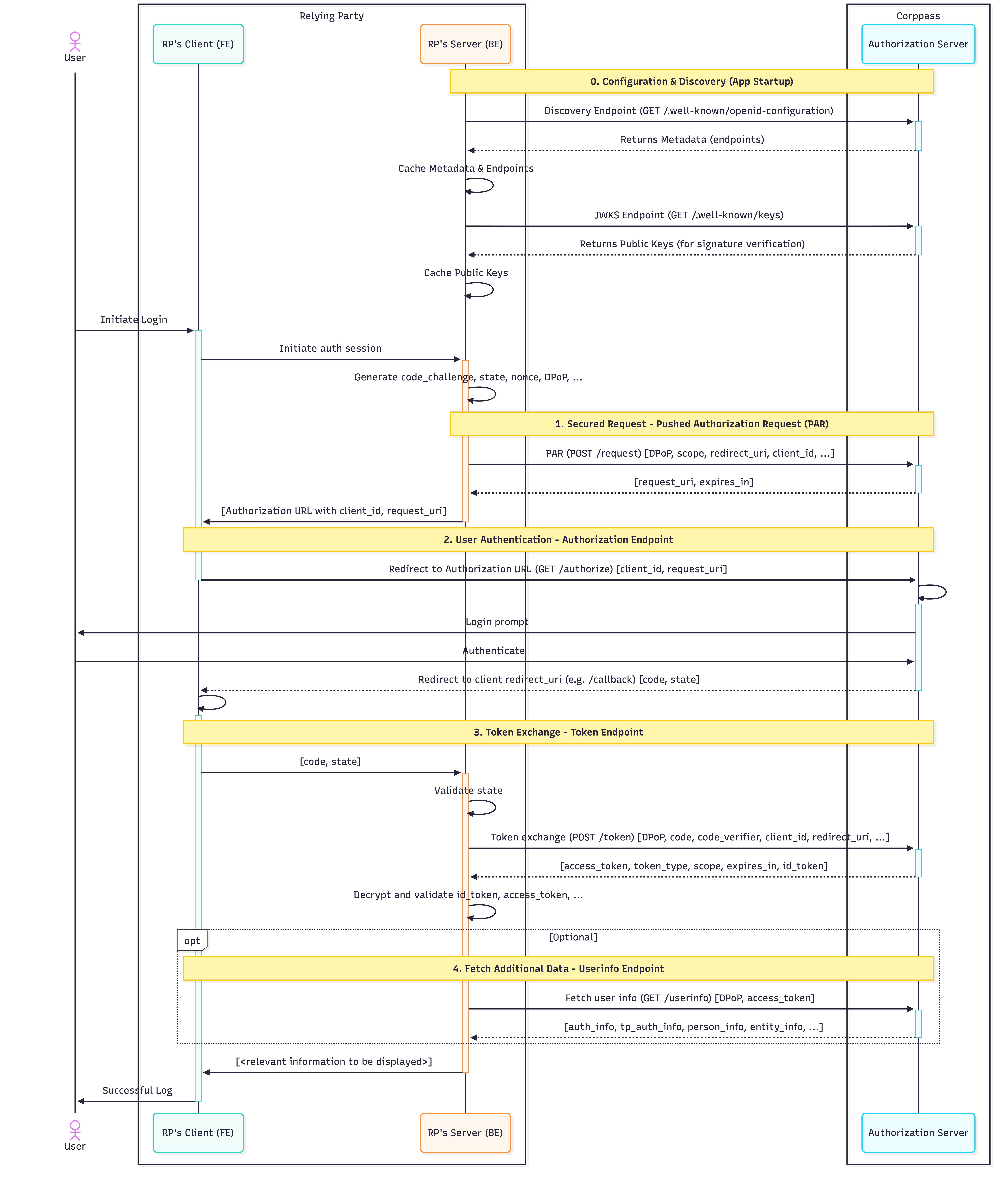
The following diagram illustrates the FAPI 2.0 Authorization Code Flow.
This flow requires a Confidential Client (Backend-for-Frontend) architecture.
RP Client (FE): The browser / frontend handles user interaction and redirects.
RP Server (BE): The backend maintains the secure session. All sensitive operations - including signing requests, handling DPoP keys, and token exchange - must occur on the backend to prevent credential leakage.

0. Configuration & Discovery
Endpoint: /.well-known/openid-configuration | View Specification
Access: Public TLS
Once registered, programmatically discover Corppass's current configuration at runtime.
Fetch Metadata (Discovery Endpoint): Initiate a request to the OpenID Discovery Endpoint to retrieve the provider configuration. This provides endpoint URLs, supported scopes, algorithms, and JWKS locations needed for the authorization flow.
Fetch Public Keys (JWKS Endpoint): Using the
jwks_urifound in the metadata, fetch and cache Corppass's public keys. These are required later to verify the signatures of the ID Token and UserInfo response.
1. Secured Request - Pushed Authorization Request (PAR)
Endpoint: /request | View Specification
Access: Public TLS with Client Assertion and DPoP
Trigger: Initiate this flow immediately when the user initiates login with Corppass.
Corppass FAPI 2.0 requires the Pushed Authorization Request (PAR) flow. Authorization parameters are "pushed" securely via a back-channel API call rather than being exposed in the browser URL.
Action: Send a
POSTrequest to the PAR endpoint.Result: The response contains a short-lived
request_uri, which is required for the subsequent Authorization Endpoint step.
2. User Authentication - Authorization Endpoint
Endpoint: /authorize | View Specification
Access: Public TLS (Browser Redirect)
Once the request payload is registered via PAR, redirect the user's browser to Corppass to perform the actual Singpass login and consent.
Action: Redirect the user to the Authorization Endpoint with the
request_uriobtained from PAR.Result: After successful authentication, the user agent is redirected to the client's redirect URI with an Authorization Code, which is required for the subsequent Token Exchange step.
3. Token Exchange - Token Endpoint
Endpoint: /token | View Specification
Access: Public TLS with Client Assertion and DPoP
This is a secure back-channel exchange where the Authorization Code is swapped for actual credentials (Tokens).
Action: Send a
POSTrequest to the Token Endpoint, with the Authorization Code obtained from the authorization request.Result: The response contains:
ID Token: A signed and encrypted JWE that includes the entity and user information. Relying Parties (RPs) must decrypt it using their private encryption key, then verify the JWT's signature using Corppass' public keys, available at the Corppass JWKS endpoint.
Access Token: A signed JWS intended for the Corppass resource server(s). This sender-constrained token is required to query the UserInfo Endpoint for additional data.
4. Fetch Additional Data - Userinfo Endpoint
Endpoint: /userinfo | View Specification
Access: Public TLS with Access Token and DPoP
If the application requires additional entity or user information - that is not present in the ID Token, query the UserInfo endpoint.
Action: Send a
GETrequest to the Userinfo endpoint, with the Access Token obtained from the Token Endpoint.Result: The response contains information based on the requested scopes, where applicable.
Authorization details for the authenticated user
Personal information for the authenticated user
Entity information for the transacting entity
Last updated